
Comments keep feedback attached to the asset it refers to, so conversations never get lost in email or chat.
Add a comment
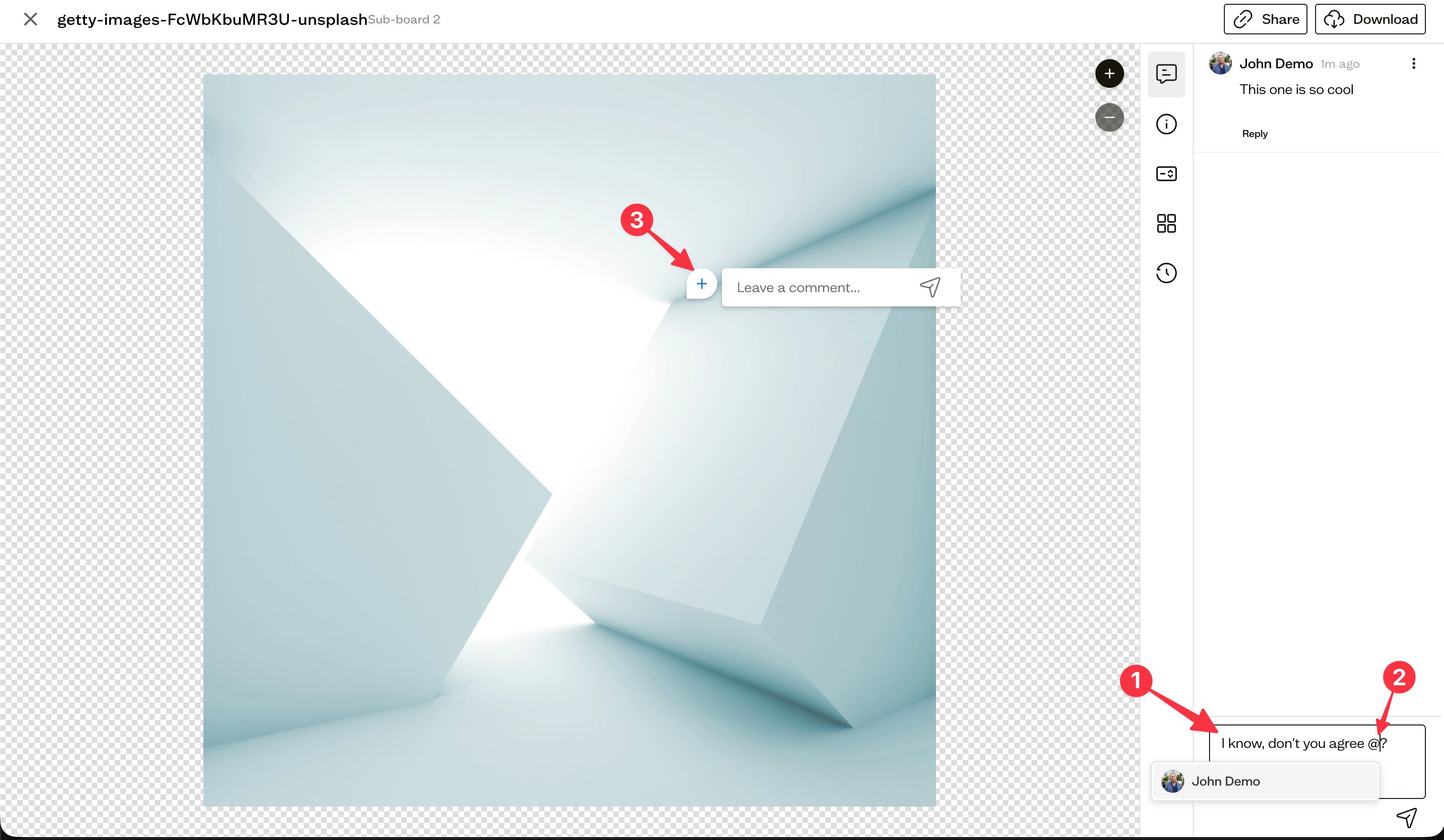
Open an asset and type your feedback in the comment box (1). Your comment appears in the thread alongside the asset for everyone with access.
Reply to a thread
Keep related feedback together by replying to an existing comment instead of starting a new thread.
Mention a teammate
Type** @ followed by a name (2)** to mention a teammate. They receive a notification so they know their input is needed.
Annotate directly on an asset
For precise feedback, drop a point or area annotation (3) directly on an image, or annotate a specific page of a PDF. The comment is pinned to that exact spot.
Wrap up a discussion
When feedback has been addressed, reply to confirm, or delete a comment you no longer need. The ability to resolve and reopen threads is coming soon.
Next steps
Adjust your notification preferences to control how and when you hear about new comments and mentions.