
Marketing resource management software, usually shortened to MRM software, is the tool category for the operational side of marketing: planning campaigns, tracking what they cost, allocating the people and agencies who do the work, and accounting for what actually shipped. It sits between strategy, where campaigns are conceived, and execution, where the creative work gets made. Teams without it run that middle layer on a patchwork of slides, spreadsheets, and email threads, and the patchwork holds until the number of campaigns, channels, and stakeholders doubles.
This guide covers what MRM software manages, how to evaluate a tool, where digital asset management fits, and how a realistic stack comes together. It closes with Baseline, framed honestly: a digital asset management platform that also publishes assets as live brand guides, galleries, and portals, not a full MRM suite. Pretending otherwise would make this guide less useful.
What Is Marketing Resource Management Software?
Marketing resource management software gives teams one connected system for the questions between strategy and output: what are we running, what will it cost, who is doing the work, and what did we get at the end. Project management tracks tasks. Digital asset management tracks assets. MRM ties the chain together, so a plan connects to a budget, the budget to a campaign, the campaign to the work and the results.
The Five Parts of Marketing Resource Management
In practice, MRM software manages five things, and few products do all five well. The scale changes from a five-person team to a global marketing department; the parts don't.
Planning is the campaign layer: the annual plan, the briefs, the calendar, and the dependencies between them, like the product launch three campaigns hang off. Good planning produces a shared answer to "what is happening and when", trivial until two teams prepare colliding campaigns off different calendars.
Budgeting and spend tracking is the money layer: budget lines per campaign and channel, committed spend like retainers and media buys, and actual spend from invoices, with variance visible without spreadsheet archaeology. This part most often pushes teams toward MRM, usually because finance asked a simple question marketing could not answer quickly.
Resourcing is the people layer: who works on what and when, so overcommitment shows up in advance instead of at the deadline. It covers staff, freelancers, and agencies, and in larger organizations it is the most argued-over view in the system, because everyone wants the same good people in the same busy weeks.
Asset operations is the production layer: briefs in, approved assets out, with review and approval as visible stages rather than email threads. It overlaps heavily with creative workflow management, and it is where a campaign's value sits, because the assets are what the market sees. It gets its own section below.
Reporting is the learning layer: what shipped, what it cost, and what should change next cycle. It is only as honest as the data captured upstream, so a tool nobody updates produces a neat description of a fiction, the most expensive kind of report to write.
Buyers meet this category under several labels: MRM tools, marketing work management, marketing operations platforms. Same problem, different names, and since no product does all five jobs equally well, the criteria below matter more than feature checklists.
What to Look for When Choosing MRM Software
Demo environments all look good. The differences show up in your data model, your adoption curve, and your budget line, so evaluate against criteria instead of checklists.
Start with the data model. Can the tool represent a campaign, with channels and sub-campaigns, rather than a generic project with a renamed field? Does it map to how your work is structured, by brand, region, market, or client? If your team must distort its habits to fit the tool, the tool loses, quietly, to a spreadsheet.
Check whether budgeting is real. A module that records planned numbers is a text field. Real spend tracking shows committed versus actual costs, ties loosely to invoices, and surfaces variance without an export. Ask the vendor to demo the path from "agency invoice arrives" to "campaign variance updates", and count the manual steps.
Look at resource views over time: a list of assignments tells you who is busy today; a capacity view tells you who is overbooked the week your biggest campaign ships.
Make sure review and approval are states in the workflow, not conversations around it: statuses, stages, and a record of who approved what and when. If approvals happen over email and the tool only logs the outcome, the audit trail has holes, and the holes are where compliance risk lives. The same review-stage design carries across tools; marketing approval workflows are worth a read on their own.
Weigh integration honestly. The work happens in design tools, in the DAM, in the company tracker, and in spreadsheets that never die. A planning tool that requires re-entering data becomes a report generator nobody feeds. Ask what syncs, how, and at what cost.
Price the adoption, not just the license. Suite implementations take setup and training effort that never shows up on the quote. Add up seats, setup, and integration, then apply the only test that predicts anything: which system will your team still update in six months? A lighter stack adopted fully beats a suite adopted partially; a planning tool only half the team maintains is a shared fiction with a login screen.
Where Digital Asset Management Fits
MRM answers what work is happening, what it costs, and who is doing it. Digital asset management answers a different question: where are the assets? Campaigns produce photography, video, layouts, and logos, and those files need a place to live, a process that makes them official, and a way to reach everyone who needs them. That is the asset layer, and it runs on a DAM: the case for marketing asset management in general, the payoff teams tally as digital asset management benefits.
The layer does four jobs, with a fifth close behind.
Storing: one library holding every approved asset, searchable by keyword, tag, or metadata, with version control so the current version is knowable rather than guessed. Folders named "final_v2" and "final_FINAL" are a storage strategy the way a shoebox is a filing system.
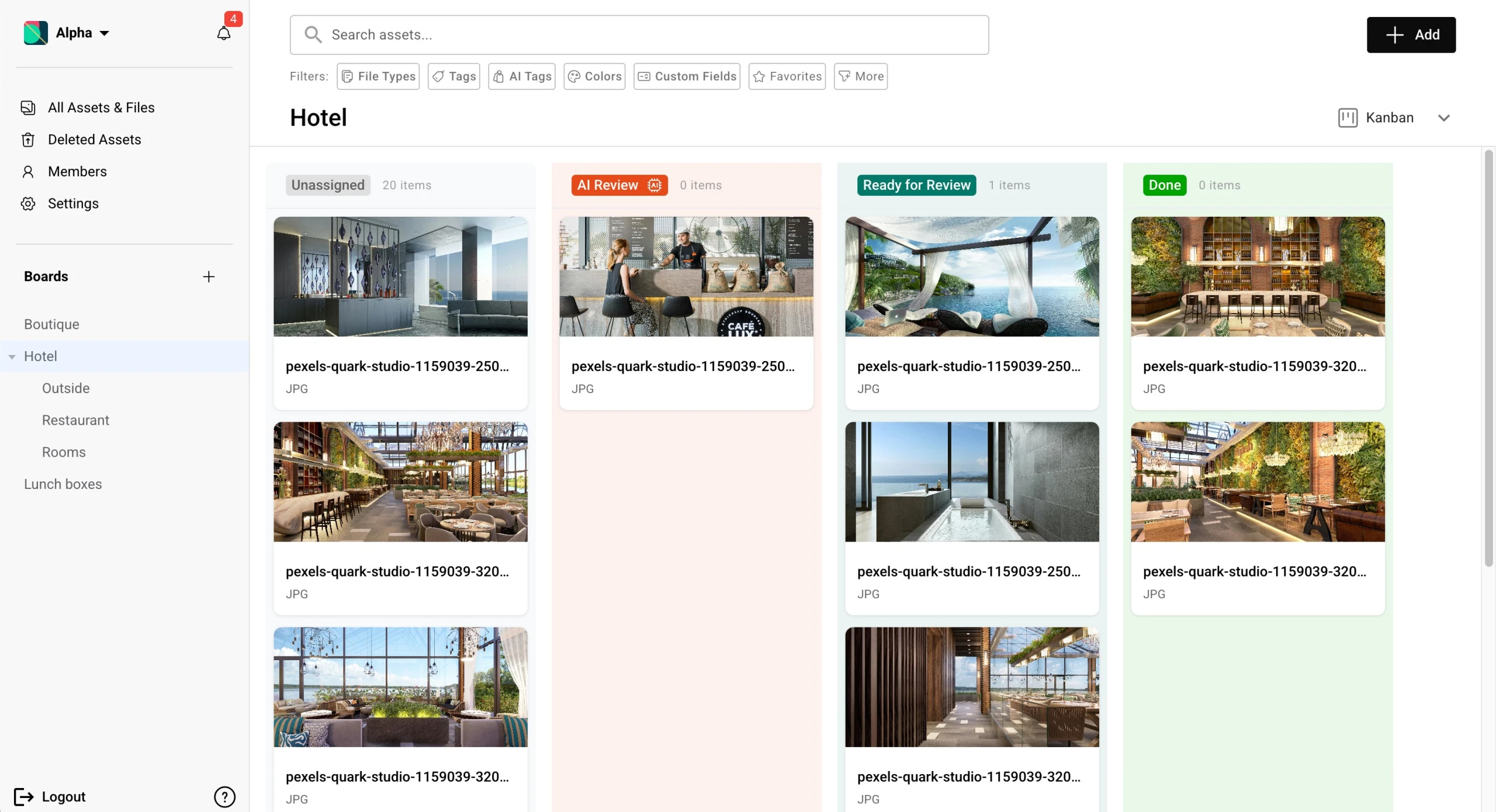
Approving: review as a visible state in the workflow, draft, in review, approved, rejected. A Kanban board grouped by approval status gives the whole team a live picture of what is safe to use, and dragging an asset between columns is the entire mechanics of an approval.
Distributing: regional teams, sales, partners, agencies, and freelancers each need a slice of the library, and no slice should leak into another. That means scoped permissions, share links that expire, and for the outside world, a proper brand portal rather than a public folder.
Publishing: assets do their real job in public, as brand guidelines, campaign galleries, sales portals, and partner pages. Publishing from the same library means one update to a logo refreshes every page that uses it, instead of one update followed by a hunt for stale copies.
The fifth job is usage analytics: which assets get downloaded, viewed, and shared, and which sit idle. That closes the loop into planning, telling the next brief what the audience already responds to.
Why not just a folder? Folders don't track versions or usage rights, can't control who sees what, and can't tell you whether anyone used the file after downloading it. Suites often bundle a DAM module for this reason; a stack wires in a dedicated DAM instead. The plan becomes history; the assets become reusable inventory.
A Realistic Stack: Planning, Work Tracking, and a DAM
For most teams, marketing resource management runs on three pieces: a planning and budget tool, which at small scale is honestly a well-kept spreadsheet; a work tracker for tasks and deadlines; and a DAM for the assets. The enterprise MRM suite consolidates the three into one system, with all the integration convenience and all the implementation weight that implies.
A suite earns its complexity when the organization matches it: many brands or regions, a large agency roster, and a team with runway for a long rollout. A stack earns its looseness when you want each job done well, need to move faster, or want spend proportionate to team size.
If you build the stack, the order that usually pays off is asset layer first, work tracking second, planning and budgeting third. The asset layer compounds: every campaign adds to the library, and search, approvals, and distribution get easier each time. Work tracking fixes the deadline chaos; planning works best once the other two produce trustworthy data. If your sharpest pain is budget visibility, start there.
How Baseline Covers the Asset Layer
Baseline is not MRM software. It does not plan campaigns, track budgets, forecast spend, or manage resource calendars. It is a digital asset management platform that also publishes: the library that stores approved assets serves them as live brand guides, photography galleries, and client portals. In the stack above, Baseline is the DAM piece.

Concretely, the asset layer in Baseline works like this:
- One library per client or brand for images, video, documents, fonts, and color palettes, with AI tagging and search across EXIF data, date taken, image quality, and boolean filters.
- Approvals as custom fields and Kanban views, assets dragged between status stages, so approval cycles that ran on email compress from weeks to days.
- Distribution through password-protected share links with expiration dates, scoped guest access for freelancers and partners, and branded portals where clients fetch approved materials themselves.
- Publishing as live brand guides, galleries, and portals that pull from the library, so an update in the DAM refreshes everywhere it is published; the guide stops going stale because there is no static file to ship.
- Usage analytics showing downloads, views, and shares per asset, so the next brief leans on what gets used.
The publishing half deserves emphasis, because it is the unusual part. A traditional DAM stores files and stops there, and the brand guide lives on as a separate document maintained by hand. A guide generated from the library instead updates every published page automatically when a logo or color changes.
For agencies, the same structure covers the multi-client version of the problem: isolated client workspaces with their own permissions, client onboarding forms that collect logos, fonts, and colors without an email chain, and per-client approval workflows. The full setup is described in brand asset management.
Two numbers from Baseline's own documentation, offered as scale rather than promise: teams save an average of five hours per week per person on search time alone, and approval cycles compress from weeks to days. The documented ROI example runs the aggressive case: a five-person team saving ten hours a week each at a blended $75 an hour is $195,000 a year. At the five-hour average the same team saves about $97,500; run your own math. Pricing is published rather than quoted: a genuinely free plan with no trial countdown and no credit card, paid plans from $59 per month on the pricing page.
If you take one thing from this section: choose the planning tool on its planning merits, then give it a DAM that can publish. The planning tool archives every plan it holds; the asset layer keeps producing value.
Frequently Asked Questions
What is marketing resource management software?
It is the tool category for the operational side of marketing: planning campaigns and calendars, tracking budgets and spend, allocating people and agency capacity, moving creative work through review, and reporting on all of it. In one line: it connects what marketing plans to what marketing spends and ships.
What is the difference between MRM software and project management software?
Project management tracks tasks and deadlines. MRM adds the marketing-specific layers: spend against campaigns, capacity over time, and a data model that knows what a campaign, channel, or brand is. The quick test: if the tool cannot tell you what a campaign cost, it is project management with marketing branding.
Is DAM part of marketing resource management?
They overlap without being the same job. MRM plans and accounts for the work; DAM manages what the work produces, storing assets, running approvals, distributing them to teams and partners, and increasingly publishing them as brand guides and portals. If there is no asset layer, approved assets live somewhere undocumented.
What does MRM software cost?
There is no honest single number for the category. Vendors mostly price per seat per month, enterprise suites are usually quoted individually, and implementation can cost as much again in year one. Budget from your realistic seat count, contractors included, and ask each vendor what year one costs all in. A listicle figure is one team's quote, not the market.
Do I need MRM software if I already have a DAM?
Only if your pain lives in the planning layers. A DAM fixes scattered assets, slow approvals, and uncontrolled sharing directly. If your sharper problems are budget visibility, capacity conflicts, and campaigns nobody can see coming, that is the planning layer's job, and the DAM you already have becomes one piece of that stack.
Get Started
Whatever you decide about planning tools, one exercise is worth doing this week: map where your approved campaign assets live, then walk the path a regional team or agency partner would take to get one today. If that path involves digging through folders, guessing at versions, or emailing someone, the asset layer is your first fix.
Baseline's free plan has no trial countdown and no credit card, so you can stand up a library, run an approval board, and publish a brand guide before spending anything. If you want the fuller walkthrough first, the free brand guide resource covers the publishing side in detail.
Related reading: marketing approvals in practice for the approval workflow end to end, creative workflow management for the review and handoff side, and brand asset management for the multi-client setup agencies run on.