
Marketing approval cycles are where creative work stalls. Files get emailed around, feedback lands in chat threads and spreadsheets, no one knows which version is current, and a "quick review" turns into a week of back-and-forth. Marketing approval software exists to fix that — centralizing feedback, tracking status, and making approvals visual instead of conversational.
This page covers what marketing approval software should do, what to look for, and how Baseline approaches it for agencies and brand teams managing multiple clients or brands.
What Marketing Approval Software Does
Marketing approval software gives teams a structured way to review, annotate, and sign off on creative work — replacing the patchwork of email, Slack, and shared drives that most teams default to.
The core job is simple: make feedback specific, trackable, and tied to the actual asset — not scattered across channels.
A strong approval tool handles:
- Visual feedback — comments pinned to exact points on an image or timestamps in a video, not vague "change the blue" notes in an email
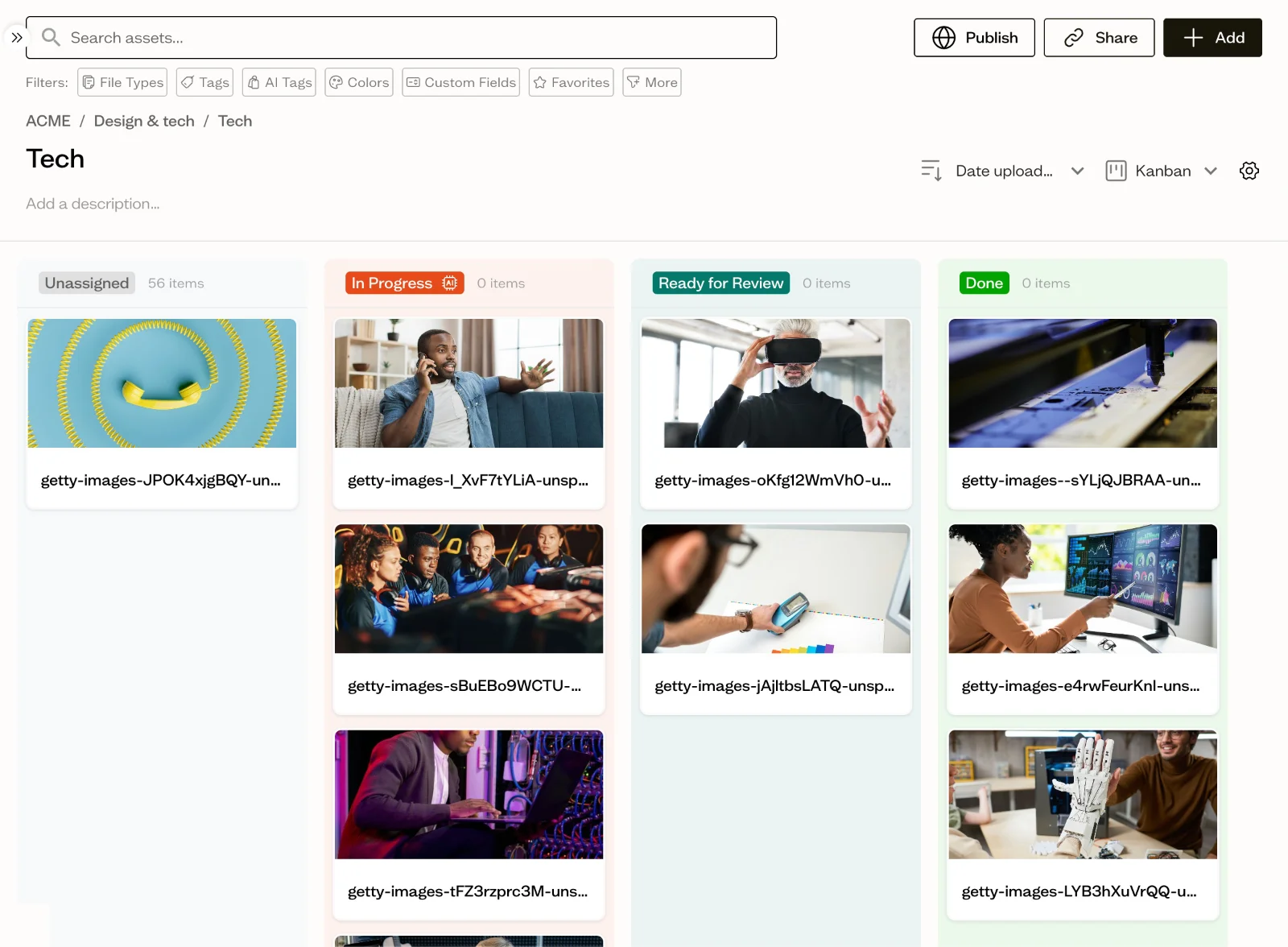
- Status tracking — a board or list showing where each asset is in the review pipeline (draft → in review → approved)
- Version control — every iteration logged, so reviewers always look at the right file
- External collaboration — clients and stakeholders can review and approve without creating an account
- Audit trail — who approved what, and when
Why Teams Outgrow Email-and-Chat Approvals
Most marketing teams don't start looking for approval software until the old system breaks. The breaking points are predictable:
Version chaos — final_v3_REAL_FINAL.psd lives in someone's Downloads folder. Reviewers comment on the wrong file. Changes get lost between versions.
Feedback ambiguity — "Make the logo bigger" arrives in a Slack DM with no reference to which design, which placement, or what size is expected. The designer guesses, resubmits, and the cycle repeats.
No status visibility — The project manager doesn't know which assets are approved, which are waiting on client feedback, and which are blocked. Status meetings exist just to answer this question.
Client friction — Clients have to download files, open them in another app, type feedback in a separate email, and remember to attach the right screenshot. Most don't bother — they just reply "looks good" without actually reviewing carefully.
No audit trail — When a stakeholder questions why a decision was made, there's no record of who approved it or what feedback led to the change.
What to Look for in Marketing Approval Software
1. Visual Annotation
The single most important feature. Comments should be pinned to specific points on an image or specific timestamps in a video — not left as free-floating notes in a sidebar. This eliminates the "which part are you talking about?" problem entirely.
2. Approval Workflows with Status Tracking
A Kanban-style board or status pipeline that shows where every asset stands: draft, in review, changes requested, approved. The project manager should see the whole pipeline at a glance without asking anyone.
3. Frictionless Client Access
Clients should be able to review and approve via a share link — no account creation, no app install, no login wall. Every step you add between "send for review" and "client sees the work" is a step where approvals get delayed.
4. Version History
Every version saved automatically, with the ability to compare and restore. Reviewers should never have to ask "is this the latest version?"
5. Centralized Feedback Threads
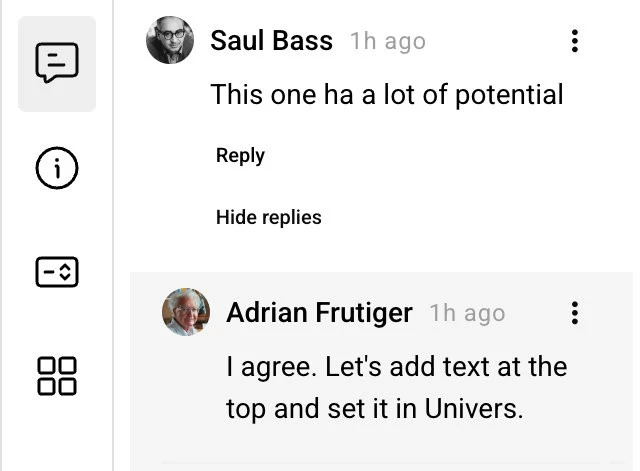
All comments on an asset should live on that asset — not in email, not in Slack, not in a meeting notes doc. When a designer opens a file, they should see every piece of feedback in context.
6. Multi-Client or Multi-Brand Structure
For agencies and brand teams managing multiple clients or brands, approvals need to be organized by client — not dumped into one shared workspace where everyone sees everything.
How Baseline Handles Marketing Approvals
Baseline is built around visual, asset-specific feedback and transparent approval workflows — designed for agencies and brand teams managing multiple clients.
Annotate directly on any asset
Drop point and area markers right onto images, or pin comments to exact timestamps in videos. Feedback is tied to the precise location, so there's no ambiguity about what needs to change.

Centralized feedback threads
Comments live on the asset itself, with reply threads that keep discussions focused. Tag colleagues or clients with mentions. No more hunting through email chains or chat history to find what someone said about a design.
Kanban-style approval boards
Track every asset from draft through review to final approval on a visual board. Flexible columns, assigned ownership, and custom field tracking give teams clarity on what's moving and what's stuck.
Effortless client collaboration
Send a secure board link to clients and they can review, comment, and approve without signing up. All feedback lands in one place — consolidated on the asset, not scattered across email.

Complete version control
Every iteration is logged automatically. Browse previous versions, review differences, and restore earlier states. No more final_final_v3 filename chaos.

Multi-client workspace isolation
Each client gets its own board with sub-boards for individual projects and campaigns. Board-specific guest access means freelancers see only what they're assigned to. Approvals stay organized by client, not mixed into one shared pile.
Who This Is For
Creative agencies managing approvals across multiple clients — each client's review cycle stays isolated in its own workspace, with freelancers granted access only to the boards they're working on.
In-house marketing teams coordinating reviews between designers, marketing managers, and external stakeholders — visual feedback replaces vague email notes, and the approval board shows exactly what's waiting on whom.
Brand teams managing approvals across multiple sub-brands or regions — workspace isolation keeps each brand's assets and approval cycles separate.
Baseline vs Other Approval Approaches
| Approach | Visual Feedback | Status Tracking | Client Friction | Version Control | Multi-Client |
|---|---|---|---|---|---|
| Email + chat | ❌ Vague text notes | ❌ None | ❌ Download & reply | ❌ Filename chaos | ❌ Everything mixed |
| Shared drive + comments | ⚠️ Limited | ❌ None | ⚠️ Account required | ⚠️ Manual | ❌ No isolation |
| Generic project management tool | ❌ No asset-level annotation | ✅ Task boards | ❌ Account required | ❌ Not asset-native | ⚠️ Manual setup |
| Enterprise DAM (Brandfolder, Bynder) | ⚠️ Basic comments | ✅ Workflows | ❌ Account required | ✅ Yes | ✅ Yes |
| Baseline | ✅ Point & area markers | ✅ Kanban boards | ✅ Share-link, no signup | ✅ Automatic | ✅ Purpose-built |
Pricing
Baseline's approval features are included in every plan — no add-on, no enterprise upgrade required.
- Starter: $49/month — single workspace, visual feedback, share-link commenting
- Growth: $149/month — multi-client workspaces, Kanban approval boards, version history
- Business: $349/month — unlimited boards, board-specific guest access, advanced workflows
All pricing is published transparently — no sales quotes required. See full pricing.
Compare this to enterprise DAM platforms where approval workflows are locked behind $18K-$100K+/year tiers and require a sales process to even see the price.
Frequently Asked Questions
What is marketing approval software?
Marketing approval software is a tool that centralizes the review and sign-off process for creative work. Instead of emailing files back and forth and collecting feedback in chat, the software lets reviewers annotate assets visually, track approval status on a board, and maintain a version history — all in one place.
Do clients need to create an account to review work in Baseline?
No. Clients can review, comment, and approve via a secure share link without signing up. This removes the friction that delays most client approval cycles.
Can Baseline handle approvals for multiple clients?
Yes. Each client gets its own board with sub-boards for projects and campaigns. Board-specific guest access means freelancers and external reviewers see only what they're assigned to. This is purpose-built for agencies — not a workaround on top of a generic tool.
How does visual annotation work?
You drop point and area markers directly onto images, or pin comments to exact timestamps in videos. Each marker opens a reply thread, so feedback and discussion stay tied to the precise location on the asset.
Does Baseline track approval status?
Yes. Kanban-style boards show every asset's status — draft, in review, changes requested, approved — with assigned ownership. Project managers see the whole pipeline at a glance.
Is there a version history?
Yes. Every version is logged automatically. You can browse previous versions, compare changes, and restore earlier states. Reviewers always see the current version.
How is this different from a project management tool like Asana or Monday?
Project management tools track tasks; Baseline tracks assets. Comments in Asana are free-floating text attached to a task card. Comments in Baseline are pinned to exact points on the actual image or video being reviewed. If your approval problem is "people can't agree on what needs to change," visual annotation solves that in a way task comments can't.
What does it cost?
$49-$349/month, with approval features included in every plan. No sales quotes, no enterprise tier required. See pricing for full details.
Get Started
Marketing approval cycles don't need to be slow. Baseline turns them into a visual, trackable workflow that keeps work moving — without the email chains, version chaos, or client friction.
Try Baseline free | Book a demo | See pricing