A new client signs, and the clock starts. Logos, colors, and fonts need to land in your system. Someone has to ask the right discovery questions. Access to old accounts and platforms needs to get requested. If any of that happens over email, it takes two or three weeks and something (a font license, a Google Ads login, the client's actual goals) gets lost in the thread.
A structured process fixes this: a checklist so nothing gets skipped, a template so you're not rebuilding the wheel per client, and a questionnaire so discovery happens once instead of over five separate calls. This guide gives you all three, plus what a creative intake form needs to actually work, and how Baseline's Content Collection Forms turn this whole process into something a client finishes in one sitting.
What Belongs in a Client Onboarding Checklist
Most onboarding checklists you'll find online describe steps in prose ("establish communication channels") without telling you what to actually check off. Here's one you can use as-is, organized by phase.
Phase 1: Pre-onboarding (before kickoff)
- Signed contract or SOW on file
- Scope, deliverables, and timeline confirmed in writing
- Primary client point of contact identified
- Internal account lead and team assigned
- Billing details and invoicing schedule confirmed
Phase 2: Brand & asset collection
- Logo files collected (primary, horizontal, icon-only, reversed)
- Brand colors documented (HEX, RGB, CMYK, and Pantone if the client has them)
- Fonts collected or licensed, with license terms noted
- Existing brand guidelines or brand book requested
- Photography and imagery library shared
- Access requested to existing platforms (CMS, social accounts, ad accounts, analytics)
Phase 3: Discovery & strategy
- Client questionnaire completed (template below)
- Competitor list gathered
- Target audience and positioning discussed
- Goals and success metrics defined
- Budget and timeline constraints confirmed
Phase 4: Systems & access
- Client added to your project management / communication tools
- Shared workspace or client portal created
- Team roles and responsibilities communicated to the client
- Approval process and stakeholders defined (who signs off on what)
Phase 5: Kickoff & handoff
- Kickoff call scheduled and held
- Written onboarding recap sent to the client
- First deliverable timeline confirmed
- Internal team briefed with all collected assets and answers
Twenty-four items, five phases. Copy it into whatever you run projects in: a doc, a project tool, or a Baseline board if you want the assets living next to the checklist itself.
Why Agency Onboarding Falls Apart Without One
The failure points are predictable, and they're the same ones that show up in agency post-mortems:
Assets trickle in over weeks. The client sends the logo Tuesday, the brand colors the following Monday, and the fonts never, because nobody asked directly. Work starts before the brand kit is complete, and it gets redone.
Discovery happens more than once. Sales asks the client about their goals. Then the account manager asks again on the kickoff call, because the answers never got written down anywhere the team can see. The client notices, and it doesn't build confidence.
Access requests block real work. A designer is ready to publish, and it turns out nobody has the client's CMS login. Now there's a two-day wait on an email that should have gone out during week one.
Nothing is written down consistently. Client A's onboarding lived in a Notion doc. Client B's lived in Slack DMs. When the account lead for Client B goes on leave, no one else knows what's been collected and what hasn't.
A checklist prevents the first three. A template (the same structure, reused for every client) prevents the fourth.
Client Onboarding Template: What to Set Up Once
A template isn't a checklist with different formatting. It's the reusable structure you build once and duplicate for every new client, so onboarding doesn't get reinvented each time. At minimum, it should have four sections:
1. Contact & scope: client name, primary contact, account lead, contract dates, scope summary, billing details.
2. Brand assets: a slot for each item in the Phase 2 checklist above: logo files, colors, fonts, guidelines, imagery, platform access. This is the section that most templates leave as a vague "collect brand assets" bullet instead of a real structure. List the actual asset types you need, with a place to mark each one received.
3. Discovery answers: the questionnaire responses below, stored somewhere the whole team can see, not buried in a sales call recording.
4. Kickoff & timeline: kickoff date, first deliverable due date, approval stakeholders, communication cadence.
Build this once as a document template, a spreadsheet, or (if you want the brand-assets section to fill itself in automatically) a Baseline board template with a form attached. That last option is covered below.
Client Questionnaire Template: What to Ask Every New Client
This is the actual list of questions, grouped so you can turn it into a form or a call script. Aim to get written answers to all of these before kickoff, not during it.
Company & contacts
- Company name, industry, and a one-line description of what you do
- Primary point of contact and their role
- Who else needs to review or approve work?
- What's your typical decision-making process, and who has final sign-off?
Brand & visual identity
- Do you have existing logo files? (request the actual files, not "we'll send them")
- Do you have documented brand colors? Fonts? Do you have licenses for those fonts?
- Is there an existing brand guide or style guide?
- Are there any competitors' brands you specifically want to avoid resembling?
Audience & positioning
- Who is your target audience?
- Who are your top three competitors?
- What makes you different from them?
- What's the one thing you want people to feel when they see your brand?
Goals & success metrics
- What does success look like for this project, specifically?
- What's the timeline, and is there a hard deadline?
- What's the budget range for this engagement?
- Have you worked with an agency before? What worked, and what didn't?
Access & logistics
- What platforms will we need access to (website, social, ad accounts, analytics)?
- Who owns those accounts, and how should access be granted?
- What's your preferred communication channel and frequency?
- Is there anything about your brand or business we should know that isn't obvious from the outside?
Twenty questions is enough to run a real kickoff call without spending it on discovery you could have gotten in writing.
What Makes a Good Creative Intake Form
A creative intake form is the delivery mechanism for the questionnaire and the asset checklist above: the thing you actually send the client instead of a Google Doc. The difference between a form that gets finished and one that gets abandoned halfway through comes down to a few things:
- No account required. Every login wall you add is a reason the client puts it off until tomorrow.
- One question at a time, not a giant scroll. A single long form reads as a chore. A guided, one-question-at-a-time flow reads as five minutes of work.
- Direct file upload, not "email us your logo." If the form can't accept the actual logo file, color swatches, and fonts, you're back to a back-and-forth email thread.
- Conditional logic. A question like "upload your secondary logo" should only appear after the client confirms they have one. Don't make everyone answer questions that don't apply to them.
- Branded to feel like part of your agency, not a generic third-party form that makes the client wonder if it's legitimate.
This is a fairly specific list of requirements, and it's exactly what Baseline's Content Collection Forms feature was built for. More on that next.
How Baseline's Intake Forms Shortcut the Whole Process
Baseline's forms are branded, no-login intake forms that put the checklist and questionnaire above directly in front of the client, and the submissions land pre-organized, not as a pile of email attachments to sort through later.
Build the form once. Mix File Upload, Color, Text, and Email questions to cover the full checklist: logo files, brand colors, fonts, and the questionnaire answers, all in one full-screen, one-question-at-a-time flow. Conditional questions mean a color picker only appears after logo files are uploaded, and a File Select question can ask the client which of several uploaded logos is their primary one. See how to create a form for the step-by-step.
Submissions organize themselves. Turn on "Create a board per submission," and every new client's answers and files land in their own board, automatically named after them and nested under your agency's parent board. No manual filing.
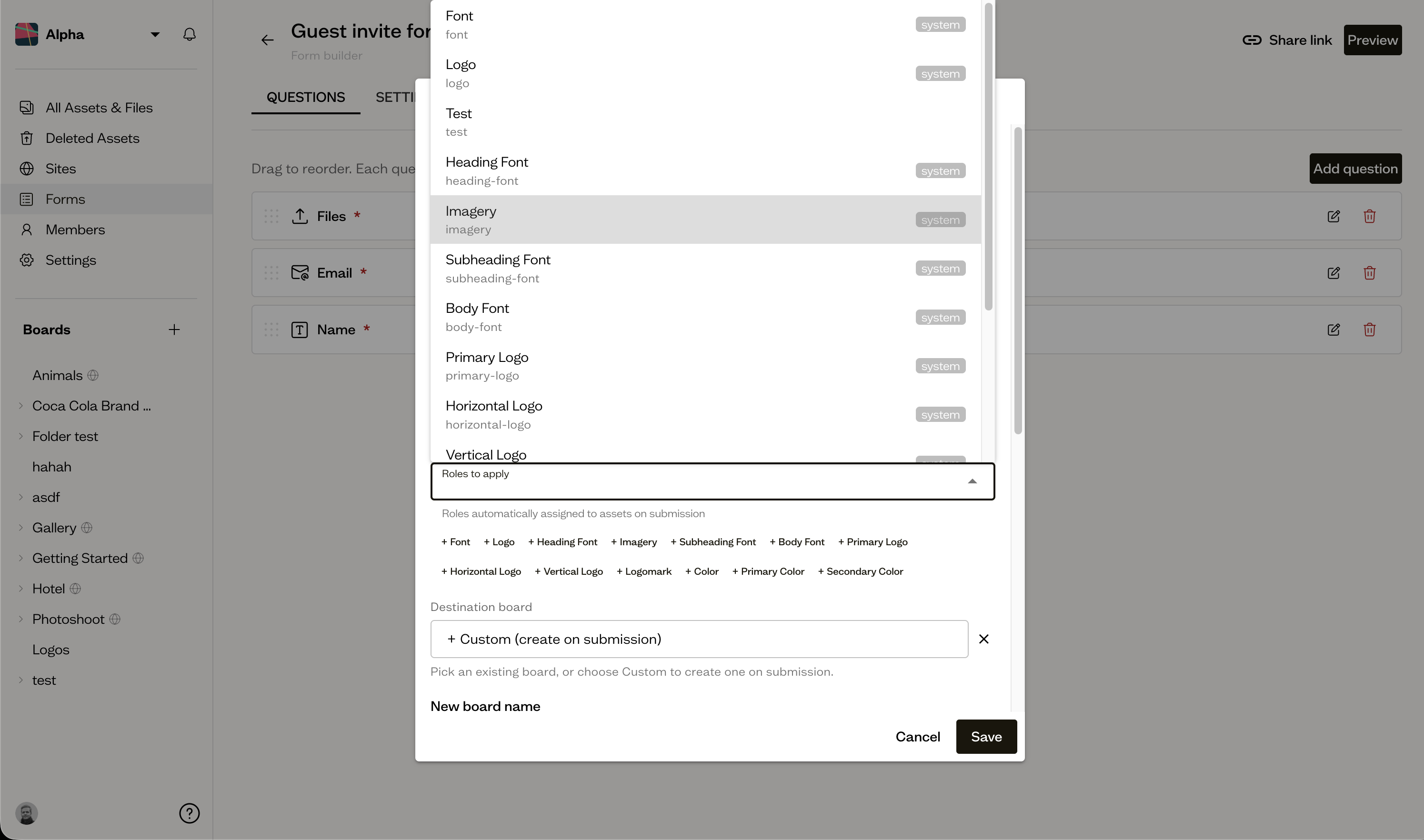
Assets tag themselves. Attach asset roles like primary-logo, heading-font, and primary-color to the relevant form questions. The moment a client submits, their files are tagged automatically. No one has to open the folder and manually label which file is which.
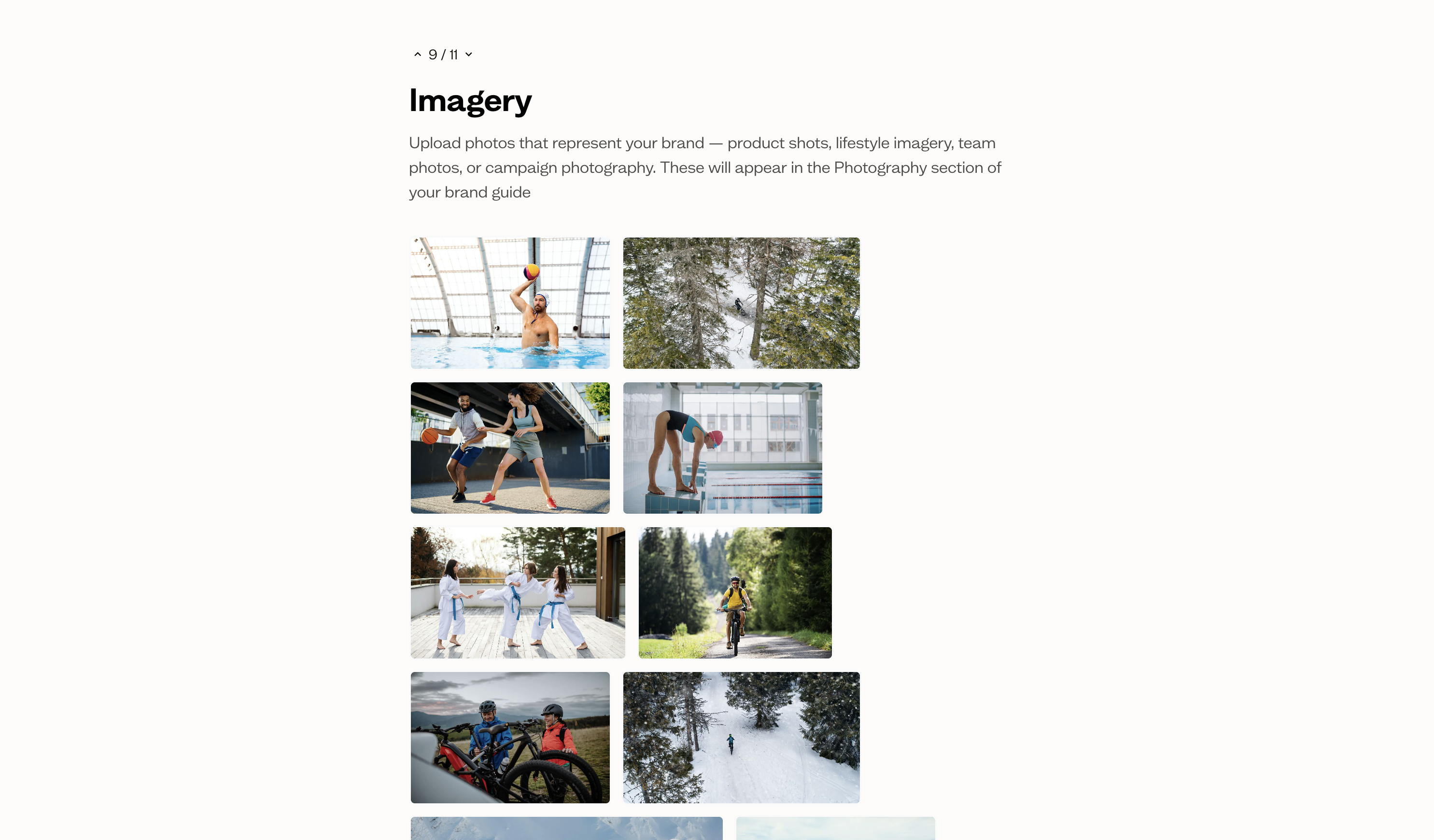
Building the brand guide afterward is fast, not manual. Because every upload already carries the right asset role, publishing a live brand guide from those assets is a matter of dropping them into a template rather than hunting through an unsorted folder to figure out which file is the primary logo.
Your team gets access automatically. On Business plan and above, submitters can be automatically invited as guests to their new board once their assets are processed. No separate "send them an invite" step.
It looks like your agency, not a form tool. On Team plan and above, add your own logo, colors, and font to the public form.
Baseline vs Other Ways to Run Client Onboarding
| Approach | Real checklist/template | Asset collection | Auto-organized | Client friction |
|---|---|---|---|---|
| Email threads | ❌ Tribal knowledge | ❌ Scattered attachments | ❌ Manual filing | ❌ 3-5+ email exchanges |
| Google Docs / spreadsheets | ✅ Reusable, but static | ❌ Still emailed separately | ❌ Manual | ⚠️ No file upload |
| Generic form tool (Typeform, Google Forms) | ✅ Reusable | ⚠️ Basic file upload | ❌ Manual sorting after | ⚠️ Often account-gated |
| Client onboarding / CRM software | ✅ Built-in | ⚠️ Varies by tool | ⚠️ Depends on setup | ⚠️ Can require client login |
| Baseline | ✅ Branded, reusable form | ✅ Direct upload, auto-tagged by role | ✅ Per-client board, auto-created | ✅ No login required |
Who This Is For
Creative and marketing agencies onboarding new clients regularly. The checklist and questionnaire standardize discovery, and the form eliminates the asset-collection email chain entirely.
Freelance designers and small studios who don't have a dedicated onboarding process yet. The template above is enough structure to start without over-engineering it.
In-house brand and marketing teams onboarding new internal stakeholders, sub-brands, or franchise locations. The same checklist and form pattern applies, just with "client" swapped for "new brand" or "new location."
Pricing
Baseline's Content Collection Forms are available starting on the Starter plan ($59/month): File Upload, Text, Email, and Color questions, with AI tagging included and up to 300 boards to organize submissions into. Board guest limits scale by plan: 10 on Starter, 50 on Team, and unlimited on Business and Enterprise.
- Starter ($59/month): File Upload, Text, Email, and Color form questions, 250 GB storage, up to 300 boards, AI auto-tagging, up to 10 board guests
- Team ($199/month): Custom form branding (your logo, colors, and font on the public form), 1 TB storage, version history, Baseline branding removed from published sites, up to 50 board guests
- Business ($399/month): Automatic guest invites from form submissions, 3 TB storage, custom domain for published sites, priority support, unlimited board guests
- Enterprise (custom pricing): Everything in Business, plus SSO, custom integrations, and a dedicated account manager
See full pricing for the complete breakdown.
Frequently Asked Questions
What is client onboarding?
Client onboarding is the structured process of collecting everything an agency needs to start work for a new client: signed paperwork, brand assets like logos and colors, discovery answers about goals and audience, and access to relevant platforms. It also means getting the client and internal team aligned before real work begins.
What should a client onboarding checklist include?
At minimum: contract and scope confirmation, brand asset collection (logos, colors, fonts, guidelines), a completed discovery questionnaire, platform access requests, and a kickoff call with a written recap. See the full 24-item checklist above.
How long should client onboarding take?
For most agencies, one to five business days once the contract is signed, assuming assets and answers are collected through a single structured form rather than scattered emails. Waiting on back-and-forth email threads is what stretches onboarding to two or three weeks.
What's the difference between an onboarding checklist and an onboarding template?
A checklist is the list of steps to complete once, per client. A template is the reusable structure (the document, board, or form) you duplicate for every new client so you're not rebuilding the checklist from scratch each time.
What is a creative intake form?
A creative intake form is the form a design or marketing agency sends a new client to collect brand assets (logos, fonts, colors) and discovery answers in one sitting, instead of over email. The best ones require no client login, accept direct file uploads, and use conditional logic so clients only answer questions that apply to them.
Does Baseline require clients to create an account to submit a form?
No. Baseline's Content Collection Forms are public and no-login. Clients fill them out and submit files without creating an account.
Can form submissions create a board automatically?
Yes. Turn on "Create a board per submission" and each client's answers and files land in their own board, named from their submission and nested under a parent board you choose.
Get Started
Stop rebuilding your onboarding process from scratch for every new client. Set up one form, and every client's assets and answers land organized, tagged, and ready to work with.
Try Baseline free | Book a demo | See pricing