Most digital asset management checklists are written for a global brand with an IT department, a six-month rollout and a procurement team. They tell you to "align stakeholders" and "define a governance framework", then end with a button to book a demo.
If you run an agency or a brand team of five to fifty people, you need something smaller and more concrete. You need to know what to check before you buy, what to set up in the first two weeks, and what to keep doing so the library doesn't turn back into a shared drive full of logo_final_v3_USE-THIS.png.
That's what this checklist covers. It has 41 items across five phases, with a rough effort estimate for each. There's a copy-ready version of all 41 items at the end, so you can paste it into whatever you track work in.
The Checklist at a Glance
| Phase | What it answers | Items | Rough effort for a 5–20 person team |
|---|---|---|---|
| 0. Do you need a DAM? | Is it time, or is a shared drive still fine? | 6 | 30 minutes |
| 1. Requirements | What must the system do for your team? | 10 | 2–3 hours |
| 2. Choosing a DAM | Which tool, at what real cost? | 10 | 1–2 weeks of trials, a few hours of actual work |
| 3. Setup | How do you get from scattered files to a library people use? | 10 | 2–5 days, spread over two weeks |
| 4. Upkeep | How do you keep it clean? | 5 | 1 hour a month |
The effort figures are estimates for a team with a few thousand assets. Double them if you're migrating tens of thousands of files or several clients at once.
Phase 0: Do You Actually Need a DAM?
Start here, because the honest answer is sometimes no. If your team mostly works with documents and spreadsheets, Google Drive or Dropbox is the right tool and you can stop reading. A DAM earns its cost when your files are visual: logos, photography, video, fonts and colors, and the people who need them aren't the people who made them.
Check the boxes that apply to you:
- Someone on the team asks "where's the latest logo?" at least once a week
- You have the same file in three or more places and aren't sure which is current
- Clients, freelancers or other departments regularly email you asking for assets
- You've used an outdated logo, color or photo in something that shipped
- Finding a specific photo means scrolling through folders by date and guessing
- Your brand guidelines are a PDF that nobody has updated since it was exported
Two or fewer: a well-organized shared drive with a naming convention (see Phase 3) will probably carry you for now. Three or more: the disorganization is costing you more time than a DAM would, and the rest of this checklist applies. For a deeper comparison, read DAM vs file sharing.
Phase 1: Requirements Checklist
Write these down before you look at a single vendor. Demos are designed to show you features you didn't know you wanted. A short written list of what you actually need is the best defense against paying for an enterprise platform to solve a small-team problem.
Your assets
- List the file types you store (for example: SVG and PNG logos, RAW and JPG photos, MP4 video, font files, PDFs)
- Estimate the total size of your library today, and how fast it grows per year (video is usually what blows up storage)
- Count roughly how many assets you have: hundreds, thousands or tens of thousands
Your people
- Count the internal people who need to upload or edit
- Count the external people who only need to view or download: clients, freelancers, partners, other departments
- Decide whether external people need their own logins or whether a share link is enough
Your workflows
- Write down how assets currently get in: designers uploading, clients sending files, photographers delivering shoots
- Write down how assets currently get out: share links, brand guidelines, client portals, email attachments
- Note whether you need any approval step before an asset is "official"
Your budget
- Set a yearly budget ceiling before you talk to sales, and decide whether you can accept quote-based pricing at all
That last item matters more than it looks. Most of the big DAM vendors don't publish prices, and a sales call is much easier to steer when you already know your number.
Must-have vs. nice-to-have for small teams
Enterprise checklists treat every feature as essential. For a small team, most of them aren't.
| Usually must-have | Usually nice-to-have | Usually skip (for now) |
|---|---|---|
| Fast search, including by what's in an image | Approval workflows | Digital rights management modules |
| Folders or boards you can nest | Custom metadata fields | Multi-region data hosting |
| Share links with expiry and download control | File version history | SSO (unless IT requires it) |
| Guest access for clients or freelancers | Published brand guidelines or portals | Headless API and CDN delivery |
| Bulk upload that keeps your folder structure | Usage analytics | Custom integrations |
| Published, predictable pricing | Annotation and comments | Dedicated onboarding services |
If something in the right-hand column is a hard requirement for you (SSO for a client in a regulated industry, for example), move it left. Just make sure it's there because you need it and not because a demo made it look impressive.
Phase 2: Choosing a DAM
With your requirements written down, evaluating tools gets much faster. Shortlist three, and only three. More than that and nobody on the team will test any of them properly.
Evaluation checklist
- Shortlist three tools that publish pricing or give you a written quote up front
- Sign up for a free plan or trial with your own files, not the vendor's demo content
- Upload one real folder (one client, or one campaign) with its existing structure
- Time how long it takes a teammate who wasn't involved to find five specific assets
- Send a share link to someone outside the team and ask them what was confusing
- Check what happens when you hit a plan limit: storage, users, guests
- Confirm how you get your files out if you leave (bulk download, original quality)
- Ask what the price is for your team size in 18 months, not just today
- Check for setup fees, onboarding fees and minimum contract lengths
- Have two people on the team, not just the buyer, use it for a week
Warning signs in a DAM demo
- "Let's talk about pricing after we understand your needs." This usually means the price scales with how much they think you can pay. Ask for a range on the first call.
- Implementation measured in months. For a team under 50 people, a DAM should be usable within days. Long rollouts are built for enterprise migrations.
- A demo library that's suspiciously tidy. Every DAM looks great with 40 perfectly tagged stock photos. Ask to see search work on your own messy upload.
- Per-guest pricing. If every client or freelancer needs a paid seat, agency costs climb fast.
- No free plan or self-serve trial. You can live without one, but you won't be able to test with real files before signing.
What DAM software really costs
Here's what published rates and reported contract values look like for a 20-person agency. Full breakdown and sources are in our DAM pricing comparison.
| Platform | Publishes pricing? | Typical yearly cost, 20-person agency |
|---|---|---|
| Baseline | Yes | $4,188 billed annually (Business plan) |
| Frontify | No | ~$8,000–$15,000 |
| MediaValet | No | ~$10,000–$20,000 |
| Canto | No | ~$15,000–$25,000 |
| Brandfolder | No | ~$18,000–$36,000 |
| Bynder | No | ~$30,000–$40,000 |
The enterprise platforms do more at the top end, particularly around integrations, rights management and global deployments. The question for a small team is whether you'd use enough of that to justify paying 2–10x as much.
If you're specifically an agency, our roundup of the best DAM software for creative agencies compares the options on agency workflows like client separation and guest access.
Phase 3: Setup Checklist
This is where most DAM projects quietly fail. The tool gets bought, someone dumps the old Dropbox into it, and six months later it's the same mess with a monthly bill. Budget real time for these ten items.
Clean up before you move anything
- Audit your existing files and delete duplicates, old drafts and anything nobody will use again (a smaller, trusted library beats a complete, messy one)
- Pick the one current version of every core brand asset: primary logo and variants, colors, fonts
Decide on structure
- Agree on a top-level structure before uploading (examples below)
- Agree on a file naming convention and write it down somewhere the team can see it
- Decide which information is a tag (what's in the file) and which is a field (status, campaign, usage rights, expiry date)
Move in
- Upload one folder first, check that the structure and tags work, then upload the rest
- Set permissions: who can upload, who can only view, and which boards guests can see
- Replace old shared-drive links in your docs, wiki and email signatures with links to the DAM
Make it the default
- Publish your brand guidelines or a brand portal from the library, so people stop asking for files
- Archive or make read-only the old shared-drive folders, so there's only one place to look
Example structures
For an agency, organize by client first, because client separation is what matters most for permissions:
Clients
  Acme
    Brand (logos, colors, fonts)
    Campaigns
      2026-Spring launch
    Photography
      2026-03 Product shoot
  Northwind
    ...
Internal
  Agency brand
  Templates
For an in-house brand team, organize by purpose:
Brand (logos, colors, fonts, guidelines)
Campaigns (one folder per campaign)
Product (photography and renders by product line)
Photography (by shoot)
Archive (retired assets, kept for reference)
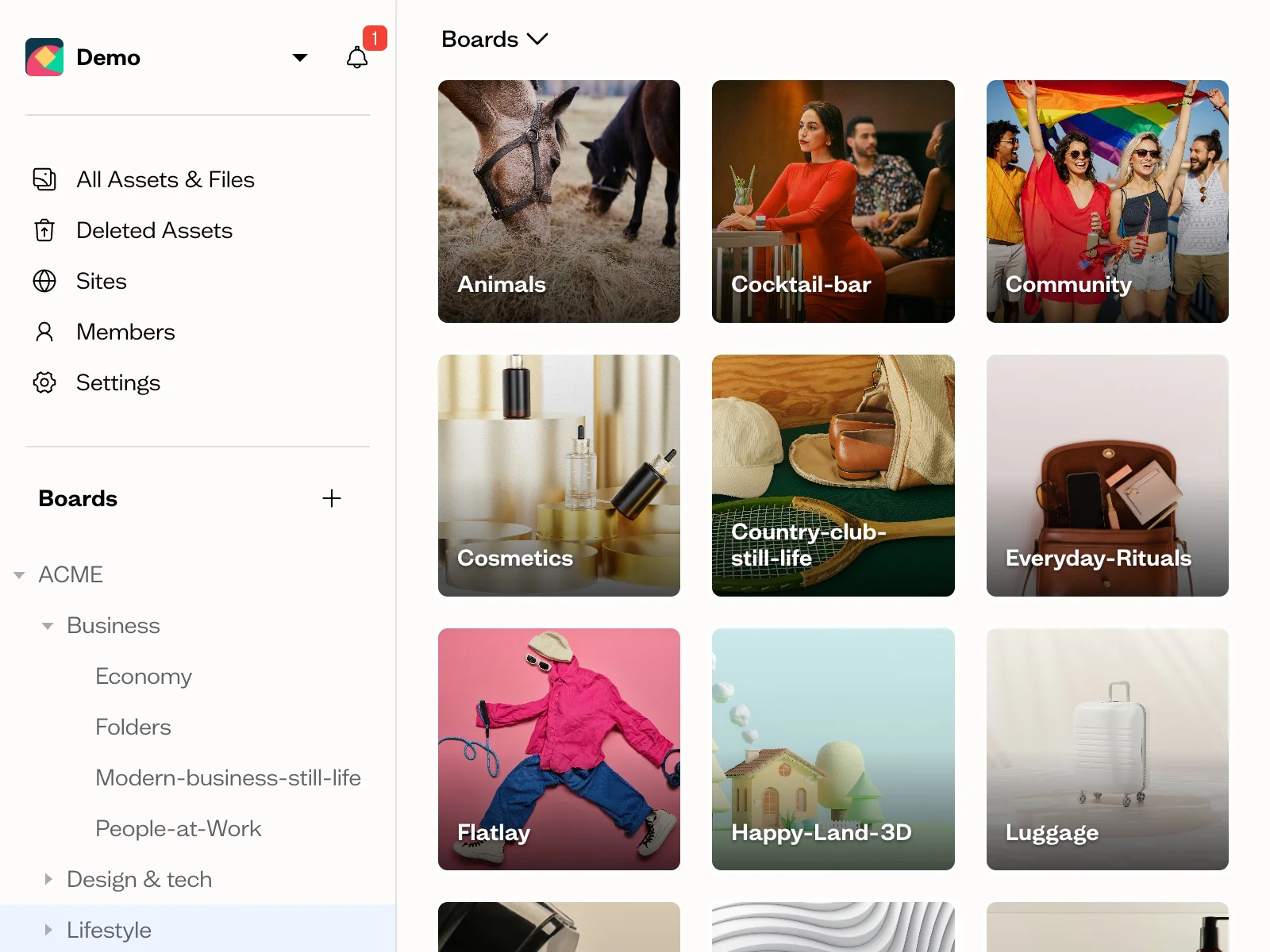
In Baseline these are nested boards. If you upload a folder from your computer, Dropbox or Google Drive, the folder structure is recreated as boards automatically, which is why the cleanup step comes first.
A naming convention that holds up
Keep it short enough that people will actually use it:
client_project_asset-type_variant_v01.ext
For example: acme_spring26_logo_horizontal-reversed_v02.svg
Use lowercase, hyphens inside each part, underscores between parts, and a two-digit version number. Never use "final" in a file name. There's always another final.
Tags vs. fields
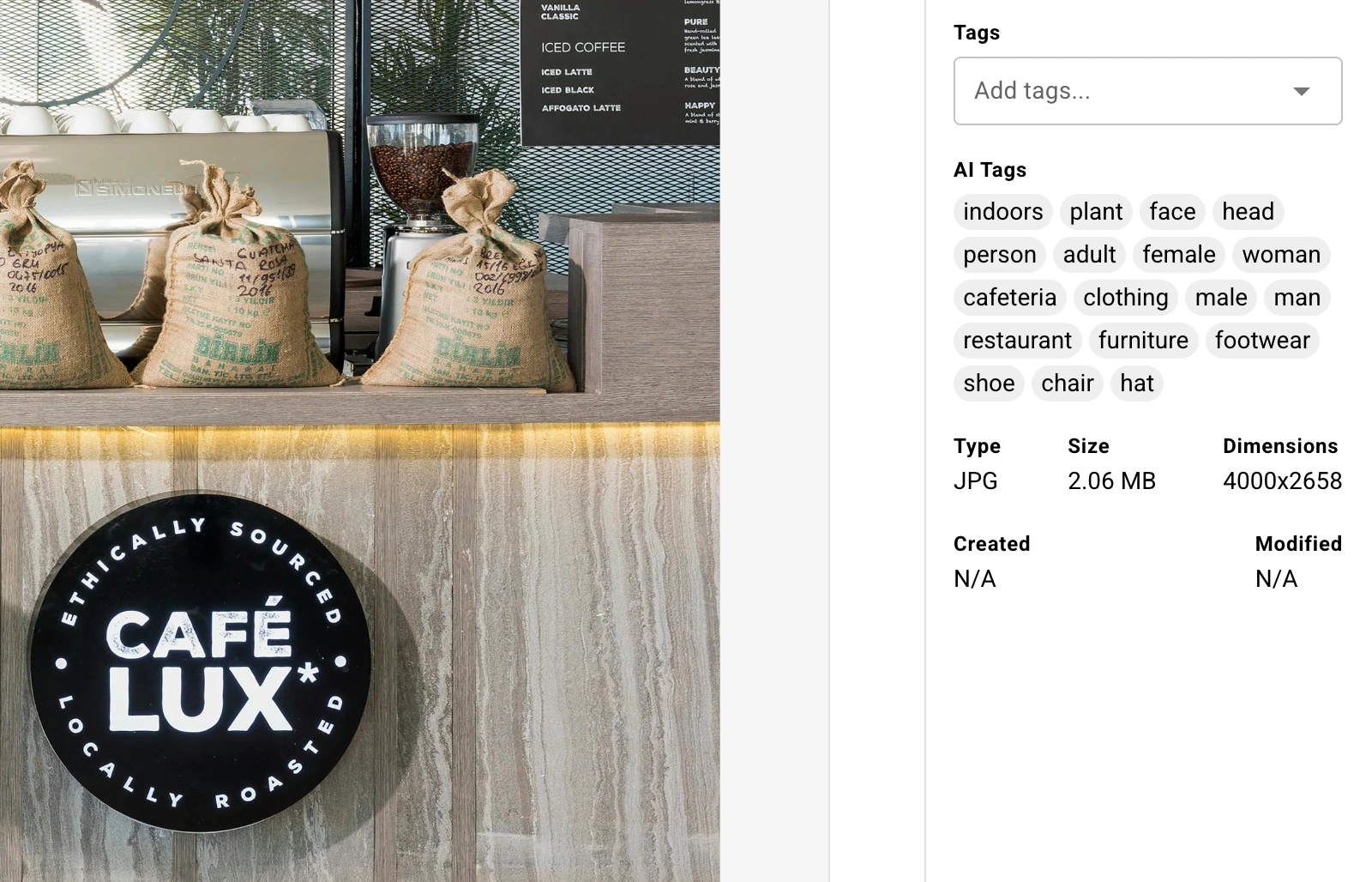
Tags describe what's in the file: "beach", "product", "woman", "blue background". Fields describe what you're allowed to do with it: approval status, campaign, usage rights, expiry date.
Tagging by hand is where most teams give up, so let AI do the first pass. In Baseline, every image is tagged automatically on upload, on every plan including Free, and you can search by what's in an image without anyone typing a tag.
Use custom fields for the business information AI can't guess. An "Approval status" field with Draft, In review and Approved options, viewed as a Kanban board, gives you a simple approval workflow without buying a separate tool.
Phase 4: Upkeep Checklist
A DAM stays useful only if someone owns it. That doesn't need to be a full-time job. One person and one hour a month is enough for most small teams.
- Name an owner. One person decides structure, naming and what gets archived. Everyone else follows their lead.
- Monthly: archive assets for finished campaigns, and delete obvious duplicates and drafts
- Monthly: check that the core brand assets (logo, colors, fonts) are still the current versions everywhere they're published
- Quarterly: review who has access, and remove ex-employees, finished freelancers and old client guests
- Quarterly: expire or disable share links that are no longer needed
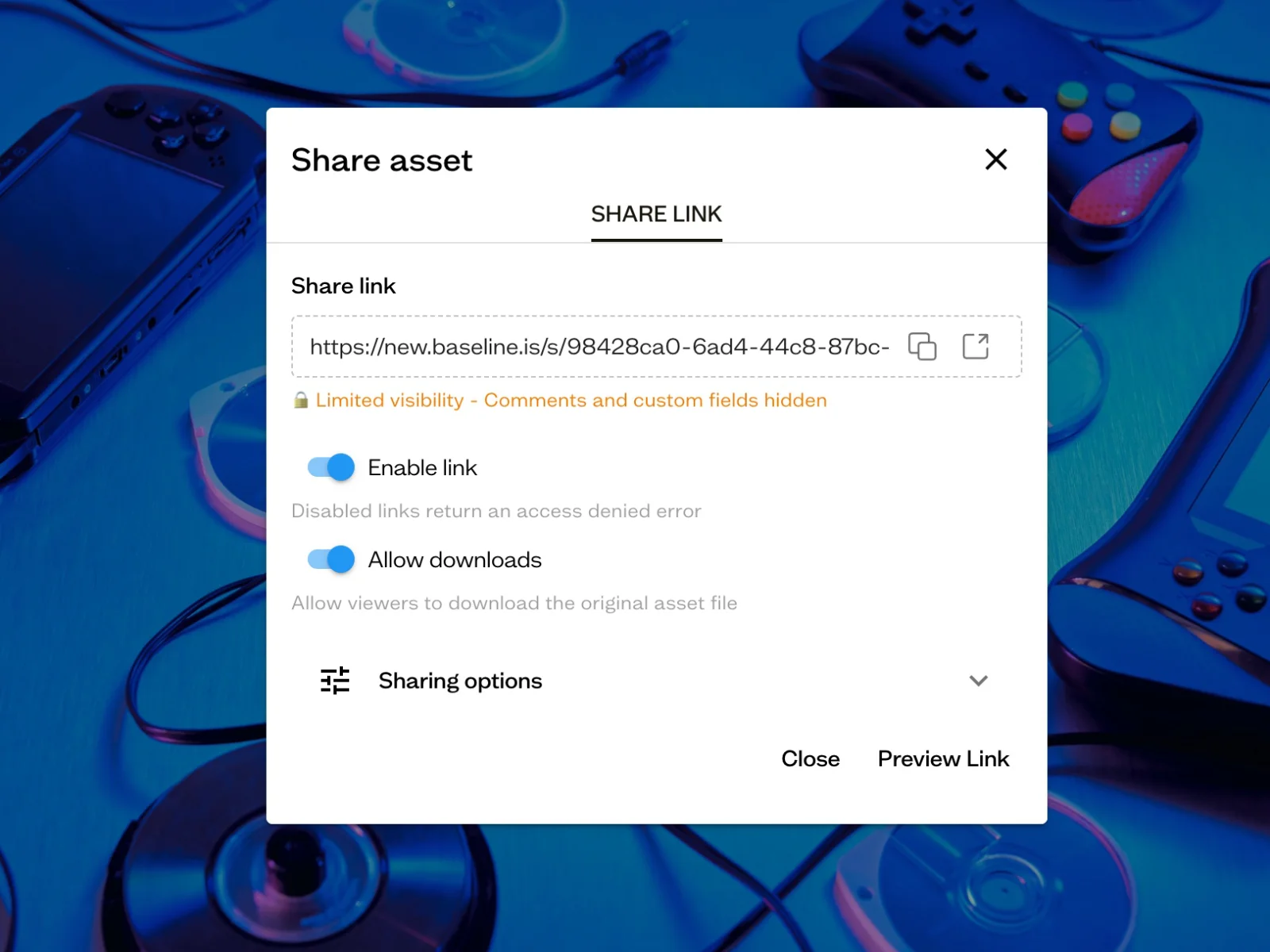
The access review is the item teams skip most often, and it's the one that causes real problems. A freelancer from two years ago with access to a client's unreleased campaign is a bad conversation to have.
The Full Checklist, Copy-Ready
All 41 items in one block. Copy it into a doc, a project tool or a Baseline board, and tick things off as you go.
PHASE 0: DO YOU NEED A DAM? (3+ checked = yes)
[ ] Someone asks "where's the latest logo?" at least weekly
[ ] The same file lives in 3+ places and nobody knows which is current
[ ] Clients, freelancers or other teams regularly email asking for assets
[ ] An outdated logo, color or photo has shipped in something
[ ] Finding a specific photo means scrolling folders and guessing
[ ] Your brand guidelines are a PDF nobody has updated since export

PHASE 1: REQUIREMENTS
[ ] List the file types you store
[ ] Estimate library size today and yearly growth
[ ] Count your assets (hundreds, thousands, tens of thousands)
[ ] Count internal people who upload or edit
[ ] Count external people who only view or download
[ ] Decide: logins for external people, or share links?
[ ] Write down how assets get in
[ ] Write down how assets get out
[ ] Note whether you need an approval step
[ ] Set a yearly budget ceiling before talking to sales

PHASE 2: CHOOSING A DAM
[ ] Shortlist 3 tools with published pricing or a written quote
[ ] Sign up with your own files, not demo content
[ ] Upload one real folder with its existing structure
[ ] Time a teammate finding 5 specific assets
[ ] Send a share link to an outsider and ask what confused them
[ ] Check what happens at plan limits (storage, users, guests)
[ ] Confirm how you export everything if you leave
[ ] Ask the price for your team size in 18 months
[ ] Check setup fees, onboarding fees, minimum contract length
[ ] Have 2 people (not just the buyer) use it for a week

PHASE 3: SETUP
[ ] Delete duplicates, old drafts and dead files
[ ] Pick the one current version of every core brand asset
[ ] Agree on a top-level structure
[ ] Agree on a naming convention and write it down
[ ] Decide what's a tag and what's a field
[ ] Upload one folder first, check it, then upload the rest
[ ] Set permissions: uploaders, viewers, guest boards
[ ] Replace old shared-drive links in docs, wiki and signatures
[ ] Publish brand guidelines or a brand portal from the library
[ ] Archive or lock the old shared-drive folders

PHASE 4: UPKEEP
[ ] Name one owner
[ ] Monthly: archive finished campaigns, delete duplicates
[ ] Monthly: confirm core brand assets are current everywhere
[ ] Quarterly: review access, remove old staff, freelancers, guests
[ ] Quarterly: disable share links you no longer need
How This Checklist Maps to Baseline
We build Baseline, so here's where it fits this checklist and where it doesn't.
Where it fits well:
- Phase 0 and 2: there's a free plan with no time limit and no credit card. It covers the search, upload and structure tests. To test share links, or to upload a full photo or video folder, you'll need Starter ($49/month billed annually), which adds board sharing links and 250 GB of storage.
- Phase 3: folder uploads become nested boards, images are AI-tagged on upload, and custom fields and Kanban views cover simple approvals.
- Publishing: brand guidelines and portals are built from the same library, so when you swap a logo in the DAM, every published guide updates. Read more about living brand guidelines.
- Agencies: each client gets their own boards, and clients or freelancers can be invited as guests to only the boards they need. See client portals for agencies.
Where to check carefully:
- SSO and API access are on the Enterprise plan only.
- File version history starts on the Team plan ($199/month, or $169/month billed annually).
- The Free plan includes 1 GB of storage, 2 members and 1 board guest, and doesn't include board sharing links or content collection forms. It's enough to try the product, not to run an agency on.
- Guest seats are capped by plan: 1 on Free, 10 on Starter, 50 on Team, and unlimited on Business. Guests don't cost extra, but if you work with a lot of clients and freelancers, check which plan your guest count puts you on.
- If you need deep rights management or complex enterprise integrations, the larger platforms in the pricing table above are built for that.
Frequently Asked Questions
What should a digital asset management checklist include?
A useful DAM checklist covers four stages: your requirements (asset types, library size, who needs access, budget), how you'll evaluate and choose a tool, how you'll set it up (cleanup, structure, naming, tags, permissions), and how you'll maintain it afterwards (an owner, monthly cleanup and quarterly access reviews). The setup and upkeep stages matter most, because that's where DAM projects usually fail.
What are the most important requirements for a DAM?
For small teams and agencies: fast search (including by what's in an image), nested folders or boards, share links with expiry and download control, guest access for clients and freelancers, bulk upload that keeps your folder structure, and predictable pricing. Features like SSO, rights management and API access matter for larger organizations but are rarely essential under 50 people.
How long does it take to set up a DAM?
For a team of 5–20 people with a few thousand assets, plan for two to five days of work spread over about two weeks. Most of that time goes into cleaning up old files and agreeing on structure, not the upload itself. Enterprise rollouts take months because of integrations and migrations, but a small team doesn't need that.
How much does digital asset management software cost?
It ranges widely. Baseline publishes its pricing, from a free plan up to $399/month on the Business plan. The large DAM vendors (Bynder, Brandfolder, Canto, Frontify, MediaValet) quote per customer, with reported costs for a 20-person team of roughly $8,000 to $40,000 a year. Our DAM pricing comparison has the full breakdown.
Is a shared drive like Dropbox or Google Drive good enough?
For documents, yes. For visual brand assets it usually stops being enough once you have several people looking for the same files, clients or freelancers asking for assets, and more than one version of your logo in circulation. Shared drives can't search by what's in an image, and they don't publish brand guidelines that stay current.
Who should own the DAM on a small team?
One person, usually whoever already gets asked "where's the logo?" most often: a brand manager, studio manager or senior designer. They decide structure and naming, run the monthly cleanup and do the quarterly access review. It takes about an hour a month once the library is set up.
Next Step
Copy the checklist above into your project tool and work through Phase 0 and Phase 1 this week. They take less than an afternoon and they'll tell you whether you need a DAM at all.
If you do, the quickest way to test one is with your own files. Create a free Baseline account, upload a sample of one client's or one campaign's folder, and run the search and structure tests on it. If it isn't clearly better than what you have now, you've lost an afternoon.