
What is the difference between a DAM and file sharing?
File sharing stores files and tells you where they are. Digital asset management stores files and tells you what they are: which logo is approved, when the old one was retired, who signed off, what the usage rights allow. A shared drive holds assets. A DAM manages them, and can publish them.
Last updated: September 29, 2026
The one-sentence version
A folder can tell you where a file is. It cannot tell you whether it is the right file.
That gap is the whole difference. Everything below is an elaboration of it.
Side by side
| File sharing (Dropbox, Drive, SharePoint, Box) | Digital asset management | |
|---|---|---|
| Core job | Store and sync files | Organise, govern and publish assets |
| Finding things | Filename and folder path | AI tags, visual similarity, metadata filters |
| Images | Thumbnails only | Searchable by what they contain |
| Metadata | Filename conventions | Structured fields: campaign, client, rights, status |
| Approvals | Email or chat threads | Approval state on the asset, Kanban views |
| Versions | A list of previous copies | Side by side comparison and rollback |
| Client separation | Folder permissions | Isolated workspaces |
| Usage insight | None | Downloads, views, shares per asset |
| Publishing | Nothing | Live brand guides, galleries, portals from the library |
| Pricing shape | Per seat | Per seat or flat, depending on vendor |
| Right for | Documents, contracts, spreadsheets | Logos, photography, video, fonts, brand systems |
Why shared drives fail specifically at brand assets
They do not fail at documents. A contract in a folder is fine: it has a name, a date, and one version that matters. Creative assets break the model in four ways.
They carry state that a filename cannot hold. Approved or not. Current or retired. Licensed through next year or expired last month. Cleared for social but not for print. Teams encode this in filenames (logo_FINAL_v3_approved_USE-THIS.ai) because there is nowhere else to put it, and then it drifts.
They cannot be found by description. Nobody remembers what the spring campaign hero image was called. They remember that it was the blue one on the beach. Filename search cannot answer that, which is why people ask a colleague instead, which is where the real cost sits.
They exist in many forms of the same thing. One logo is a dozen files: SVG, EPS, PNG at four sizes, mono, reversed, with and without the wordmark. Folders make these look like twelve unrelated files rather than one asset with twelve renditions.
They need to be shown to people, not just sent. A client needs to see the brand system, not download a ZIP. A freelancer needs the correct logo and the colour codes, not access to every folder. This is where shared drives stop entirely: there is no way to present a library, only to grant access to it.
All four of those failures compound with the number of brands you manage. Dave Gustafson runs 15 of them at WSI Peak Digital, and this is what the fourth one looked like in practice:
"Any time I had to go back and do work that involved branding, I had to dig through my project management system. Often, I'd find that I didn't have everything for any particular client, and I'd have to go back through emails, project folders, or to their website."
Fifteen client brands, and the fastest route to a client's own logo was the client's own website. The honest incumbent in this category is not an enterprise platform. It is a massive shared folder that nobody maintains.
When a shared drive stops being enough
You do not need a DAM because your library is large. You need one when these start happening:
- Someone asks where the current logo is and nobody can answer confidently
- The same asset exists in four folders and you cannot tell which is newest
- An outdated logo or an expired image reaches a client or a campaign
- You maintain a PDF brand guide that is already out of date
- Onboarding a freelancer means either a folder tour or exposing other clients' work
- Approvals live in email threads you have to reconstruct later
- You are managing brand assets for more than two or three clients at once
In practice the threshold arrives for agencies at roughly three to five people and five hundred to a thousand assets. That is the point where the folder structure someone set up at the start stops matching how the team actually works. If several of the points above sound familiar, the digital asset management checklist walks through requirements, choosing a tool and setup.
DAM vs specific tools
DAM vs Dropbox
Dropbox has the best sync in the category and nothing built for assets: no AI tagging, no visual search, no approval state, no publishing. Business plans are per seat, so cost scales with headcount. Many teams keep Dropbox for documents and move creative work elsewhere. See Box vs Dropbox for the storage-side comparison.
DAM vs Google Drive
Shared drives handle team documents well and share Dropbox's limits on assets. Search covers document text but not image content. Publishing means a Google Site, which is not a brand guide.
DAM vs SharePoint
SharePoint comes closest, because metadata columns and content types can be configured into something asset-like. What configuration cannot produce is AI tagging, visual similarity search, version comparison or published brand guides, and the effort to get partway there is significant. See Dropbox vs SharePoint vs Google Drive.
DAM vs Box
Box is the strongest of the four on governance: retention, legal holds, audit trails, unlimited storage from the Business tier. All of that governs documents. None of it knows what a logo is.
DAM vs cloud storage in general
Cloud storage is a filing cabinet. A DAM is a library with a catalogue, a check-out desk and a display window. Both hold paper. Only one helps you find the right page and show it to someone.
What a DAM adds, concretely
- AI auto-tagging on upload, so assets are searchable without anyone typing keywords
- Visual similarity search, finding assets that look like a reference image
- Metadata filters on camera, lens, ISO, date taken, usage rights, campaign, client, approval status
- Approval workflows with Kanban views grouped by status, replacing email chains
- Precise feedback through point and area annotations on images, instead of marked-up screenshots
- Version history with side by side comparison and rollback
- Font and colour management as first-class assets, including Pantone, HEX, RGB and CMYK values
- Per-client workspaces with guest access scoped to a single board
- Usage analytics on downloads, views and shares
- Publishing from the library itself, which is the capability with no equivalent in any file sharing tool
What it costs, honestly
Most DAM vendors do not publish pricing, which makes comparison hard. Research estimates put Frontify around $14,000 to $57,000 a year and Bynder and Brandfolder in the $25,000 to $100,000 range, all behind a sales call. That is the main reason teams stay on a shared drive: the visible alternative looks like an enterprise procurement exercise.
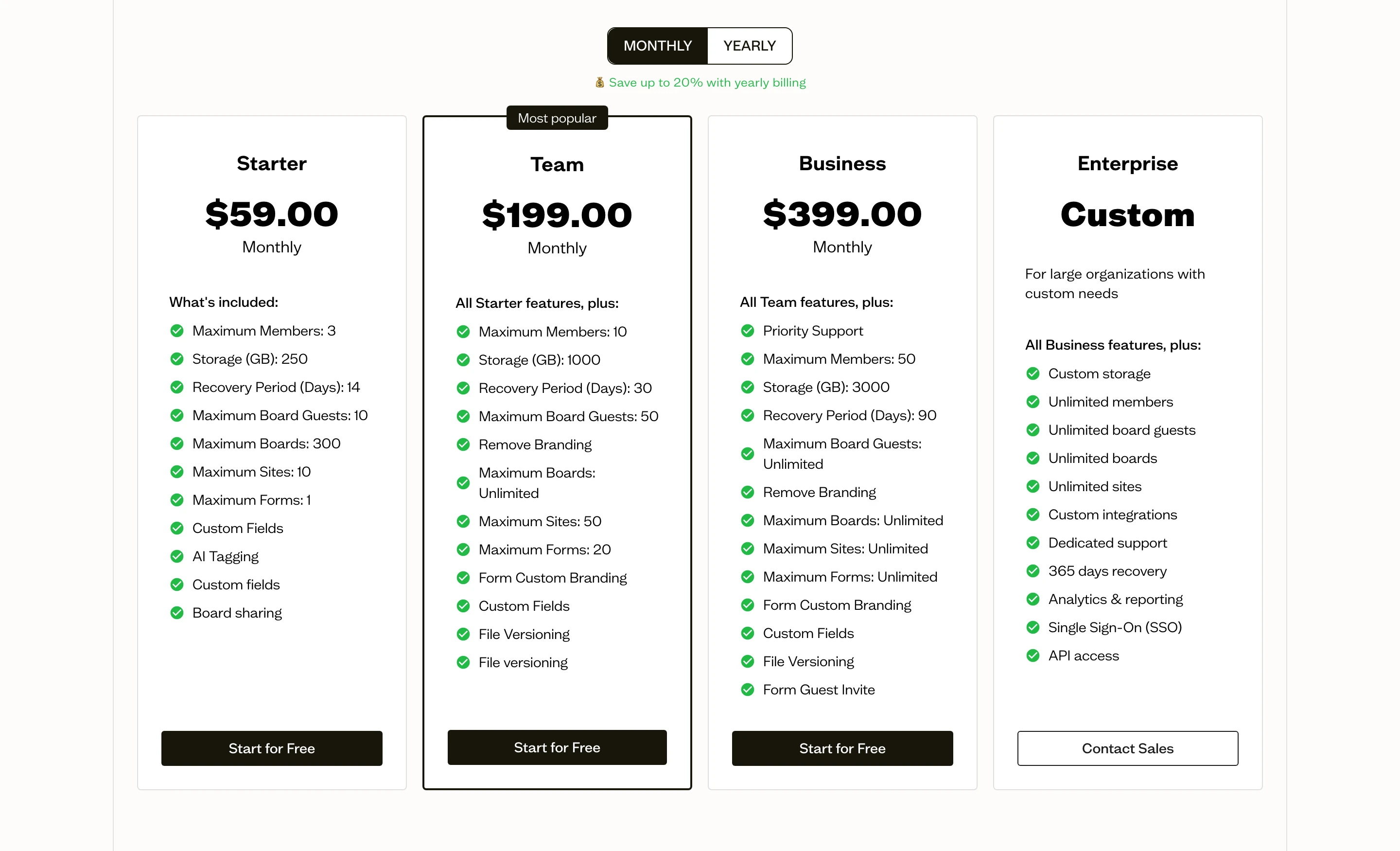
It does not have to be. Baseline publishes its pricing: a free plan with no trial clock, $59/month on Starter, $199/month for a ten-person team, $399/month for fifty, all on the pricing page. Pricing is flat rather than per seat, which is the opposite shape to every file sharing tool on this page.
Baseline's specific difference within the category is publishing. The DAM is also the presentation layer, so a brand guide, gallery or client portal is generated from the library and updates when the underlying asset changes. There is no export step and no separate brand guide to keep in sync. For a full category comparison with real numbers, see the DAM pricing comparison.
Being straight about the trade: Box Business gives unlimited storage at $15 a seat and SharePoint is effectively bundled with Microsoft 365. If your problem is a large archive of ordinary files, those are cheaper and better suited, and a DAM is the wrong purchase. A DAM earns its cost when the problem is finding, approving and publishing creative work.
You probably want both
This is not usually a replacement decision, and treating it as one is why the choice stalls.
Contracts, spreadsheets, decks and internal documents belong in general file storage, where they already are and where they work fine. Logos, photography, video, fonts and brand systems belong somewhere that can tag, approve, version and publish them. The split is by file type and workflow, not by team or department.
Existing folder structures usually survive the move. Baseline turns an uploaded folder into boards automatically, so a Dropbox or Drive hierarchy imports as a starting structure rather than needing to be rebuilt.
Frequently Asked Questions
What is the difference between a DAM and cloud storage?
Cloud storage stores and syncs files, organised by folder and found by filename. A DAM adds a layer of meaning on top: automatic tagging, visual search, structured metadata like usage rights and approval status, version comparison, and publishing assets as brand guides or portals. Storage answers where a file is. A DAM answers whether it is the right one.
Can I use Dropbox or Google Drive as a DAM?
You can store creative files in either and many teams do. What you cannot do is search images by content, filter on metadata like usage rights or camera data, track approval state on the asset, compare versions side by side, or publish a brand guide from the library. Those are the features that define a DAM, and no tier of either product includes them.
Do I need a DAM if I only have a few hundred assets?
Probably not for volume alone. The trigger is complexity rather than count: multiple clients or brands, assets that need approval, outdated files reaching campaigns, or anything you need to present to people outside the team. A single brand with a few hundred files and one person managing them is fine on a shared drive.
Is SharePoint a DAM?
No, though it is the closest of the mainstream file tools. Metadata columns and content types let you build something that behaves partly like asset management. It still has no AI tagging, no visual similarity search, no version comparison and no brand guide publishing, and reaching even a partial result takes substantial configuration work.
Should a DAM replace our file sharing tool?
Usually not. The practical arrangement is both: documents stay in the file sharing tool you already pay for, and brand and creative assets move to the DAM. Trying to make one tool do both jobs is what produces either a shared drive full of untracked logos or a DAM full of invoices.
Is a DAM the same thing as a brand portal?
They overlap. A DAM is the system that stores and manages assets, mostly used by the team managing them. A brand portal is a self-service front end for people who need to download approved materials, including clients and partners. Platforms that publish from the library provide both: the DAM for the team and portals generated from it. See what is a brand portal.
How much does a DAM cost?
The category range is wide and mostly hidden. Enterprise platforms are estimated at $14,000 to $100,000 a year and quote only after a sales call. Tools aimed at agencies and smaller brand teams publish their prices and start far lower, in the $50 to $400 a month range. The DAM pricing comparison lists real numbers where they are public.
Will migrating from a shared drive mean rebuilding everything?
Not necessarily. Baseline creates boards from an uploaded folder structure, so an existing Dropbox, Drive or SharePoint hierarchy becomes the starting organisation. The work that remains is the audit you were already overdue: deciding which of the four copies of each logo is the real one.
Next step
If your files are documents, stay where you are. A shared drive is the right tool and this guide does not apply to you.
If they are logos, photography, video and brand systems, the question is not whether a DAM would help. It is whether the disorganisation is costing you more than the subscription yet. For most agencies the honest answer arrives somewhere between the third client and the thousandth asset.
The cheapest way to find out is to stop estimating. Create a free Baseline account, upload one client's folder, and see whether the tagged and searchable version of it is recognisably better than what you have now. If it is not, you have lost an afternoon. Background on the agency workflow is in solutions for agencies.