
Box vs Dropbox: the short answer
Box is built for governance: permissions, retention, audit trails and compliance certifications. Dropbox is built for speed: sync, sharing, and getting files to people with no friction. Choose Box when IT owns the decision. Choose Dropbox when the people who use the files own it. If those files are mostly brand and creative assets, neither tool was designed for the job.
Last updated: September 29, 2026 · Pricing verified: September 2026 against Box's pricing page and Dropbox's plans page. Both vendors publish their rates, so every figure below is checkable.
Quick comparison
| Box | Dropbox | |
|---|---|---|
| Built for | IT and compliance teams | Everyday file users and small teams |
| Entry business price | $20/user/mo ($15 annual) | $18/user/mo ($15 annual) |
| Business storage | Unlimited from the Business tier | 3 TB for the first user, +1 TB per extra licence |
| Max file size | 5 GB (Business), up to 50 GB (Enterprise) | 2 TB on every plan |
| Desktop sync | Box Drive, streams on demand | Native sync, the best in the category |
| Free tier | 10 GB, 250 MB max file | 2 GB |
| Minimum users (business) | 3 | 3 |
| Compliance | HIPAA, FedRAMP, FINRA, GxP | SOC 2, ISO 27001, HIPAA on higher tiers |
| Weak spot | Slower, heavier, steeper learning curve | Thin admin controls, filename-only search |
What each one actually is
Box is an enterprise content management platform that happens to store files. Its centre of gravity is control: who can open what, what happens to a file after seven years, which regulator's checklist it satisfies. Unlimited storage from the Business tier up is genuinely unusual, and the compliance list (HIPAA, FedRAMP, FINRA, GxP) is the longest of any mainstream file tool. The cost of that is weight. Box Drive is slower than Dropbox sync, the admin console has a real learning curve, and non-technical users tend to find it fussy.
Dropbox invented modern cloud sync and still does it better than anyone. Files behave like local folders, conflicts resolve cleanly, and nobody needs training. Sharing is a right-click. The trade is depth: admin controls are thinner than Box's, search is essentially filename matching, and the business tiers cap storage in a way Box does not.
Neither one is a bad product. They are answers to different questions.
Pricing, with the real numbers
Both vendors publish their pricing, so this is verifiable rather than estimated. Prices are per user per month, with the annual rate in brackets.
Box
| Plan | Price | Storage | Max file size |
|---|---|---|---|
| Individual | Free | 10 GB | 250 MB |
| Personal Pro | $10 | 100 GB | 5 GB |
| Business Starter | $5 | 100 GB | 2 GB |
| Business | $20 ($15) | Unlimited | 5 GB |
| Business Plus | $33 ($25) | Unlimited | 15 GB |
| Enterprise | $47 ($35) | Unlimited | 50 GB |
| Enterprise Plus | Custom | Unlimited | Not published |
| Enterprise Advanced | Custom | Unlimited | Not published |
Business tiers require a minimum of 3 users. Enterprise Plus and Enterprise Advanced are separate tiers, not one: Advanced sits above Plus and adds Box AI Studio, Doc Gen and Archive. Neither publishes a price, so both are a sales call.
Dropbox
| Plan | Price | Storage | Users |
|---|---|---|---|
| Basic | Free | 2 GB | 1 |
| Plus | $11.99 | 2 TB | 1 |
| Essentials / Professional | $19.99 | 3 TB | 1 |
| Standard | $18 ($15) | 3 TB, +1 TB per extra licence | 3+ |
| Advanced | $30 ($24) | 15 TB team minimum, 5 TB per licence | 3+ |
| Enterprise | Custom | Custom | Custom |
What that costs a real team
For a five-person team on annual billing:
| Tool | Plan | Annual cost | Storage |
|---|---|---|---|
| Box | Business | $900 | Unlimited |
| Box | Business Plus | $1,500 | Unlimited |
| Dropbox | Standard | $900 | 7 TB |
| Dropbox | Advanced | $1,440 | 25 TB |
At five seats the two are close enough that price should not decide it. Box wins on raw storage economics if you have a genuinely large archive. Dropbox wins if 7 TB is plenty and you want the better sync client.
The number that matters more is what happens at fifteen or thirty people, because both prices are per seat. A thirty-person agency on Dropbox Standard pays $5,400 a year. The same agency on Box Business pays the same. Per-seat pricing is the structural cost of both tools, and it is worth knowing before you standardise on either.
Feature by feature
Sync and desktop experience
Dropbox wins, clearly. Selective sync, Smart Sync, and conflict handling are all more mature. Box Drive works and streams files on demand to save disk space, but it is noticeably slower on large folders and drops offline more often.
Permissions and admin control
Box wins, clearly. Seven granular permission levels, retention policies, legal holds, watermarking, device trust rules, and detailed audit logs. Dropbox has team folders and admin roles but nothing near this depth.
Search
Neither is good. Both search filenames and, on higher tiers, document text. Neither can find an image by what is in it. If you store a lot of photography or design files, this is the limitation you will hit first, and no tier of either product fixes it.
External collaboration
Box Business Plus wins. External collaborators do not consume licences, which matters if you work with many clients or vendors. On Dropbox, sharing a link is easier, but bringing outsiders properly into a workspace means paying for them. If the outsiders in question are clients who need to see their own assets and nobody else's, neither model is really the right shape, and a client portal is.
Compliance
Box wins, decisively. If you are in healthcare, financial services, life sciences or government, this is usually where the conversation ends.
Integrations
Roughly even. Both cover Microsoft 365, Google Workspace, Slack, Zoom and Adobe. Box has more enterprise app connectors, Dropbox has smoother everyday ones.
Who should pick which
Pick Box if:
- IT or compliance is signing off on the purchase
- You are in a regulated industry
- You have a large archive and unlimited storage changes the maths
- You need retention rules, legal holds or detailed audit trails
- You collaborate with a lot of external parties and do not want to buy them licences
Pick Dropbox if:
- The people using the files are choosing the tool
- You want it working this afternoon with no training
- Desktop sync quality is the thing you care about most
- Your team is small and your needs are straightforward
- You want the fewest possible support tickets
Pick neither if: the files causing the problem are logos, photography, video, fonts, brand colours and design files, and the problem is that nobody can find the current version. That is a different category of tool, and it is worth understanding why before you pay for a bigger storage plan that will not fix it.
The case neither tool covers: brand and creative assets
Both Box and Dropbox are storage with sharing on top. That is the right shape for documents. It is the wrong shape for brand assets, for a reason that has nothing to do with capacity.
Both tools are very good at answering where a file lives. Neither has any way to record that this logo is the approved one, that its predecessor was retired in March, that this photograph is licensed only through next year, or that the file a client is looking at right now is current. That information has nowhere to go, so teams improvise: naming conventions, a duplicate "FINAL" folder, a PDF brand guide that is stale the week after it ships.
This is not a hypothetical cost. Dave Gustafson runs 15 client brands at WSI Peak Digital, and described the search problem before he moved off folders:
"Any time I had to go back and do work that involved branding, I had to dig through my project management system. Often, I'd find that I didn't have everything for any particular client, and I'd have to go back through emails, project folders, or to their website."
Fifteen brands, and the quickest path to a client's logo ran through that client's public website. Note what would not have helped: a bigger storage tier on either product. The missing thing was never space.
What a DAM does that a shared drive does not
- Finds assets by content, not filename. AI tagging and visual similarity search, so "the blue hero shot from the spring campaign" is a query rather than an archaeology project.
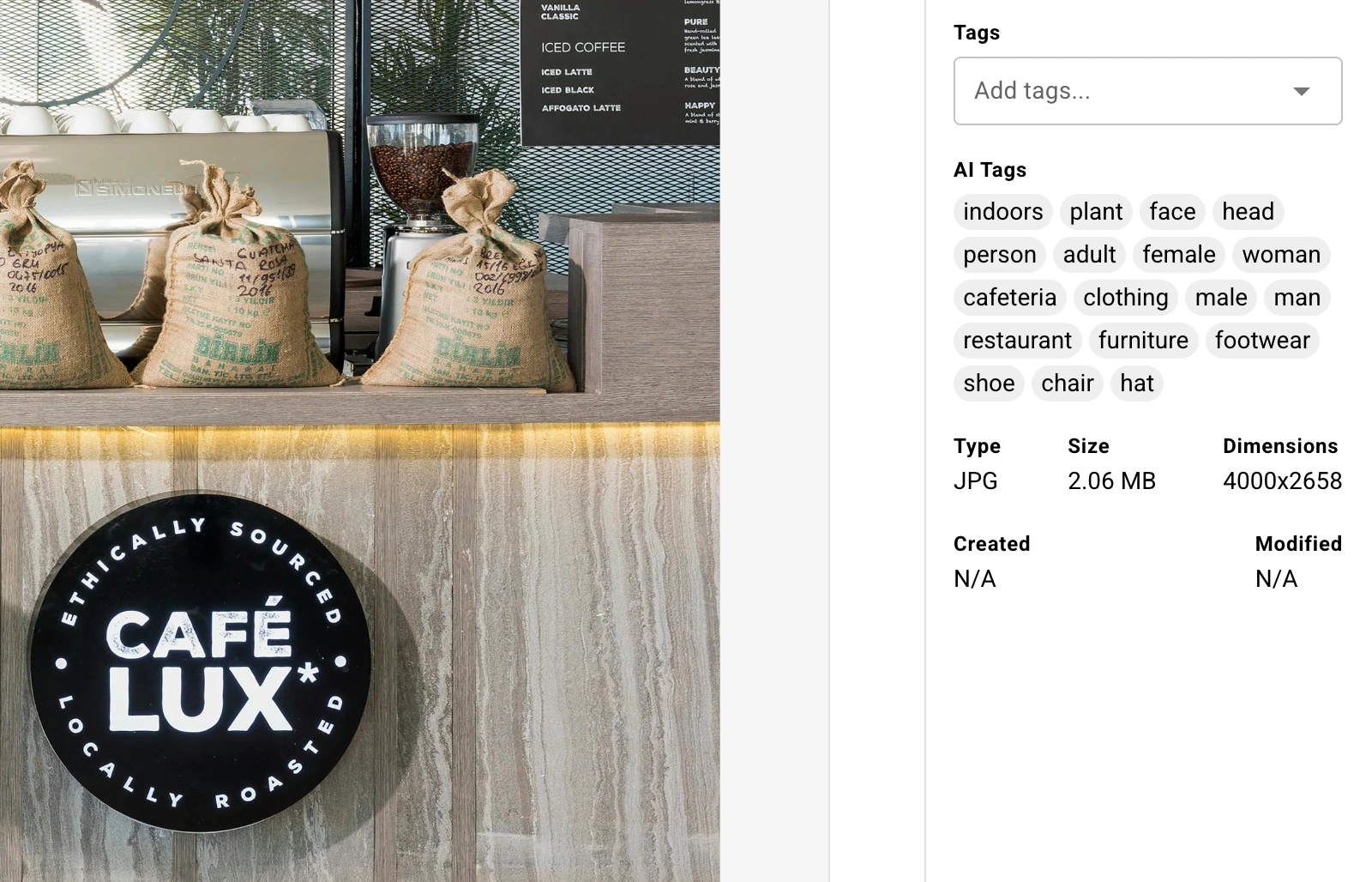
- Filters on real metadata. Camera, lens, date taken, usage rights, campaign, client, approval status.
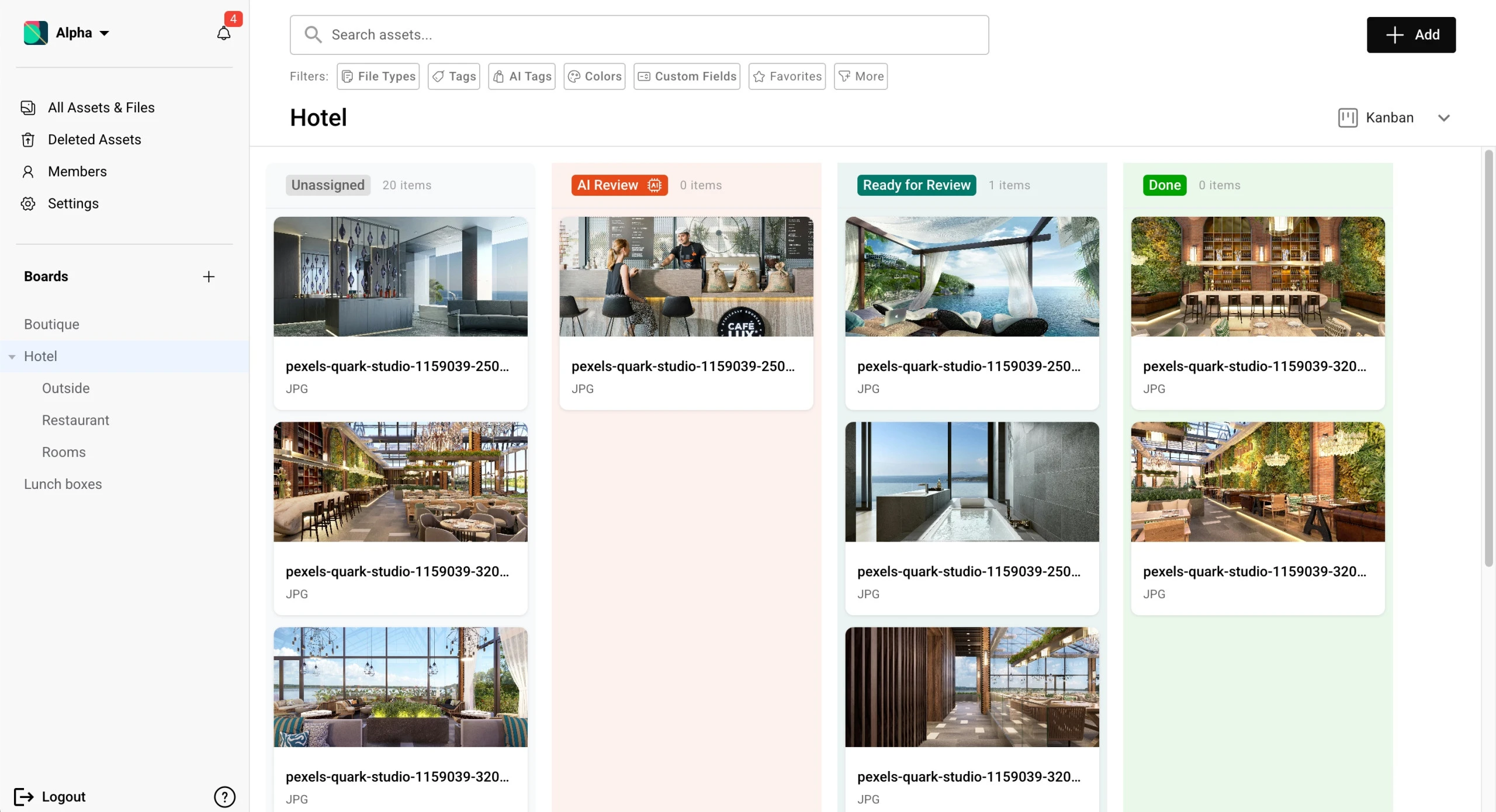
- Carries approval state. A Kanban view of what is in review and what is signed off, instead of an email thread.
- Versions properly. Compare iterations side by side and roll back, rather than reading filenames for clues.
- Separates clients. Isolated workspaces rather than folder permissions you hope are set correctly.
- Publishes. This is the part shared drives cannot do at all: turning the asset library itself into a live brand guide, gallery or client portal that updates when the underlying file changes.
Baseline is one of these, built for agencies and brand teams, and the last bullet is what it optimises for: the library is also the publishing layer, so a logo update propagates to every brand guide and portal using it.
It is also priced on a different axis to everything in the tables above. Box and Dropbox both charge per seat, so the bill tracks headcount. Baseline charges per plan: $59/month, $199/month and $399/month cover 3, 10 and 50 people respectively, published openly with a free plan rather than a trial countdown. At three people Box and Dropbox are far cheaper. Somewhere around ten the lines cross.
Being straight about the trade: Box Business gives you unlimited storage for $15 a seat, and Baseline's Team plan gives you 1 TB. If your problem is a very large archive of ordinary files, Box is cheaper and better suited. Baseline is the right answer when the problem is finding, approving and publishing creative work, not when it is raw capacity.
Running both is normal and not a failure of planning. Contracts, decks and spreadsheets have no reason to leave Box or Dropbox. The split is by file type, not by team.
The recommendation
For general business files, Box if IT is deciding, Dropbox if the users are. That single question predicts the right answer more reliably than any feature table.
For brand and creative assets, neither. Compare the category properly in our DAM pricing comparison and best DAM software for creative agencies guides, or read why file sharing is not asset management for the short version.
Frequently Asked Questions
Is Box better than Dropbox?
Neither is better in general. Box is better for governance, compliance and unlimited storage, which is why IT departments in regulated industries choose it. Dropbox is better at sync, sharing and ease of use, which is why teams who pick their own tools choose it. The right question is who is making the decision and why.
Is Box cheaper than Dropbox?
They are close. Box Business is $20 per user per month, or $15 on annual billing, with unlimited storage. Dropbox Standard is $18 per user per month, or $15 annual, with 3 TB for the first user and 1 TB per additional licence. At equivalent tiers the price is effectively the same, so Box wins on storage per dollar if you have a large archive.
Can Box and Dropbox be used together?
Yes, and many organisations do, usually by accident. It works when the split is deliberate: one tool as the system of record with retention rules, the other for fast everyday sharing. It causes problems when the same file lives in both and nobody knows which copy is current.
Does Box or Dropbox work as a digital asset management system?
Not really. Both store creative files perfectly well, but neither can tag assets automatically, search by image content, filter on metadata like usage rights or camera data, run approval workflows, or publish a live brand guide from the library. Those are the features that distinguish a DAM from cloud storage, and no tier of either product includes them.
What is the largest file I can upload?
Box caps individual files by plan: 250 MB on the free Individual tier, 5 GB on Business, 15 GB on Business Plus, and 50 GB on Enterprise. Dropbox caps individual files at 2 TB on every plan, though anything over roughly 350 GB needs the desktop app rather than a browser. For large video, Dropbox is the clearly better choice.
Which one is better for an agency managing client work?
Box Business Plus has the edge over Dropbox because external collaborators do not consume paid licences, which adds up quickly across many clients. But if the client work in question is brand and creative assets, a DAM with per-client workspaces and client-facing portals fits the workflow far better than either. See our guide to client portals for agencies.
Is there a free version of Box or Dropbox?
Both have one. Box's free Individual plan gives 10 GB with a 250 MB file size limit. Dropbox Basic gives 2 GB with no file size restriction. Box's free tier is more generous on space, Dropbox's is more usable for real files.
Next step
If you are choosing between Box and Dropbox for documents, either will serve you. Decide on governance versus usability and move on.
If you got here because brand assets are scattered across folders and nobody can find the current logo, that is a different purchase. Start free on Baseline with no credit card and no trial countdown, or look at what Baseline does for agencies first.