
Search for "affordable digital asset management" and you'll find long lists of "budget-friendly" DAMs that don't include a single price. Some of them list Brandfolder and Canto, which typically cost $15,000 a year or more.
This page does the opposite. It covers seven DAMs a small team can actually afford, with the price, storage and user limits each one publishes. It also covers the costs that make a cheap DAM expensive later.
The short answer: Filecamp has the cheapest paid plan at $29 a month. For a 5-person team with 200 GB of files, Stockpress is cheapest at $1,188 a year. Air, Stockpress and Baseline all have free plans with no time limit. Once you need more storage or users, some tools on this list cost about $470–$900 a month billed annually, or up to $1,100 month to month.
For comparison, enterprise platforms like Bynder, Brandfolder and Canto typically run $15,000–$40,000 a year for a 20-person team, and none of them publish prices.
Affordable DAM Software Compared
Sorted by the cheapest paid plan, billed monthly. Prices are in USD and were checked on each vendor's pricing page in November 2026.
| DAM | Free option | Cheapest paid plan | Storage on that plan | Users on that plan |
|---|---|---|---|---|
| Filecamp | 30-day trial | $29/mo, or $348/yr | 20 GB | Unlimited |
| Baseline | Free plan | $59/mo, or $49/mo billed annually | 250 GB | 3 |
| Pics.io | 7-day trial | $100/mo | 100 GB | 1 |
| Stockpress | Free plan | $108/mo, or $99/mo billed annually | 200 GB | Unlimited |
| Dash | 14-day trial | $109/mo | 10 GB, 250 downloads/mo | Unlimited |
| Air | Free plan | $125/mo, or $100/mo billed annually | 200 GB | 5 |
| ResourceSpace | Free open-source download | Team Cloud, $473/mo, or $5,681/yr billed annually | Self-hosted: your server. Cloud: 1 TB | Cloud: 25 |
Two patterns stand out. Only three of these DAMs (Filecamp, Stockpress and Dash) include unlimited users on every plan. Baseline, Pics.io and Air cap users per tier, and so do ResourceSpace's cloud plans, which matters as your team grows. And the cheapest paid plans vary hugely in storage, from 10 GB (Dash) to 1 TB (ResourceSpace Team Cloud), so the headline price alone tells you very little.
What a 5-person team needing 200 GB would pay
A more useful comparison is the cheapest published plan that actually fits a real team. Here's a 5-person team with about 200 GB of logos, photography and video, billed annually. Same prices as the table above, checked November 2026.
| DAM | Cheapest plan that fits | Yearly cost |
|---|---|---|
| Stockpress | Essential (200 GB, unlimited users): $99/month billed annually | $1,188 |
| Air | Starter (200 GB, 5 users) | $1,200 |
| Filecamp | Basic (20 GB) plus a 250 GB storage add-on at $100/month: $348 + $1,200 | $1,548 |
| Baseline | Team (1 TB, 10 members) | $2,028 |
| Pics.io | Micro (1 TB, 10 users) | $2,700 |
| ResourceSpace | Team Cloud (1 TB, 25 users) | $5,681 |
| Dash | Established Brand (200 GB), $589/mo less 10% annual | $6,361 |
Baseline is fourth here, and we'd rather tell you that than bury it. If plain storage is all you need, Stockpress, Air and Filecamp are the better deals at this size. Air's Starter is capped at 5 users, though, so a sixth person moves you to Business at $10,800 a year. What Baseline adds for the extra cost is covered in its section below.
Filecamp sells extra storage from a fixed list of sizes, and its pricing page doesn't say whether you can combine them. If you can stack two 100 GB add-ons instead of one 250 GB add-on, Filecamp would come to $1,428 a year, still third.
Dash's Growing Brand plan looks like it should be cheaper, but its storage options stop at 190 GB ($389 + $180 = $569/month), just short of 200 GB.
For enterprise prices on the same basis, see our DAM pricing comparison.
The 7 Affordable DAMs, Reviewed
1. Filecamp
Cheapest paid plan: Basic, $29/month or $348/year. Free plan: no, but there's a 30-day trial. Filecamp's pricing page
Filecamp is a straightforward DAM with unlimited users on every plan. Plans go from Basic (20 GB) to Advanced ($59/month, 50 GB) and Professional ($89/month, 100 GB). The trial is the Professional plan, so you can test everything, including white-label and custom domains.
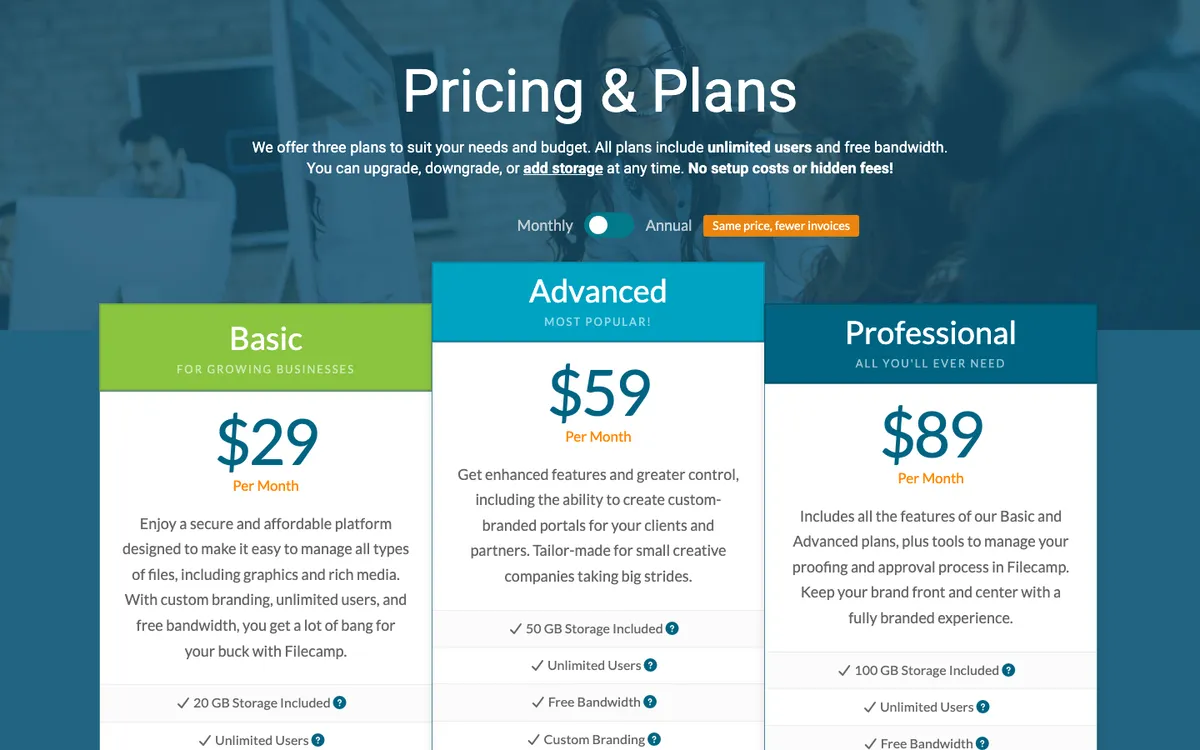
Best for: teams with small libraries and lots of people who need access. If your library is mostly logos, templates and documents, Filecamp is the best value on this page. Watch out for: storage. The plans include 20–100 GB, and extra storage is sold separately, from $10/month for 10 GB, $45 for 100 GB and $100 for 250 GB, up to 20 TB.
2. Baseline
Cheapest paid plan: Starter, $59/month or $49/month billed annually ($588/year). Free plan: yes, no time limit and no credit card. Baseline's pricing page
This is us, so read this one with that in mind. Baseline is a DAM that also publishes: the same library powers live brand guidelines, client portals and galleries, so when you update a logo, every published guide updates with it. Images are AI-tagged on upload on every plan, including Free.
| Plan | Billed monthly | Billed annually | Storage | Members | Board guests |
|---|---|---|---|---|---|
| Free | $0 | $0 | 1 GB | 2 | 1 |
| Starter | $59/mo | $49/mo | 250 GB | 3 | 10 |
| Team | $199/mo | $169/mo | 1 TB | 10 | 50 |
| Business | $399/mo | $349/mo | 3 TB | 50 | Unlimited |
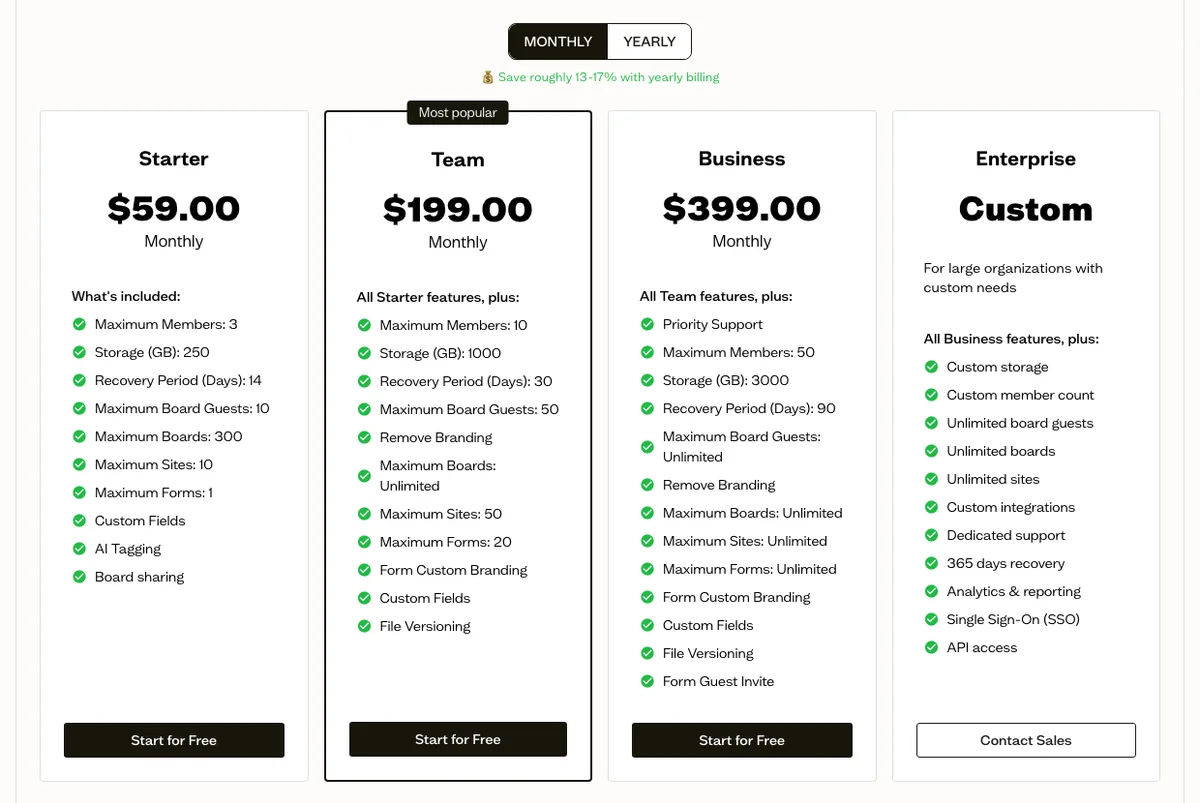
Like Air and Pics.io, Baseline caps team members by plan, so a 5-person team needs Team, not Starter. Guests (clients and freelancers you invite to specific boards) don't count as members.
Best for: agencies and brand teams that need to publish brand guidelines or give clients their own portal, not just store files. Watch out for: the Free plan's 1 GB and 2 members are enough to try the product, not to run a team on. Version history starts on Team, and SSO and API access are Enterprise-only.
The quickest way to judge it: create a free account, upload a client's logos and photos, share the board with that client, and see whether they find the logo they need without asking you.
3. Pics.io
Cheapest paid plan: Solo, $100/month (monthly billing only). Free plan: no, but there's a 7-day trial. Pics.io's pricing page
Pics.io's distinctive feature is "bring your own storage": you can connect storage you already pay for instead of using theirs. Solo includes one user and 100 GB. The more practical plan for a team is Micro, at $250/month or $225/month billed annually ($2,700/year), with 10 users and 1 TB.
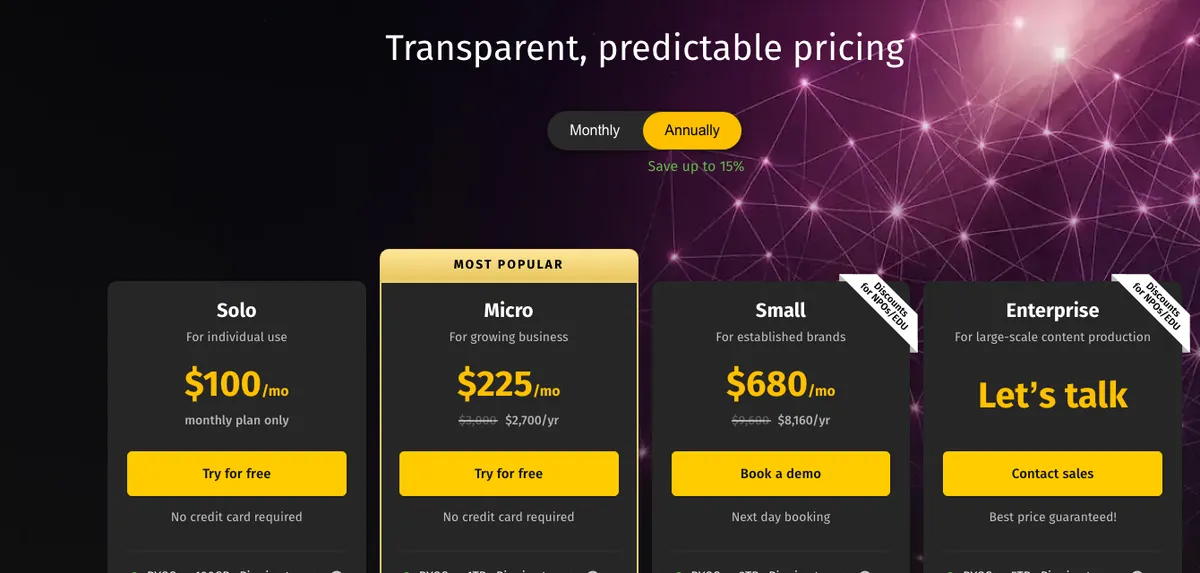
Best for: teams that already pay for cloud storage and want a DAM layer on top. Watch out for: Solo is hard to recommend. $100 a month for one user is more than Filecamp charges for unlimited users, so most teams should start at Micro ($225–$250/month).
4. Stockpress
Cheapest paid plan: Essential, $108/month, or $99/month billed annually ($1,188/year). Free plan: yes, 3 GB with unlimited users. Stockpress's pricing page
Stockpress keeps pricing simple: unlimited users on every plan, no contracts, and storage that scales from 200 GB (Essential) to 500 GB and up on Pro ($192/month, or $175 billed annually) and Premium ($247/month, or $225 billed annually). The free plan starts with 14 days of access to the Premium features.
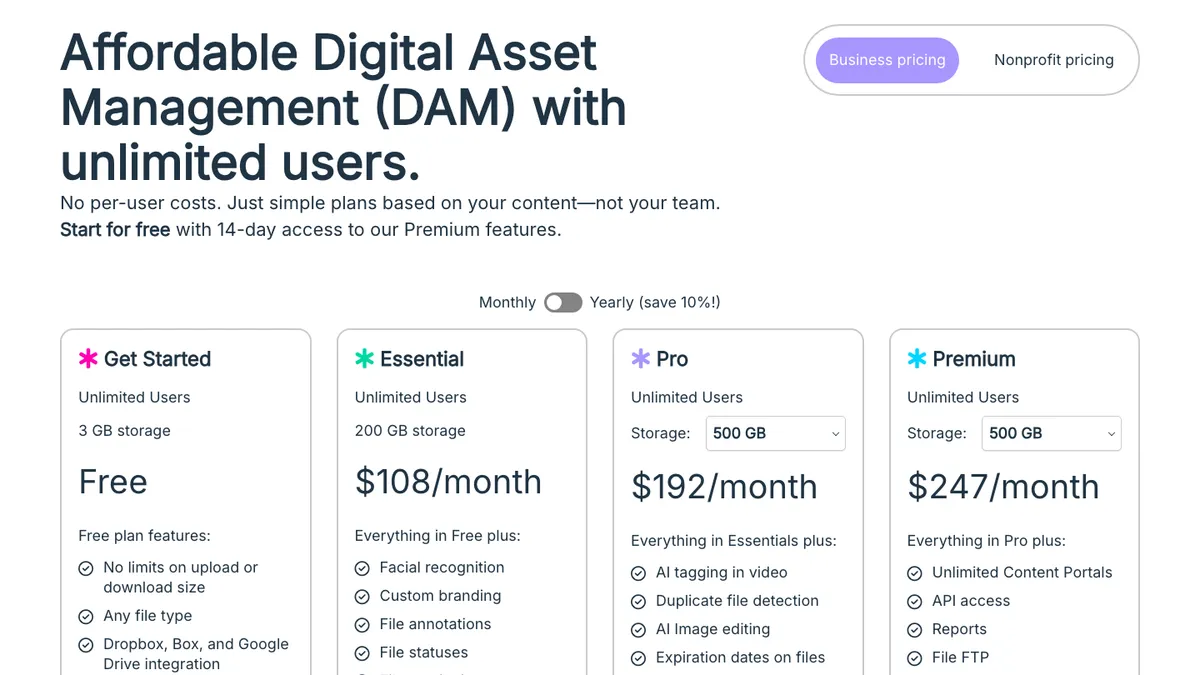
With the toggle set to Yearly, the same page shows $99, $175 and $225 a month.
Best for: teams that want a lot of storage and unlimited users for a predictable flat price. Watch out for: the jump from 3 GB free to $99–$108/month paid, with nothing in between.
5. Dash
Cheapest paid plan: Start up, $109/month. Free plan: no, but there's a 14-day trial. Dash's pricing page
Dash includes unlimited users and every feature on every plan. Its plans are separated by storage and download allowance instead of features: Start up ($109/month) includes 10 GB and 250 downloads a month, Small Team ($239) 50 GB, Growing Brand ($389) 100 GB, and Established Brand ($589) 200 GB with unlimited downloads. Annual billing saves 10%, and free onboarding and migration support are included.
Best for: brands with a modest library and a lot of people who need access. Watch out for: storage is tied to the plan, so a growing library pushes you up a tier. Extra storage costs more on top: on the smaller plans it's sold in 10 GB steps at $20–$33/month each, depending on the plan.
6. Air
Cheapest paid plan: Starter, $100/month billed annually ($1,200/year), or $125 month to month. Free plan: yes, 10 GB with up to 3 users. Air's pricing page
Starter includes 200 GB and up to 5 users, which makes it good value for a small team. Storage is separate from Air's AI credits, which cover image editing, video creation and other AI features.
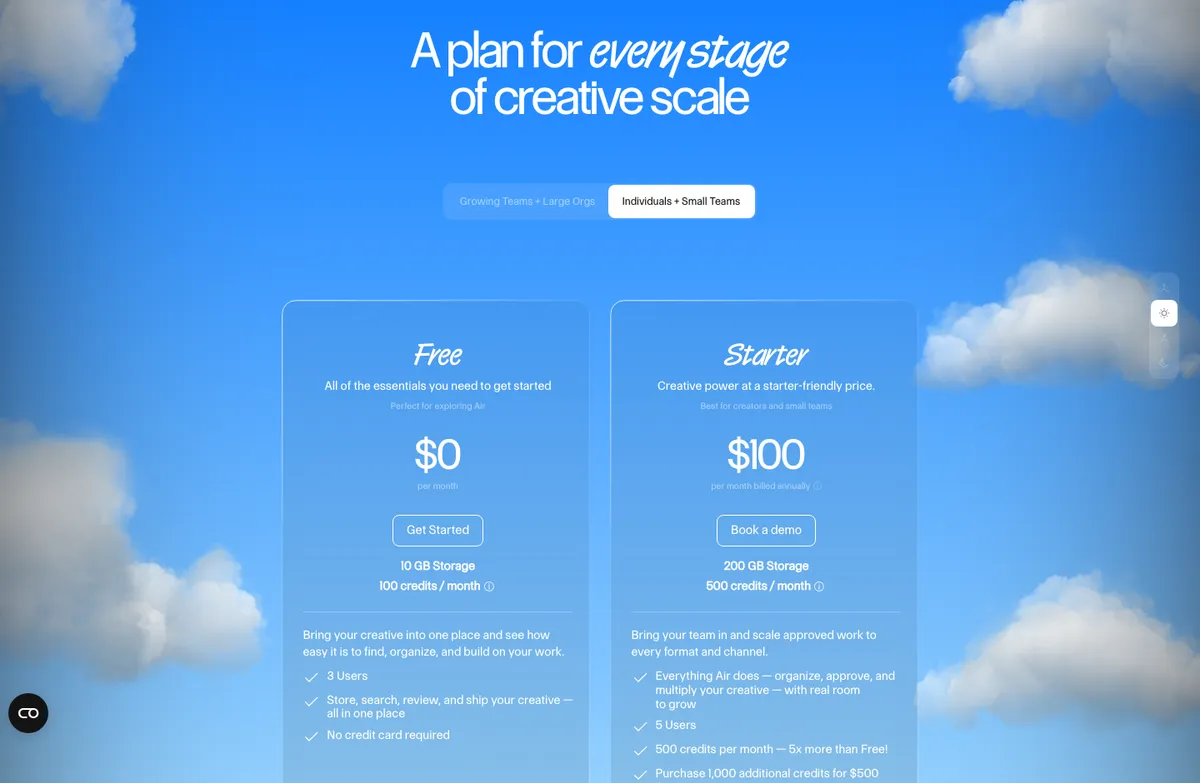
The catch is the jump between tiers. Starter stops at 5 users, and the next plan is Business at $900/month billed annually ($10,800/year), or $1,100 month to month. Air has also changed its pricing several times since 2024: in September 2026 Starter cost $25/month. Our Air pricing breakdown covers what changed and the earlier history.
Best for: teams of up to 5 people who need real storage. Watch out for: the 5-user cap on Starter and the 9x jump to Business. If that rules Air out, see our Air alternatives.
7. ResourceSpace
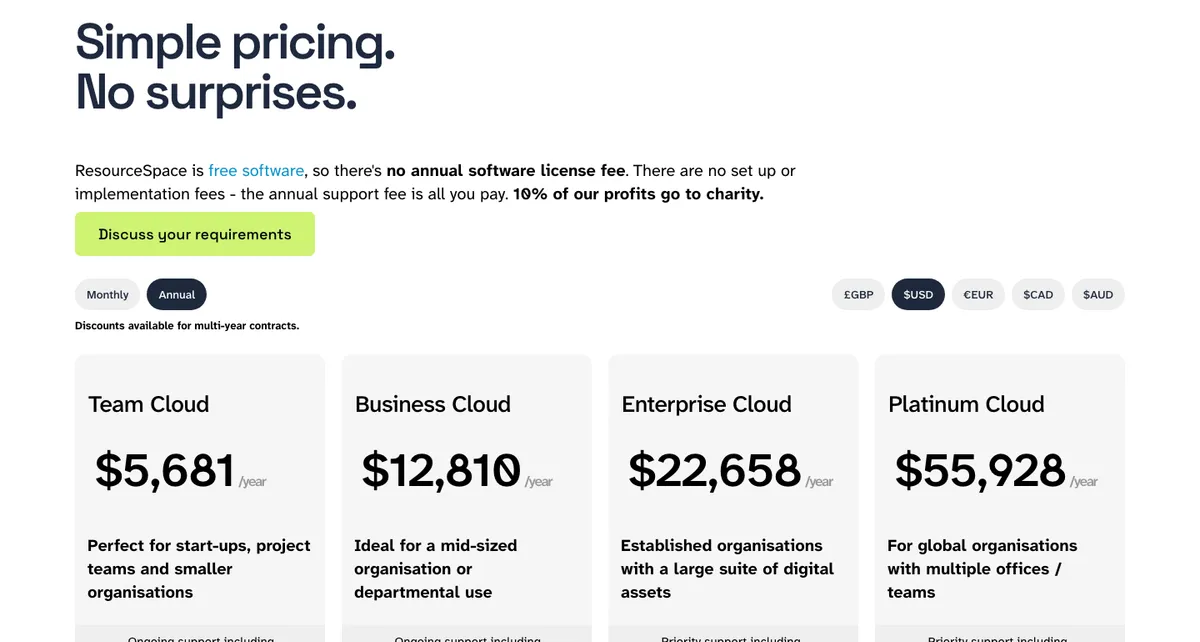
Cheapest paid plan: Team Cloud, $473/month, or $5,681/year billed annually, with 25 users and 1 TB. ResourceSpace publishes monthly prices too, but its FAQ says billing is annual by default and monthly payment has to be requested and paid by direct debit. The two work out about the same: $473 × 12 is $5,676, against $5,681 billed annually. Free option: the open-source version is free to download and run yourself. ResourceSpace's pricing page
ResourceSpace is the genuinely free DAM: open-source software with no license fee. That's why it shows up so often when people search for free DAM software. But "free" here means free to download. You still pay for a server, someone to install and update it, backups and security.
If you'd rather not run it yourself, ResourceSpace's hosted Team Cloud plan includes support, SSO and API access. At $5,681 a year it's one of the more expensive options on this page, which shows the real trade-off: the software is free, but running it isn't.
Best for: organizations with in-house IT that want full control. Watch out for: the time cost. If nobody on your team is comfortable running a web server, a hosted DAM will be cheaper in practice.
Is There a Free DAM?
Yes. Free DAM software comes in three forms, and they're very different products. The best-known fully free option is ResourceSpace, an open-source DAM you host yourself.
Free plans on hosted DAMs. Air, Stockpress and Baseline all have free plans with no time limit. Air's has the most storage (10 GB, up to 3 users). Stockpress offers 3 GB with unlimited users. Baseline's is the smallest (1 GB, 2 members) but includes brand guide publishing and AI tagging. All three are built to be outgrown, which is fine: they let you test with real files before paying.
Open-source DAMs. ResourceSpace is the best-known. The software is free, but the hosting, setup and maintenance aren't. Budget for a server and a few hours a month of someone's time.
Shared drives. Google Drive and Dropbox are free or cheap, and for documents they're the right tool. For brand assets they're thinner: they're organized around folders and documents, tagging and visual review tools are basic or missing, and neither publishes brand guidelines. Our DAM vs file sharing guide explains where the line is.
The Hidden Costs of a Cheap DAM
The sticker price is rarely what a cheap DAM ends up costing. Check these before you choose:
- Storage add-ons. Filecamp's $29 plan includes 20 GB; adding 100 GB costs another $45 a month. Check the cost per extra GB before you sign.
- Download and bandwidth caps. Dash's entry plan caps downloads at 250 a month. Teams that share a lot with clients hit limits like this first.
- Per-user pricing. Tools that charge per seat get expensive fast as you add freelancers and clients. Prefer unlimited users or free guest access.
- Credit systems. Credits for AI features make your monthly cost harder to predict, especially if you buy extra packs.
- Big jumps between tiers. A cheap entry plan is less useful if the next step is a leap: Air goes from $1,200 a year on Starter to $10,800 on Business, a 9x jump.
- Price changes. Check how often the vendor has changed pricing. Air's Starter plan went from $250 a year to $1,200 a year between September and November 2026.
- Getting your files out. Make sure you can bulk-download everything at original quality if you leave.
For a full evaluation list, use our digital asset management checklist.
How to Choose
- Under 5 people, small library: start on a free plan (Air, Stockpress or Baseline) and only pay when you hit a limit.
- Lots of people, mostly viewing and downloading: pick a tool with unlimited users, such as Stockpress, Filecamp or Dash.
- Agency managing client brands: look for free guest access and published brand guidelines or client portals. That's where Baseline fits best. Our roundup of the best DAM software for creative agencies compares more options.
- In-house IT and full control: consider self-hosting ResourceSpace.
- Already outgrowing all of these: our DAM pricing comparison covers what Bynder, Brandfolder, Canto, Frontify and MediaValet cost.
Frequently Asked Questions
What is the most affordable digital asset management software?
By entry price, Filecamp's Basic plan ($29/month) is the cheapest paid plan of the DAMs we compared, followed by Baseline's Starter ($59/month, or $49/month billed annually). Air, Stockpress and Baseline also have free plans with no time limit. The cheapest option for your team depends on storage and headcount: for a 5-person team needing 200 GB, Stockpress's Essential plan ($1,188 a year, billed annually) is the lowest published price we found.
Is there a free digital asset management tool?
Yes. Air, Stockpress and Baseline offer permanent free plans with limited storage, and ResourceSpace is open-source software you can run yourself for free. Free hosted plans are best for testing and very small teams. Open-source DAMs are free to download but require your own server and maintenance.
How much does a DAM cost for a small business?
For a 5-person team, the cheapest DAMs with published pricing cost $0 to about $250 a month, or $0 to about $3,000 a year. Some cost about $470–$900 a month billed annually, or up to $1,100 month to month, once you need more storage or users. Enterprise DAM platforms cost far more and don't publish their prices.
Are cheap DAMs worth it compared to Google Drive or Dropbox?
For visual brand assets, usually yes. A DAM adds tools built for visual files, such as AI tagging, visual feedback on images and approval status, and in some cases published brand guidelines. For documents and spreadsheets, a shared drive is still the better and cheaper tool.
What should I watch out for with cheap digital asset management software?
Storage limits and the cost of extra storage, download caps, per-user pricing, credit-based plans, big price jumps between tiers, and how easily you can export everything if you leave.
Why don't Bynder, Brandfolder and Canto publish their prices?
They sell mostly to larger organizations through sales teams, and prices are negotiated per customer. Reported costs for a 20-person team run from about $15,000 to $40,000 a year.
Next Step
The fastest way to find out whether an affordable DAM is enough for you is to use one with your own files. Start with any of the free plans above.
If you want to try Baseline, create a free account. Upload a sample of your logos and photography, publish a brand guide from it, and ask a teammate to find a specific logo. If it takes longer than 10 seconds, it isn't working for you. Paid plans start at $49 a month billed annually. Full plan details are on the pricing page.