
Design collaboration is the working arrangement between everyone who touches a design: the designers who make it, the reviewers who mark it up, the clients who approve it, and the producers who keep it moving. When it works, one file travels a clear path from draft to approved, and every comment lands where the next person can find it. When it doesn't, you get four versions and an email chain asking which one is final.
Most of what's published about design collaboration is a list of tools. Search the term and you'll find roundups of apps with star ratings, almost none explaining the workflow underneath. This guide does the opposite: how the work flows, where it breaks, and the practices that hold it together.
This guide covers what design collaboration means in practice, where it breaks, the four practices that fix it, what collaboration software should do, a review workflow you can copy, and how Baseline handles all of it inside a digital asset management (DAM) platform.
What Design Collaboration Actually Means
In practice, design collaboration is the loop a piece of work travels: create, share, review, mark up, revise, approve, and find again later. Sharing moves files; collaboration moves decisions. A team can share files flawlessly and still fail, because the feedback, the approvals, and the current version live in places nobody can point to.
Designers create the work. Reviewers, a creative director, a brand manager, a copywriter, check it against the brief and the brand. Clients approve it, usually from outside your team's tools. Producers keep the pieces moving and chase the decisions that go quiet. Good design collaboration means all of them work from the same file, with the same sense of where it stands.
A quick test: ask three people where the latest version of a project lives and what its status is. If you get three different answers, the team doesn't have a collaboration process, it has habits that happen to overlap.
Where Design Collaboration Breaks
Most collaboration problems aren't effort problems. They're structural, and they show up in the same five places on almost every team.
Files scattered across drives and inboxes. The hero image lives in one person's local folder, the logo arrived as an email attachment, and the rest of the campaign sits in a drive folder nobody has tidied. Every project starts with a scavenger hunt that ends when someone recreates a file that already existed.
Feedback arriving from everywhere. One reviewer left notes in a chat thread. Another replied to the wrong email. The client called and described the change verbally. The feedback exists, but it's spread across five channels with no order, no owner, and no way to tell what's been addressed.
Version confusion. Folders named final, final_v2, final_FINAL, and final_actuallyFINAL are a running joke because they're real. When nobody trusts which file is current, people design against the wrong version, present the wrong version, and occasionally ship the wrong one.
Review rounds that never converge. Feedback arrives late, contradicts the previous round, or comes from someone new who never saw the earlier decisions. Without a visible review stage and a named approver, rounds don't converge on a decision; they accumulate, and the deadline makes the call.
Freelancers and clients outside the wall. External collaborators can't see inside your team's tools, so work goes out as email attachments and comes back stripped of context. Or someone hands a client broad workspace access just to view one project, exposing everything else in it.
None of these are about people not caring. They're about where the work lives and where the decisions land.
The Four Practices That Fix It
You can repair most of what's above with four working agreements. None of them require new software, and all of them make your current tools more useful.
One source of truth for files. Every project gets one home, the only place the work lives. The rule takes discipline: if it isn't in the library, it isn't the current version. A file on someone's laptop is a draft until it's uploaded. That kills both the scavenger hunt at the start of a project and the "which one is final" panic at the end.
Feedback attached to the asset itself. Agree as a team that comments live on the file, not in chat or email. "The logo needs work" written beside the exact spot beats the same words in a chat thread: the next person to open the file sees the note in context. Vague notes are the classic failure: they generate a meeting just to clarify what the reviewer meant. Pointing at the exact spot removes the meeting.
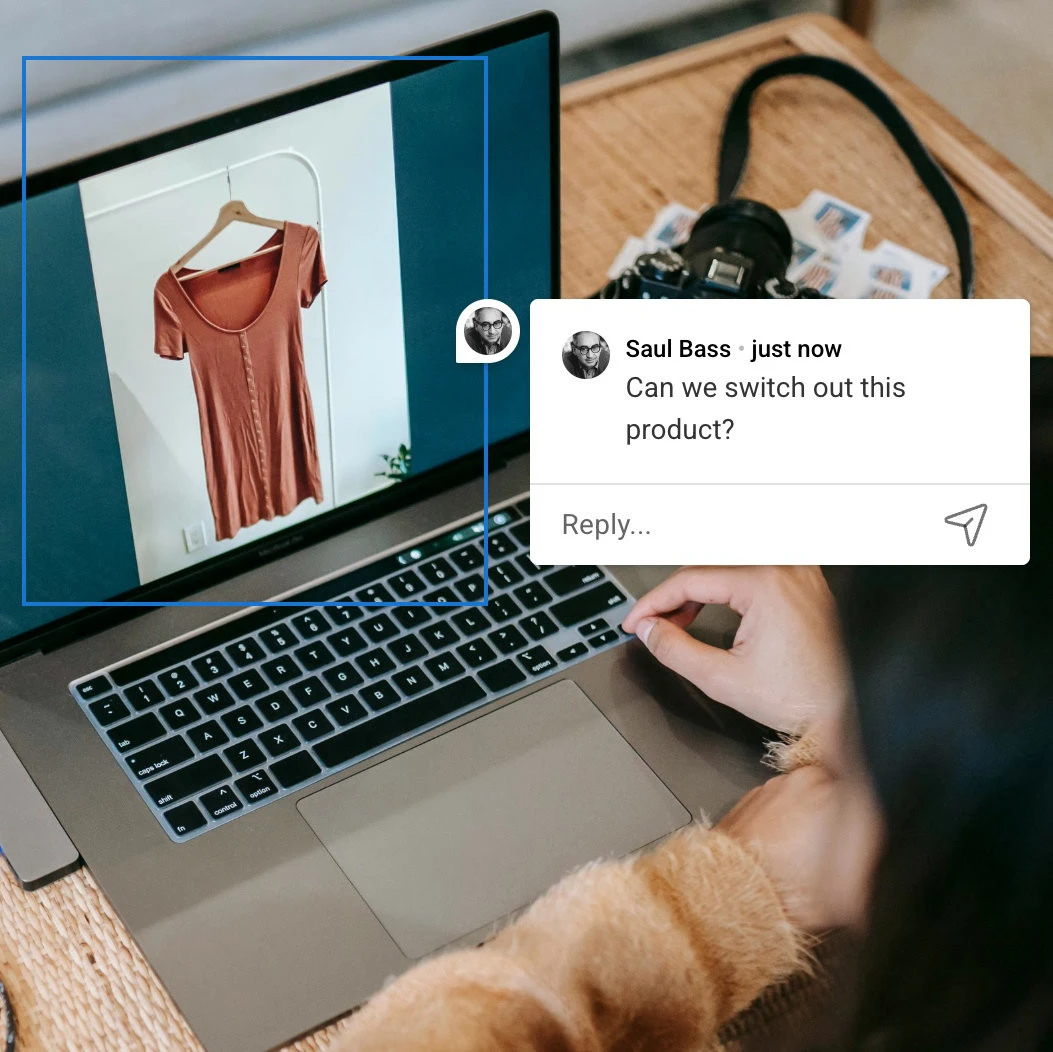
Review stages everyone can see. Give every asset a status any teammate can check without asking: draft, in review, approved, rejected. Statuses only work when they're visible on the work itself, not in someone's head or an unused spreadsheet. Then name the approver for each stage, so "waiting on review" has a face instead of being a shrug.
Versioning people trust. When a file changes, the change should be traceable: what changed, who changed it, and how to get the previous version back. Teams that trust their versioning stop hoarding private copies as insurance, and hoarded copies are what created the final_FINAL mess. People stop asking "is this the latest?" and just use the file.
None of these require a purchase. But tools either support them or quietly undermine them.
What Design Collaboration Tools Should Actually Do
Rather than evaluating tools by brand, evaluate them by whether they support the four practices. A tool worth adopting does five things.
Holds a central library. One home per project or client, holding every file type a design team produces: images, video, documents, fonts, even color palettes. If it can't hold a file type, a second home appears elsewhere, and the source of truth becomes two.
Keeps comments and visual annotations on the file. Threaded comments for discussion, and markers pinned to exact points or areas on an image for precision. The test: feedback should make sense to someone who opens the asset a week later, with no other context.
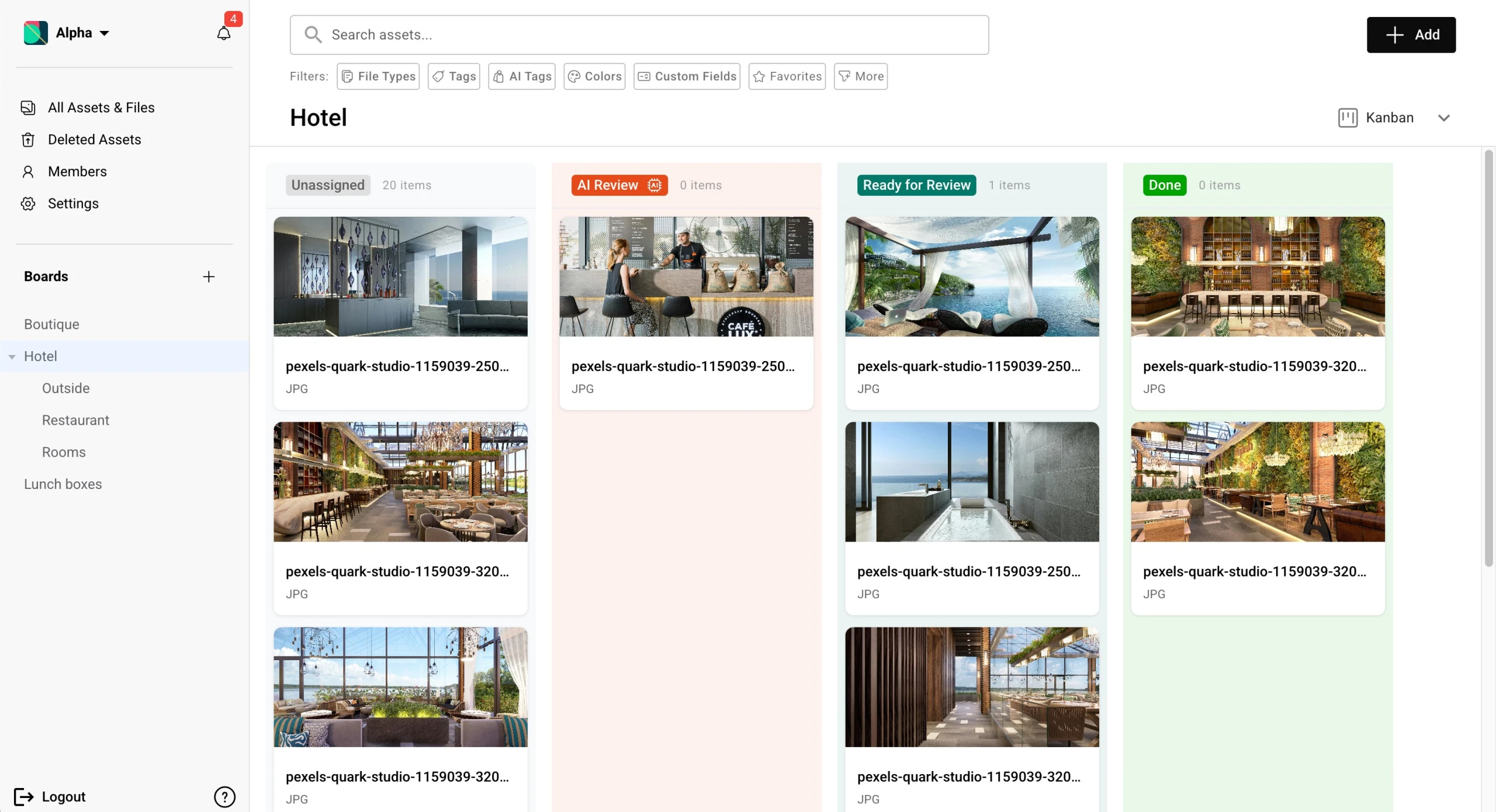
Shows approval stages. Every asset carries a status, and the board can be scanned at a glance, grouped by status, so a producer sees what's draft, what's stuck in review, and what's approved without opening a file.
Invites guests without exposing everything. Clients can view and comment without learning a full system, and freelancers can get one board without seeing the rest of the workspace. If the only options are "nothing" or "everything," external collaboration ends up back in email.
Routes attention without noise. The right people find out when files change or feedback lands, through mentions and notifications they can tune. A tool that notifies everyone about everything gets muted within a week, and a muted tool is a slower inbox.
One honest caution: a tool doesn't fix a broken process, it accelerates the one that exists. Adopt the four practices first, then pick software that supports them. If you're an agency comparing platforms, the same criteria show up in our guide to the best DAM software for creative agencies.
A Review Workflow That Works, Step by Step
Here's the loop in practice, using a campaign key visual as the example. Six steps, one file, one home.
- Upload to the project board. The designer exports the first draft straight to the campaign's board in the team library. No "where do I put this" moment, no attachment in an inbox.
- Set the status. The designer marks the asset In Review. Anyone glancing at the board knows three things: the file exists, it's ready for feedback, and it isn't approved yet.
- Reviewers comment on the file itself. The creative director pins a marker on the headline area and writes what's wrong with it. The client opens a share link and comments on the same asset, no account required.
- Tag the people who need to act. Where a comment needs a specific answer, the reviewer mentions the designer by name. The notification goes to one place, and a mention makes ownership unambiguous in a way that "someone should look at this" never does.
- Revise, upload, and keep the thread. The designer uploads the new version and replies in the same thread rather than starting a new channel. What was asked and what changed stays with the work, so round three doesn't relitigate round one.
- Approve visibly. The approver moves the asset to Approved. The status is visible to everyone, so the producer doesn't chase it, the client doesn't re-review what's signed off, and the approved file is the one people find.
The difference between this loop and the email version isn't fewer opinions. It's fewer places to look for them: one file, one conversation, one status, one home. That's also what moves a project from concept to approval in days rather than weeks, because waiting shrinks when nobody hunts for the current file.
Where Design Collaboration Sits in Your Larger Workflow
Design collaboration is one layer of a larger system, and it helps to know which layer you're fixing.
The loop above covers a single asset moving from idea to approval. Around it sits creative workflow management: planning who does what, in what order, and how it stays visible across a team. Under the signoff step sits your marketing approvals process: who may approve what, and what "approved" lets the work do. After approval, marketing asset management takes over: keeping finished assets findable, reusable, and current.
Read creative workflow management for the planning layer, how marketing approvals work for the signoff rules, and marketing asset management for what happens after the work ships. If you work with clients, a structured client onboarding helps too: a client who knows where files live and how review works is a faster collaborator.
How Baseline Handles Design Collaboration
Baseline is a digital asset management platform, so design collaboration here starts from the library and builds the loop on top. Everything below is how the product works today.
- Boards give each project or client a home. Nested boards keep campaigns organized, and one file can be referenced across boards without copies, so a single approved logo serves every project.
- Comment threads live on the asset. Feedback and replies stay attached to the file, so the conversation doesn't fork into chat and email.
- Visual annotations pin the exact spot. A reviewer drops a point or area marker on the image and writes the note beside it, so "the logo needs work" becomes an instruction a designer can act on.
- Approval status runs on a Kanban board. A custom field holds each asset's stage, draft, in review, approved, rejected, and the Kanban view groups assets by that field. Dragging a file between columns is the act of approving it.
- Share links bring clients inside without accounts. A link can carry password protection and an expiration date, and clients comment anonymously without signing up, once commenting is enabled in the link's Sharing options. They can even update the approval status field through the link, which cuts a round of back-and-forth.
- Guests see one board, not the workspace. A freelance photographer invited to their project board works inside your process without seeing any other client's material.
- Notifications route feedback to the right people. @mentions put a comment in front of the person who needs to act on it, board following surfaces uploads and comments, and a daily digest summarizes the rest.
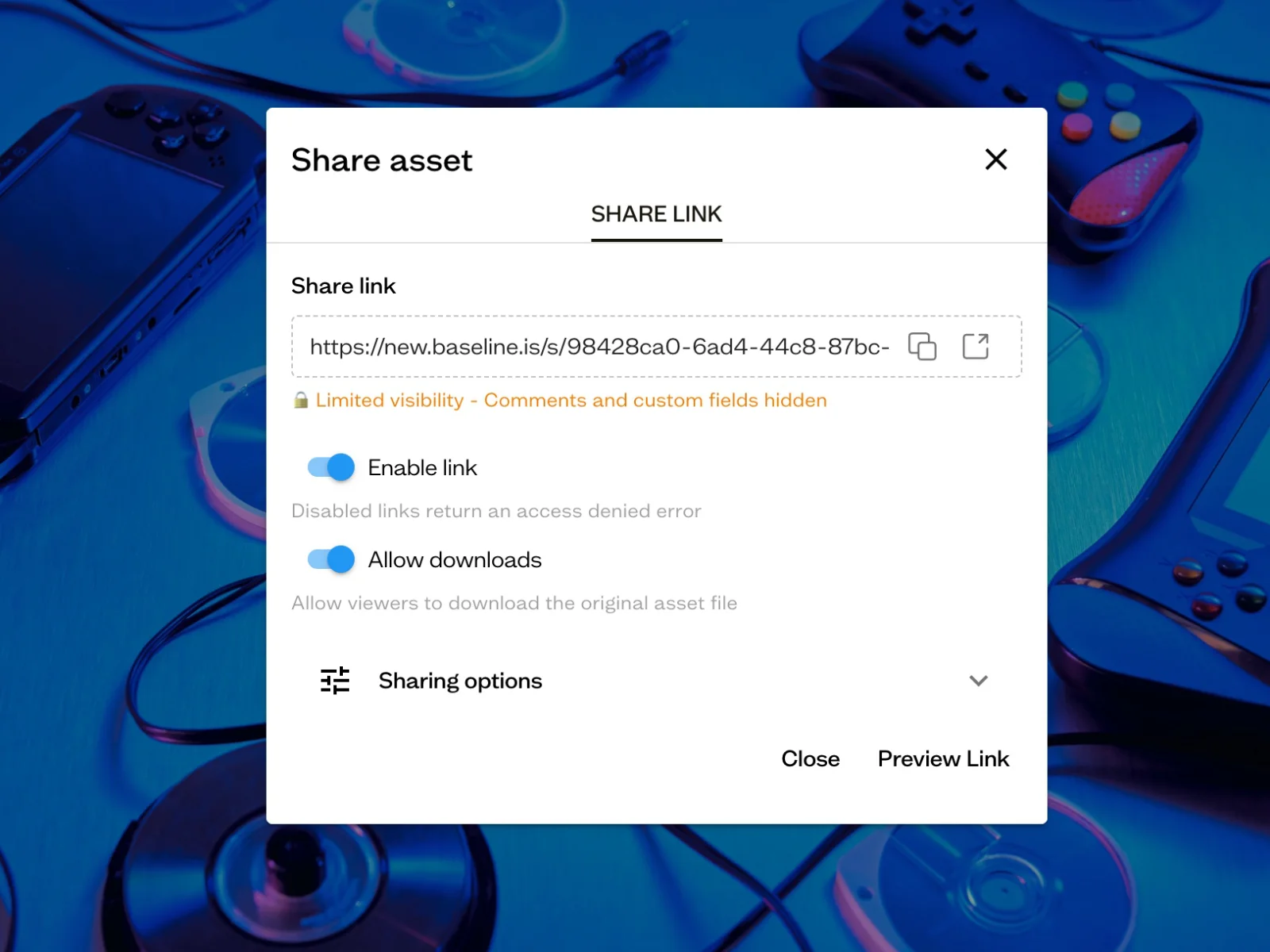
The collaboration features, comments, annotations, @mentions, notifications, and approval Kanban, are on every plan, including the free one; see Baseline's pricing page. Two capabilities sit higher up the plans: share links, with their password and expiry options, start on the Starter plan, and file versioning starts on Team. For the multi-client library pattern underneath, see brand asset management.
Frequently Asked Questions
What is design collaboration?
Design collaboration is the loop a design travels through a team: created, shared, reviewed, marked up, revised, and approved, with every step happening where the whole team can see it. It's the habits and tools that keep designers, reviewers, and clients on one file instead of parallel copies.
How is design collaboration different from file sharing?
File sharing moves files; collaboration moves decisions. A team can share flawlessly and still lose weeks if the feedback, the current version, and the approval status live in different places. Collaboration means the file, its comments, and its status travel together.
How do you collect feedback from clients who won't learn new software?
Use share links. The client opens a link in a browser, sees the work, and comments without creating an account. Anonymous commenting keeps the barrier low, and password protection plus an expiration date keeps the link under control. Share links start on the Starter plan.
What are visual annotations?
Annotations are comments pinned to exact points or areas on the image. Instead of writing "the logo needs work," a reviewer puts a marker on the logo and writes what's wrong. Whoever opens the file next knows exactly what to change.
How do you keep freelancers from seeing other clients' work?
With scoped guest access. A freelancer is invited to one project board, sees only that board, and the rest of the workspace stays invisible.
Is cloud storage enough, or do you need design collaboration software?
Cloud storage handles the sharing half: folders, links, sync. It doesn't hold comments on the file, annotation markers, approval statuses, or notifications that route feedback. If your rounds already converge, storage may be enough; if they don't, that gap is usually why.
Get Started
Pick one practice and adopt it this week: agree that feedback lands on the file, not in chat. That single rule removes the most pain, because scattered feedback is what makes review rounds drift and decisions evaporate. Add visible statuses once the habit sticks.
If you want tooling that matches, start on Baseline's free plan, no trial countdown and no credit card, and see the plans on Baseline's pricing page. Set up a board for your current project, upload the work in progress, and run your next review round with comments on the file itself.
Related reading: creative workflow management for planning the work around the loop, marketing approvals for the signoff rules, and client onboarding for starting new collaborators the right way.