
Dropbox vs SharePoint: the short answer
SharePoint is an intranet platform that stores files. Dropbox is file storage that syncs brilliantly. If your organisation already pays for Microsoft 365, SharePoint is effectively free and wins on cost alone. If you want files to just work with no configuration, Dropbox wins on usability. SharePoint needs someone to own it. Dropbox does not.
Last updated: September 29, 2026 · Pricing verified: September 2026 against Dropbox's plans page, Microsoft 365 business pricing and Google Workspace pricing.
Quick comparison
| Dropbox | SharePoint | Google Drive | |
|---|---|---|---|
| What it is | Cloud storage and sync | Intranet and content platform | Cloud storage inside Workspace |
| Business price | $18/user/mo ($15 annual) | Included with Microsoft 365, from $7.20/user/mo ($6 annual) | Included with Workspace, from $8.40/user/mo ($7 annual) |
| Storage | 3 TB, +1 TB per extra licence | 1 TB per organisation, +10 GB per licence | 30 GB to 5 TB per user by tier |
| Setup effort | Minutes | Weeks, with someone owning it | Hours |
| Desktop sync | Best in category | OneDrive sync, improved but fussier | Drive for desktop, solid |
| Permissions depth | Moderate | Very deep | Moderate to deep |
| Learning curve | None | Real | Low |
| Best for | Teams who choose their own tools | Organisations already on Microsoft 365 | Organisations already on Google Workspace |
The decision is usually already made for you
This comparison looks like a product choice and is almost always a stack choice.
If your company runs Microsoft 365, SharePoint is bundled. You are already paying for it. Adding Dropbox on top means paying twice for overlapping capability, and the hard part is not convincing anyone that Dropbox syncs better. It is explaining a second invoice for something already on the bill.
If your company runs Google Workspace, the same logic points at Google Drive.
Dropbox wins when neither is true, or when the team choosing the tool is not the team paying the Microsoft bill. That second case is extremely common in agencies, studios and creative teams, and it is why so many of them end up with SharePoint for company documents and Dropbox for actual project work.
Dropbox vs SharePoint in detail
Cost
SharePoint wins on paper. Microsoft 365 Business Basic is $7.20 per user per month on monthly billing, or $6 on an annual commitment, and it includes SharePoint. So does every higher tier. Dropbox Standard is $18 per user per month, or $15 annual. If you already hold Microsoft licences, SharePoint's marginal cost is zero.
The cost SharePoint does have is time. Site structure, permission inheritance, document libraries and metadata columns all need designing, and a badly set up SharePoint is worse than no SharePoint. Budget for someone owning it, or the licence saving evaporates in support requests.
Sync
Dropbox wins, clearly. This is the most common reason teams migrate away from SharePoint after trying it. OneDrive sync has improved a great deal, but long file paths, checked-out files and large folders still cause problems that Dropbox simply does not have.
Permissions
SharePoint wins. Site-level, library-level, folder-level and item-level permissions, inheritance rules, sensitivity labels, retention policies and conditional access via Entra ID. Dropbox has team folders, groups and admin roles, which is enough for most small teams and nothing like SharePoint's depth.
SharePoint's depth is also its main failure mode. Permission inheritance that nobody documented is how organisations end up with files that are either invisible or visible to everyone.
Search
SharePoint wins on documents, and both lose on images. SharePoint indexes document contents and respects metadata columns, so a well-configured library is genuinely searchable. Dropbox is closer to filename matching with some content search on higher tiers.
Neither can find an image by what it shows. If your library is photography, video and design files, this is the limitation that will actually cost you time.
Ease of use
Dropbox wins, by a wide margin. Nobody needs training. Files behave like folders. SharePoint's interface assumes you understand sites, libraries and views, and most people do not.
External sharing
Roughly even, differently. Dropbox links are easier to create. SharePoint's external sharing is more controllable, with expiry, domain allow-lists and guest access through Entra ID. Easier versus safer, and which one you want depends on who you are sharing with.
SharePoint vs Google Drive
The same trade, one layer sideways.
| SharePoint | Google Drive | |
|---|---|---|
| Entry price | From $7.20/user/mo with Microsoft 365 ($6 annual) | From $8.40/user/mo with Workspace ($7 annual) |
| Storage | 1 TB per organisation, +10 GB per licence | 30 GB (Starter) to 5 TB (Enterprise) per user |
| Collaboration model | Office files, co-authoring in Word and Excel | Docs, Sheets and Slides, real-time by default |
| Structure | Sites, libraries, metadata columns | Shared drives and folders |
| Setup effort | Weeks | Hours |
| Ceiling | Very high, with configuration | Moderate, with almost none |
Choose SharePoint if you are a Microsoft organisation, live in Office file formats, and need governance, retention or compliance controls. It does more than Google Drive, provided someone configures it.
Choose Google Drive if you are a Google organisation, your team works in Docs and Sheets, and you would rather have something that works immediately than something that can be shaped into anything. Shared drives cover most of what teams need from SharePoint without the project.
For small teams, Google Drive is usually the better experience. Past roughly fifty people with real compliance requirements, SharePoint's ceiling starts to matter.
What none of the three solve
The whole comparison above turns on one question: who already pays for which stack. That question has a good answer for documents and no answer at all for brand assets, because all three tools share a limitation that no tier of any of them fixes.
Go back to the search section. SharePoint's best case was a well-configured library with metadata columns, and even that only searches text. None of the three can find an image by what it shows. That is not a gap in the SharePoint configuration, it is the shape of the product category: these are filing systems for documents, and a logo is not a document.
Which is how teams end up in the state described earlier, with the same files in two places and no reliable answer to which copy is current. The files that land in that state are almost never contracts. They are logos, photography and design files, because those are the ones that carry state a folder cannot hold: approved or retired, licensed or expired, cleared for social but not for print.
Dave Gustafson runs 15 client brands at WSI Peak Digital. On how it worked before he moved to a dedicated system:
"Any time I had to go back and do work that involved branding, I had to dig through my project management system. Often, I'd find that I didn't have everything for any particular client, and I'd have to go back through emails, project folders, or to their website."
Fifteen brands, and the reliable way to retrieve a logo was to download it from the client's public site. Every tool compared above would have stored those files perfectly well.
Digital asset management is the category built for that problem. The differences that matter most against the three tools on this page:
- Search that works on images. AI tagging and visual similarity, which is the specific thing SharePoint's metadata columns cannot be configured into.
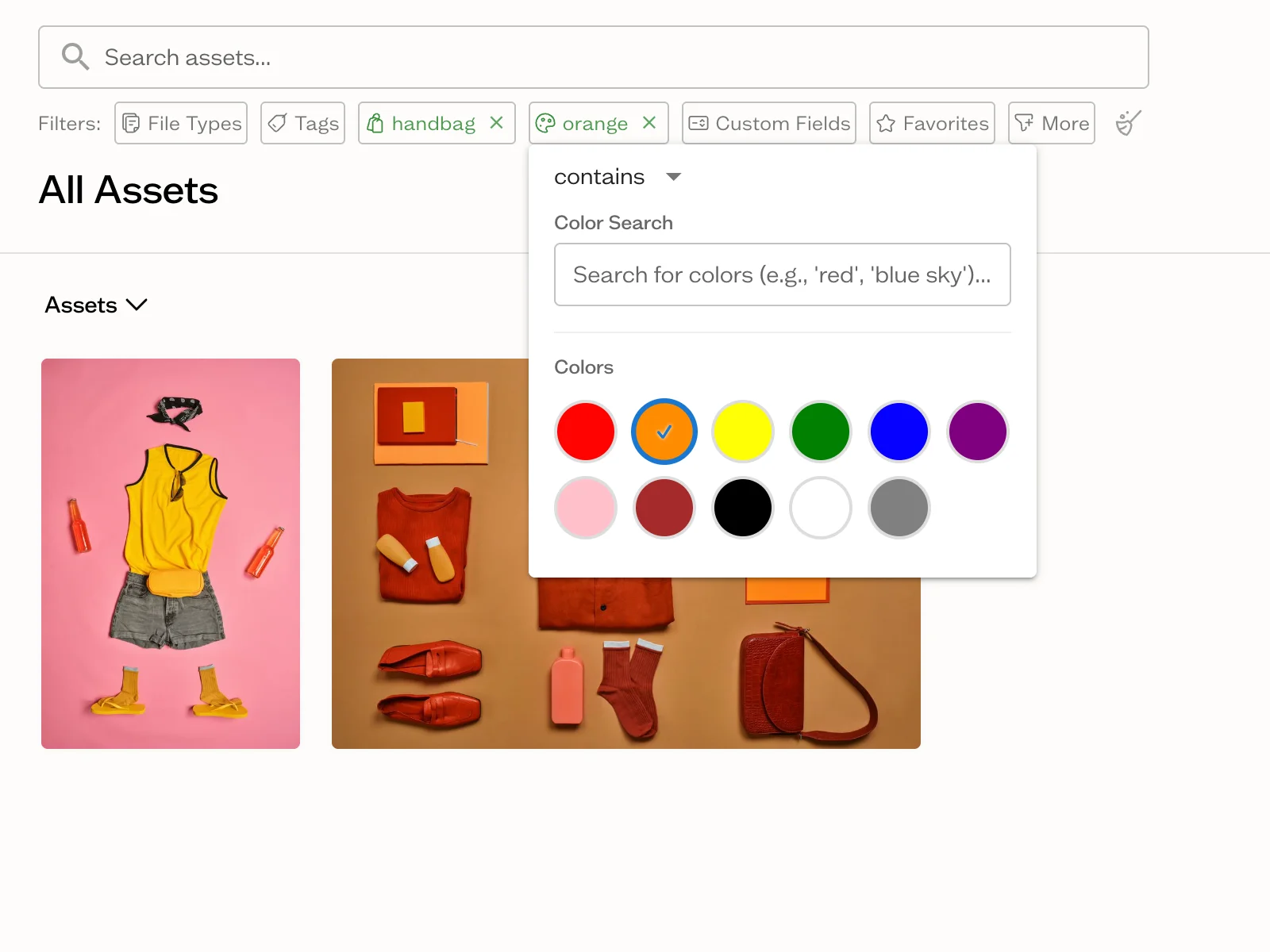
- State on the asset, not in a filename. Usage rights, campaign, client and approval status as structured fields, with a Kanban view of what is still in review.
- Versions you can compare. Side by side, with rollback, rather than a list of previous copies you open one at a time to identify.
- Publishing. The capability with no equivalent anywhere on this page: the library itself becomes a live brand guide, gallery or client portal, and updating an asset updates everywhere it appears.
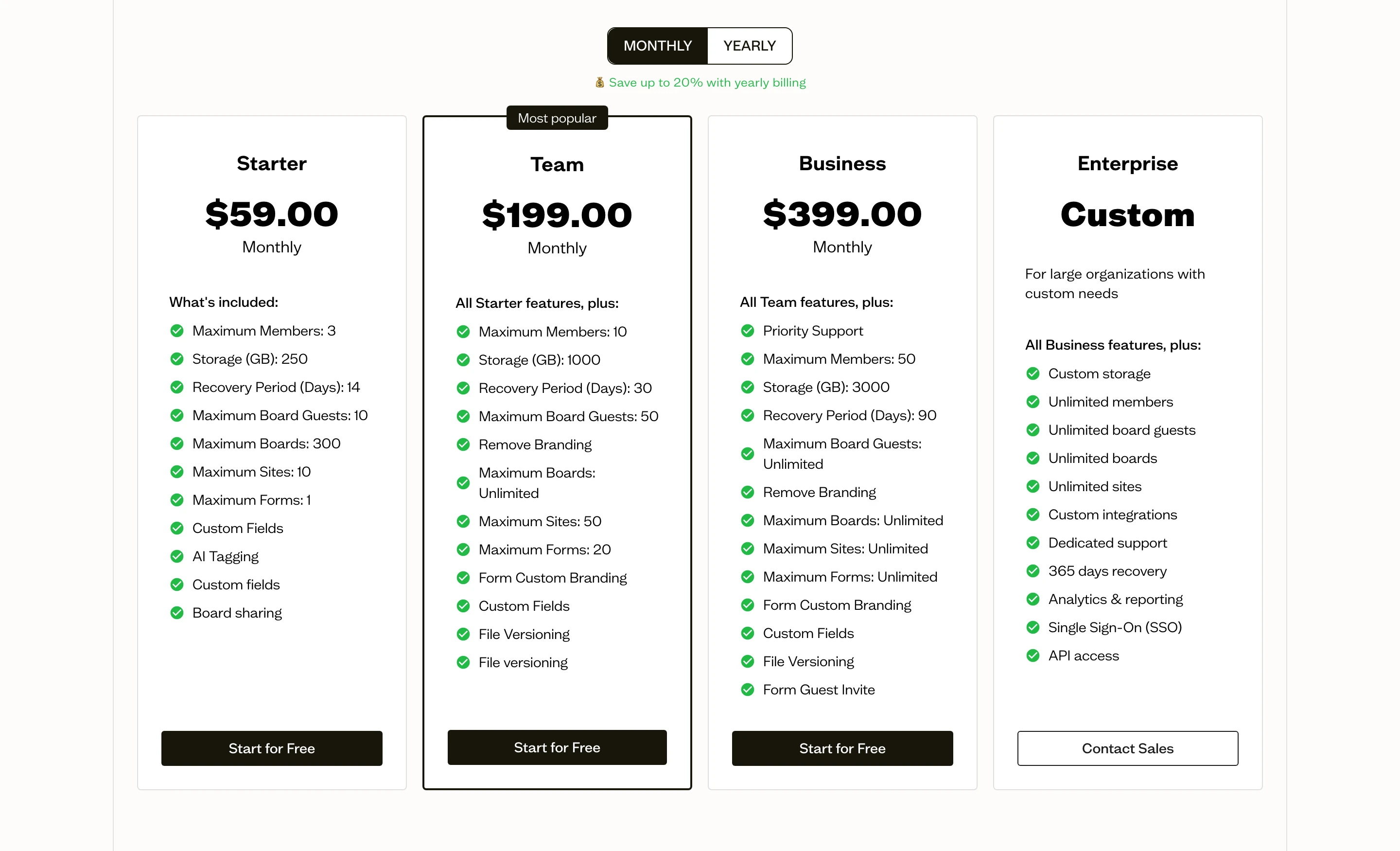
Baseline is built around that last point. Its pricing also inverts the model every tool on this page uses: flat, not per seat. Starter is $59/month, the ten-person tier is $199/month, and fifty people is $399/month, all published alongside a free plan with no trial countdown.
Being straight about the trade: if your problem is a large archive of ordinary business documents, SharePoint at $6 a seat on an annual commitment is unbeatable and Baseline is not the answer. Baseline is the answer when the problem is finding, approving and publishing creative work.
Most teams end up running both, and that is the correct outcome. Contracts and documents stay in SharePoint or Dropbox. Brand and creative assets move somewhere built for them.
Recommendations
Already on Microsoft 365: use SharePoint, and give someone real ownership of it. Add Dropbox only if sync problems are costing more than the extra licences.
Already on Google Workspace: use Google Drive with shared drives. Do not add SharePoint.
On neither, small team: Dropbox. It costs more per seat and saves that back in time not spent configuring anything.
Creative or brand assets are the problem: none of the three. Start with why file sharing is not asset management, then compare the category in our DAM pricing comparison.
Frequently Asked Questions
Is SharePoint better than Dropbox?
SharePoint does more and costs less if you already pay for Microsoft 365, with far deeper permissions, retention and compliance controls. Dropbox is better at the basics: sync is more reliable, and nobody needs training. SharePoint needs an owner to configure and maintain it. Dropbox does not.
Can SharePoint replace Dropbox?
Yes, for most organisations already on Microsoft 365, and it is usually the right call financially. The migration is more work than it looks, because SharePoint has a site and library structure where Dropbox has folders. Plan the structure before moving files rather than copying folders across and hoping.
Is SharePoint free with Microsoft 365?
SharePoint Online is included in Microsoft 365 Business Basic, Business Standard, Business Premium and the Enterprise plans, so there is no extra charge if you hold those licences. It can also be bought standalone. Storage is 1 TB for the organisation plus 10 GB per licensed user, with more available to purchase.
Which is better for a small business, SharePoint or Google Drive?
For most small businesses, Google Drive. Shared drives handle the common cases with almost no setup, and real-time collaboration in Docs and Sheets works better than Office co-authoring. Choose SharePoint if you are already a Microsoft organisation, work primarily in Office formats, or have compliance requirements that need retention and sensitivity labels.
Why do agencies keep using Dropbox when they already pay for SharePoint?
Because SharePoint sync struggles with the folder shapes creative work produces, and because the team doing the work is usually not the team paying the Microsoft bill. It is a rational local decision that produces a bad global outcome: the same files in two places and no reliable answer to which copy is current.
Can SharePoint be used as a DAM?
Only loosely. With metadata columns and content types you can build something that behaves a little like asset management, and some organisations do. What you cannot get is AI tagging, visual search, side-by-side version comparison, or publishing a brand guide from the library. Those require a purpose-built DAM, and the configuration effort to get partway there with SharePoint is substantial.
Do I need both a file sharing tool and a DAM?
Usually yes, and it is not the duplication it looks like. Your Microsoft or Google licences are already paid for and documents have no reason to leave them. What moves is the narrow set of files that carry approval state and get shown to clients: logos, photography, video, fonts and colour systems. Splitting on that line costs one extra subscription and removes the ambiguity about which copy is live.
Next step
For documents, follow the stack you already pay for. SharePoint on Microsoft, Drive on Google, Dropbox if neither. This is not a decision worth a long evaluation.
The part worth more thought is what you do with the brand assets currently sitting in the same folders. If you are running SharePoint for the company and Dropbox for project work, those assets are already duplicated across both, and neither system can tell you which copy is live.
See how Baseline handles it for agencies, or start free and import an existing folder to see what your own library looks like once it is tagged and searchable.