A creative brief is the one document that stops "this isn't what we meant" from happening three weeks into a project. Without one, a client says that about work that matches everything they said out loud. The problem was never what they said out loud. It's that nobody wrote it down in a form specific enough to catch the gap between what the client pictured and what the brief for the work actually said.
A creative brief fixes this: one document, filled out before work starts, that the client and the creative team both agree describes the project. This guide gives you a template you can use as-is, a filled-out example, the mistakes that make briefs useless, and how Baseline's forms turn the whole thing into something a client fills out directly instead of a Google Doc you chase them to open.
What Is a Creative Brief?
A creative brief is a short document that defines a creative project before work starts: the goal, the audience, the message, the deliverables, and what success looks like. It's the single reference both the client and the creative team point to when a question comes up mid-project, instead of relitigating the goals over email.
It is not a contract, a scope-of-work document, or a project plan. Those cover budget, timeline, and legal terms. A creative brief covers one thing: what the work is supposed to accomplish and for whom.
Creative Brief Template
Copy this. Every section has a one-line prompt so you know what actually goes in it, not just a vague header.
Project name: [internal name for this project]
Client / brand: [who this is for]
Project overview: One or two sentences: what are we making, and why now?
Background: What's happening that makes this project necessary? A launch, a rebrand, a campaign, a gap in the market?
Objective: What should this project accomplish? Name one primary goal, not five.
Target audience: Who is this for, specifically? Not "everyone" or "millennials," but the person, their situation, and what they currently think or do.
Key message: If the audience remembers exactly one thing, what is it?
Tone & personality: Three adjectives, plus one thing to avoid (e.g., "confident, warm, direct; not corporate or jokey").
Deliverables: Exact list with formats and sizes (e.g., "3 static Instagram posts, 1080x1080; 1 email header, 600x200"). Not "some social content."
Mandatories: Anything that must appear or be true regardless of creative direction: legal copy, logo placement, brand colors, a tagline that can't change.
Competitors / references: 2-3 examples of what's working elsewhere, and 1-2 examples of what to avoid.
Success metrics: How will you know this worked? A number, a reaction, a business outcome, not "we'll know it when we see it."
Timeline: Kickoff date, internal review date, client review date, final delivery date.
Budget range: Even a range keeps creative direction realistic.
Approvers: Who signs off, and is there more than one person who needs to agree?
Fourteen fields. If a client can't answer one, that's useful information too: it means the project isn't ready to brief yet.
Filled-Out Example
Here's the template above completed for a fictional client, so you can see what "specific enough" actually looks like next to the vague version most briefs ship with.
| Field | Vague (what most briefs say) | Specific (what actually works) |
|---|---|---|
| Objective | "Increase brand awareness" | "Get 500 people to attend the pop-up launch event on October 4th" |
| Target audience | "Coffee lovers, 25-45" | "Remote workers who already pay for a specialty coffee subscription but haven't heard of Solstice; they care about sourcing transparency more than price" |
| Key message | "Great coffee, great people" | "The coffee you've been overpaying for elsewhere, sourced directly, at a price that shows the math" |
| Deliverables | "Some social and email content" | "6 Instagram posts (1080x1080), 3 Instagram Stories (1080x1920), 1 launch email (600px wide), 1 A-frame sidewalk sign (24x36in)" |
| Success metric | "Good engagement" | "150+ email signups from the launch page within 2 weeks" |
The pattern in every row: the specific version names a number, a person, or a concrete action. The vague version could describe almost any client in any industry, which is exactly why it doesn't help anyone make a decision.
Common Creative Brief Mistakes
Writing the brief after the work starts. A brief written to justify decisions already made isn't a brief, it's documentation. It needs to exist before the first concept.
One objective becomes five. "Increase awareness, drive sales, build loyalty, and refresh our image" isn't a brief, it's a wish list. Every additional objective dilutes the creative direction. Pick the one that matters most for this specific project.
No one identified as the approver. Work goes through three rounds of feedback from four different stakeholders who each want something different, because the brief never named who actually has sign-off.
The audience is "everyone." If the target audience section could describe the whole population of a country, it hasn't actually narrowed anything down. Specific audience descriptions are what let a creative team make confident choices instead of hedging every direction to appeal broadly.
Mandatories buried in a footnote or skipped entirely. Legal copy, required logo lockups, or a tagline that can't change should be stated up front, not discovered in round two of revisions after the creative direction already ignored them.
Creative Brief vs. Design Brief vs. Project Brief
These get used interchangeably, but they're not quite the same document:
- Creative brief: Defines the message and audience for creative work: advertising, campaigns, content. Answers "what are we saying, and to whom?"
- Design brief: Defines the visual and functional requirements for a design deliverable: a website, a product, a packaging redesign. Answers "what does this need to look like and do?" See the full design brief template.
- Project brief: The broadest of the three, covering scope, timeline, budget, and stakeholders for any project, creative or not. Often sits above a creative or design brief as the umbrella document.
In practice, a single agency project often needs a creative brief (message/audience) and pulls timeline/budget from a lighter project brief. Don't over-engineer this: for most agency work, the template above covers what you need.
How Baseline Turns This Into a Form a Client Actually Fills Out
A Google Doc brief has the same problem as a Google Doc onboarding form: it depends on the client opening it, understanding what's expected in each blank, and remembering to send it back. Baseline's Content Collection Forms turn the template above into something the client completes directly.
Build the brief as a form once. Each field above becomes a question: Text questions (built for exactly this, free-text answers for project briefs, objectives, and audience descriptions) for the written sections, File Upload for reference examples or existing assets, and Email for approver contact info. Conditional logic can skip sections that don't apply (a project with no budget constraints doesn't need to show that field).
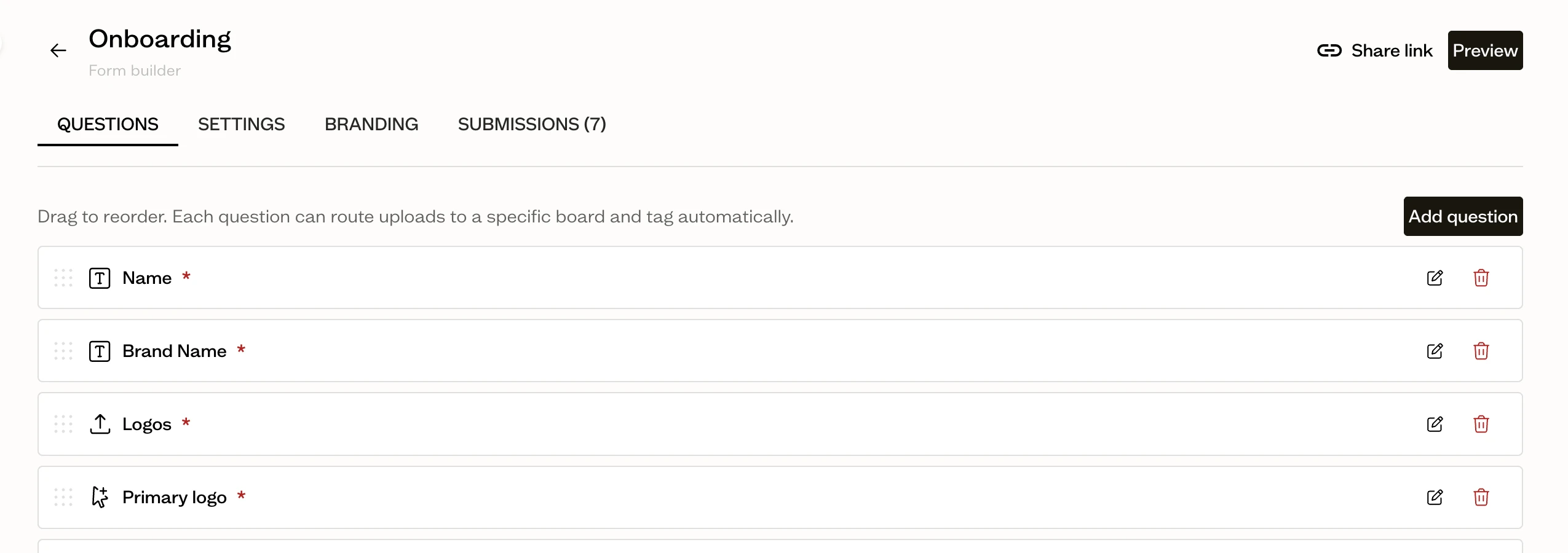
No login required. The client gets a link, fills it out in one sitting, and submits. No account creation standing between "send the brief" and "brief is answered."
Answers land organized, not in an inbox. Turn on "Create a board per submission" and every client's completed brief lands in its own board, ready for the creative team to reference without digging through email threads for the version with the final answers.
It lives next to the assets it references. Because the brief board sits inside the same platform as the DAM, "see attached reference images" becomes an actual asset reference instead of a separate email attachment nobody can find three weeks later.
Who This Is For
Creative and marketing agencies briefing new projects for existing or new clients. The template standardizes what "specific enough" means across every account lead, so brief quality doesn't depend on who happens to be writing it.
In-house creative and marketing teams briefing internal stakeholders. The same structure works whether the audience is a client or your own product team.
Freelancers who need a lightweight way to get a client's expectations in writing before starting, without building an intake process from scratch.
Frequently Asked Questions
What is a creative brief?
A creative brief is a short document, agreed on before work starts, that defines the goal, audience, key message, deliverables, and success metrics for a creative project. It's the reference both the client and creative team use to resolve disagreements about what the work was supposed to do.
What should a creative brief include?
At minimum: project overview, background, one primary objective, a specific target audience, key message, tone, an exact list of deliverables, mandatories, competitive references, success metrics, timeline, budget range, and named approvers. See the full template above.
How long should a creative brief be?
Short enough to read in five minutes. One page for most agency projects. If it's running to three or four pages, it's likely trying to cover a project plan or scope document as well, which should live separately.
Who writes the creative brief, the client or the agency?
Usually the agency drafts it based on client input (a call, a questionnaire, or a form), then the client reviews and signs off before creative work starts. The brief should reflect the client's goals in specific, actionable language, not just repeat what they said verbatim.
What's the difference between a creative brief and a design brief?
A creative brief defines the message and audience for creative work broadly (campaigns, content, advertising). A design brief is narrower and covers the visual and functional requirements for a specific design deliverable, like a website or packaging. See the comparison section above for detail.
Can a creative brief change after work starts?
Minor clarifications, yes. If the objective, audience, or deliverables change substantially, that's a new brief (or a formal revision to this one) and likely a scope conversation, not an assumption that the creative team will figure it out mid-project.
Does Baseline have a creative brief template built in?
Not as a one-click pre-built form, no. You build the template above as a form once, using Text, File Upload, and Email questions, and it's reusable for every project after that. The advantage over a static document is that submissions land as organized boards, sitting next to the reference assets they mention, rather than as a Google Doc buried in an email thread. See how Baseline's forms work for the full mechanics.
Get Started
Stop rewriting the same brief structure from a old doc every time a project starts. Build it once as a form, and every client's answers come back in the same place, organized the same way.
Try Baseline free | See how client onboarding works | See pricing