
The short answer
Most lists of Dropbox alternatives rank the same five storage tools, most written years ago with prices nobody checked. This is the November 2026 version, every figure read off the vendor's own pricing page, and one entry deliberately breaks the pattern. If the files causing your Dropbox pain are client logos, photography, video and brand files, the honest answer is not another folder tree but a different category of tool.
Quick picks:
- Cheapest if you already pay for Office: OneDrive, the storage inside Microsoft 365, from $7.00 per user per month.
- Best for Google shops: Google Drive, from $7 per user per month.
- Best for governance and big archives: Box, unlimited storage, $15 per seat annual.
- Best for privacy: Sync.com, zero-knowledge encryption, $6 per user per month.
- Best for creative teams wanting more than folders: Air, from $1,200 a year.
- Best for brand and creative assets: Baseline, not a storage swap but a DAM, explained below.
Last updated: November 27, 2026 · Pricing verified: November 2026 against Dropbox's plans page, Google Workspace pricing, Microsoft 365 business plans, Box's pricing page and Sync.com's pricing page. All five publish their rates, so every number below is checkable. Air was verified November 6, 2026; Baseline's prices are our own.
Why teams actually leave Dropbox
Dropbox is not a bad product. It invented cloud sync, it has more than 700 million registered users, and its desktop client is still the best in the business. Teams rarely leave because sync broke. They leave because of what happens after a few years of growth:
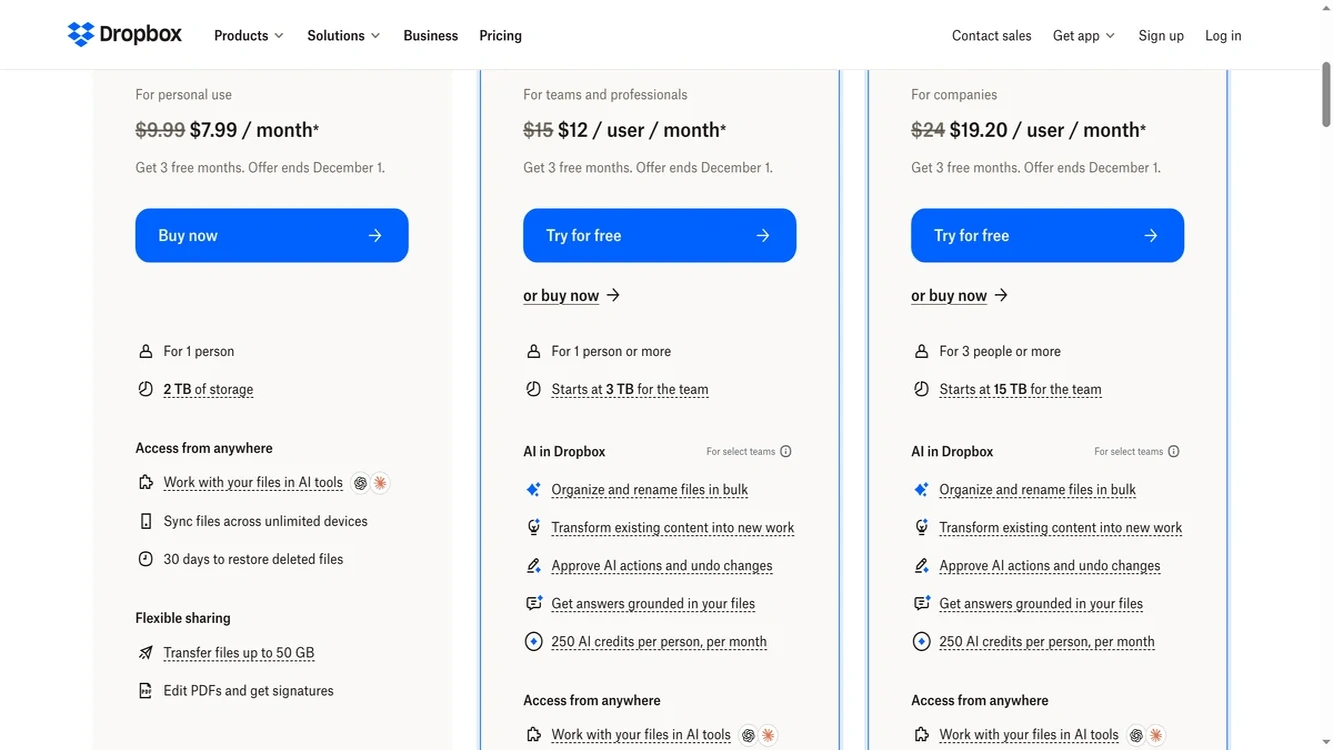
- Per-seat cost. Standard is $15 monthly ($12 annual) per user, Advanced $24 ($19.20). Thirty people on Standard pay $4,320 a year.
- Filename-only search. "I know we have that shot somewhere" is not a query that filename matching can answer.
- No approvals. Sign-off happens over email or Slack, next to the files instead of on them.
- Version soup. final_v2, final_FINAL, final_actuallyFINAL: conventions replace structure, and old versions cannot be compared.
Dave Gustafson runs fifteen client brands at WSI Peak Digital Strategy. Before he moved that work out of folders:
"Any time I had to go back and do work that involved branding (Logos, Color, and fonts in particular), I had to dig through my project management system to find the branding information I needed. Often, I'd find that I didn't have everything for any particular client, and I'd have to back through emails, project folders, or to their website."
Fifteen brands deep, and the shortcut for a client's logo was that client's public website. More gigabytes would not have fixed that. Most Dropbox competitors solve one of these pains; one entry here was built for all four, and it is not a storage tool.
The six alternatives at a glance
Entry team prices on annual billing, verified as shown.
| Alternative | Best for | Entry team price | Free tier | Verified |
|---|---|---|---|---|
| Google Drive | Gmail and Docs shops | $7 per user/mo | 15 GB personal | Nov 27, 2026 |
| OneDrive | Teams paying for Office | $7.00 per user/mo | No free business tier | Nov 27, 2026 |
| Box | Governance, big archives | $5 per user/mo (up to 10 users) | 10 GB | Nov 27, 2026 |
| Sync.com | Privacy | $6 per user/mo (3-user min) | No free plan shown; paid from $8/mo (Personal 2TB, annual) | Nov 27, 2026 |
| Air | Creative collaboration | $1,200/year | 10 GB, 3 users | Nov 6 (Business Nov 27) |
| Baseline | Brand and creative assets | $0 free plan, then $49/mo annual | 1 GB, 2 members | Nov 27, 2026 |
1. Google Drive
Google Drive is the storage layer of Google Workspace: it arrives with the Gmail, Docs and Meet subscription most Google shops already pay for. The real question is whether that plan makes a separate storage bill redundant.
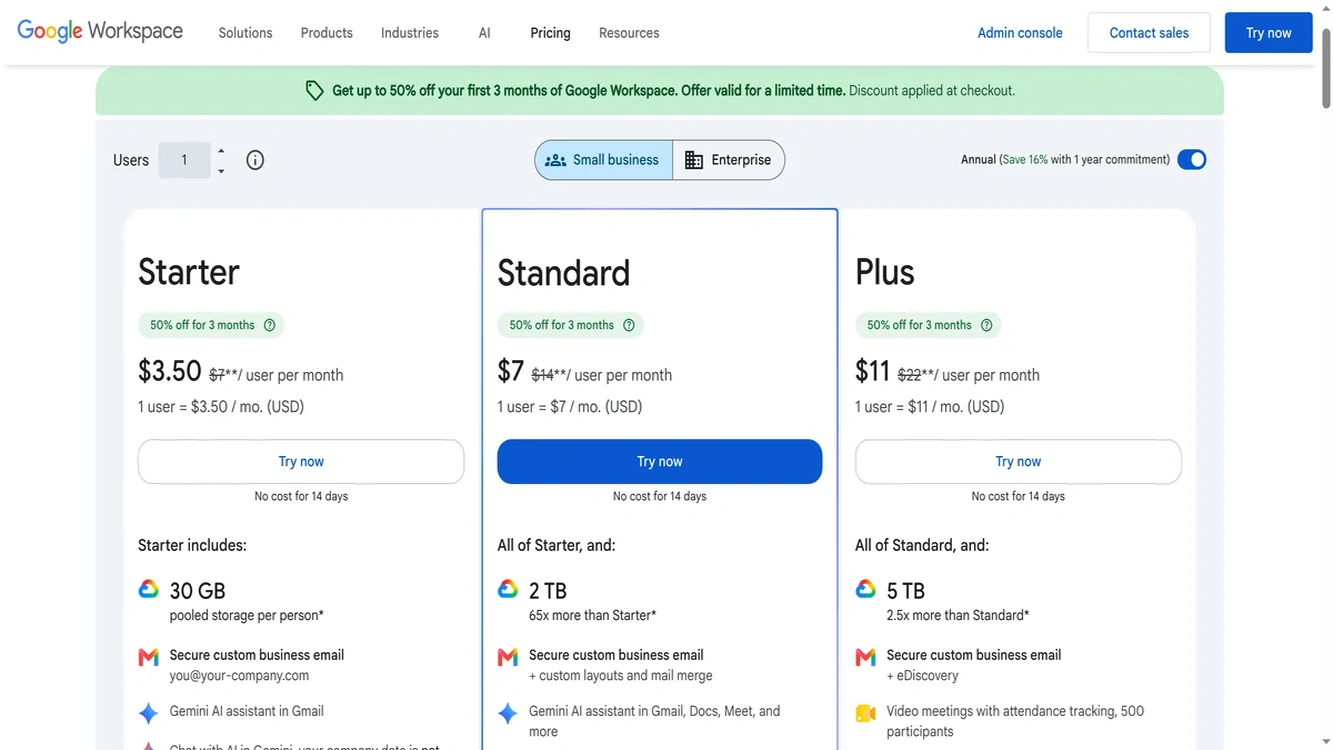
Workspace pricing, per user per month on an annual commitment:
| Plan | Price | Storage per user |
|---|---|---|
| Business Starter | $7 | 30 GB |
| Business Standard | $14 | 2 TB |
| Business Plus | $22 | 5 TB |
| Enterprise | Custom | Custom |
A 50%-off-first-3-months promo was running at verification. Personal Google accounts include 15 GB free.
Pick Google Drive if your company runs on Gmail and Docs: the best document search here, co-editing Dropbox has never matched, storage effectively pre-paid.
The trade-offs: storage is per user, not pooled, and 30 GB on Business Starter disappears under a week of design files. Previews for PSDs and video are weak, and there are no approval workflows, no client isolation, no publishing.
2. OneDrive (with Microsoft 365)
The one most lists underweight is the one you may already pay for: OneDrive is not sold separately but ships inside Microsoft 365, so the honest comparison is the Office plan you already have or would buy anyway. If that subscription is on the books, the marginal cost of storage is zero.
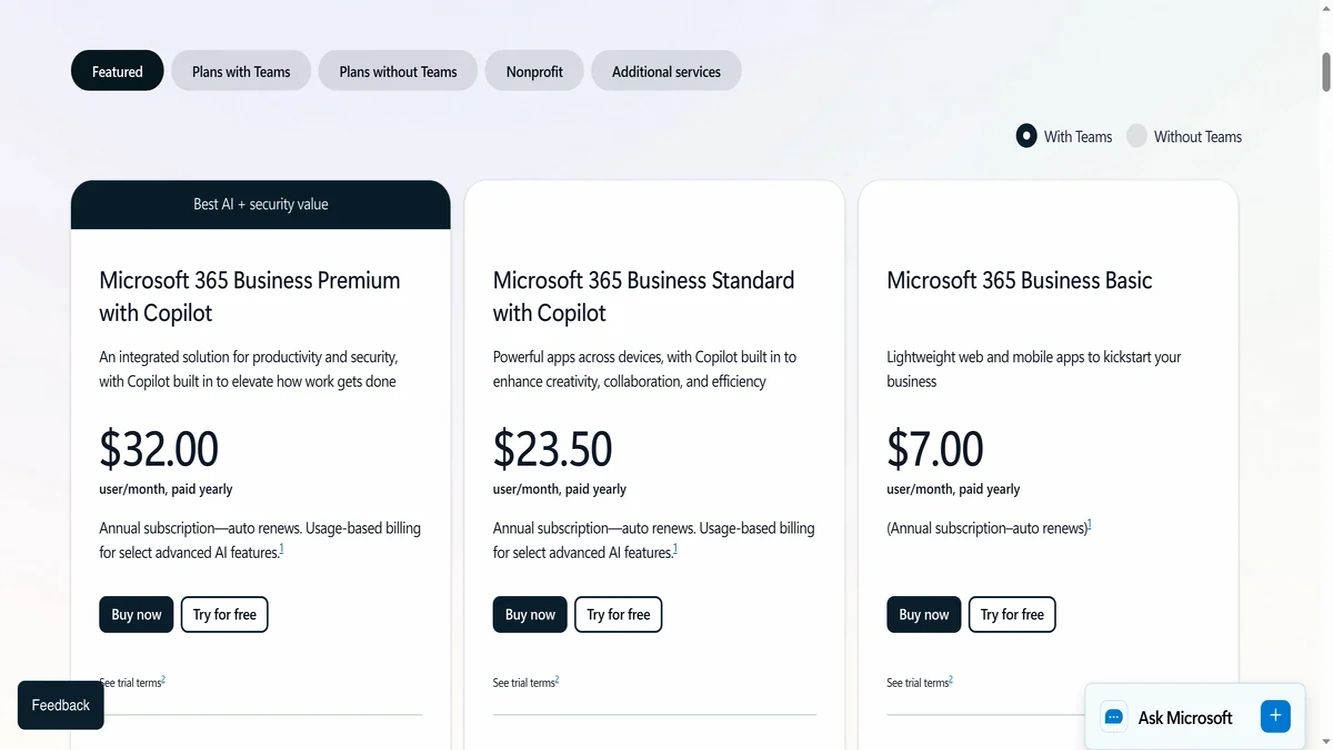
Microsoft 365 business plans, per user per month paid yearly:
| Plan | Price | What you get |
|---|---|---|
| Business Basic | $7.00 | Web and mobile Office apps |
| Business Standard with Copilot | $23.50 | Desktop Office apps plus Copilot |
| Business Premium with Copilot | $32.00 | Adds security and device management |
| Microsoft 365 Apps for business | $10.00 | Desktop apps, 1 TB storage per user |
Business plans cap at 300 users; consumer Microsoft 365 Personal is $9.99 monthly or $99.99 a year.
Pick OneDrive if your team already pays for Microsoft 365: the cheapest Dropbox alternative here for you, possibly by the whole bill.
The trade-offs: folder-first organization, filename-first search, the same DAM gap as Dropbox: no asset metadata, no approvals, no publishing. Team document libraries live in SharePoint, covered in Dropbox vs SharePoint.
3. Box
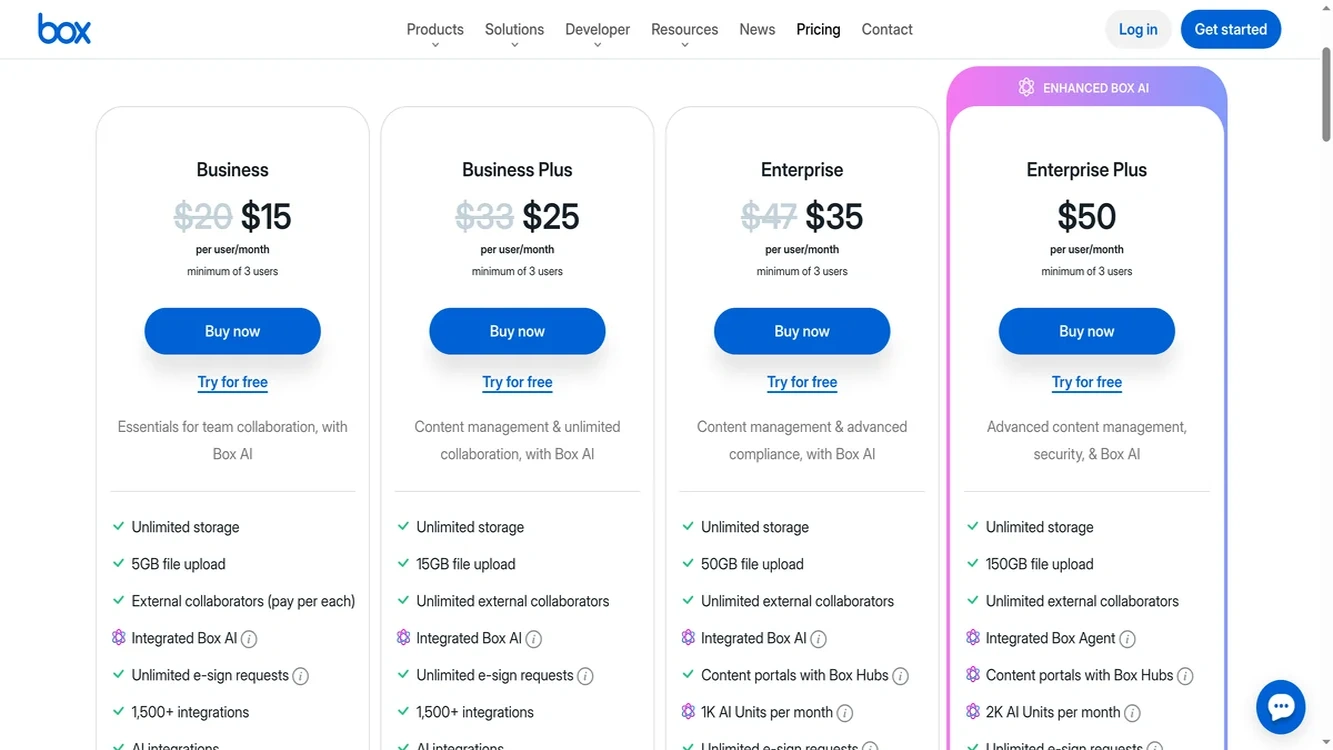
Box is enterprise content management that happens to store files, built around control: granular permissions, retention policies, legal holds, audit logs, and the longest compliance list here (HIPAA, FedRAMP, FINRA, GxP). One detail matters to agencies: unlimited external collaborators are included from Business Plus ($25) upward, while the $15 Business tier charges for them per person.
Box pricing, per user per month, annual rate first with monthly in brackets:
| Plan | Price | Storage | Notes |
|---|---|---|---|
| Individual | Free | 10 GB | 250 MB max file size |
| Personal Pro | $10 ($14 monthly) | 100 GB | |
| Business Starter | $5 ($7 monthly) | 100 GB | Up to 10 users |
| Business | $15 ($20 monthly) | Unlimited | 3-user minimum |
| Business Plus | $25 ($33 monthly) | Unlimited | 3-user minimum |
| Enterprise | $35 ($47 monthly) | Unlimited | 3-user minimum |
| Enterprise Plus | $50 | Unlimited | Annual billing only, 3-user minimum |
Pick Box if IT or compliance is signing off, you are regulated, or the archive is enormous. Unlimited storage from Business up changes the maths for large libraries, and nobody else here offers it.
The trade-offs: Box is heavy: the admin console has a real learning curve, and search is still filename-first. It shares Dropbox's blind spot: no asset metadata, approvals or publishing. If Box and Dropbox are your finalists, Box vs Dropbox is the deeper dive.
4. Sync.com
Sync.com's entire pitch is privacy: zero-knowledge end-to-end encryption, Canadian data residency, GDPR and HIPAA-ready positioning. It markets itself as a secure Dropbox alternative, and for teams leaving over trust rather than features, it earns the spot.
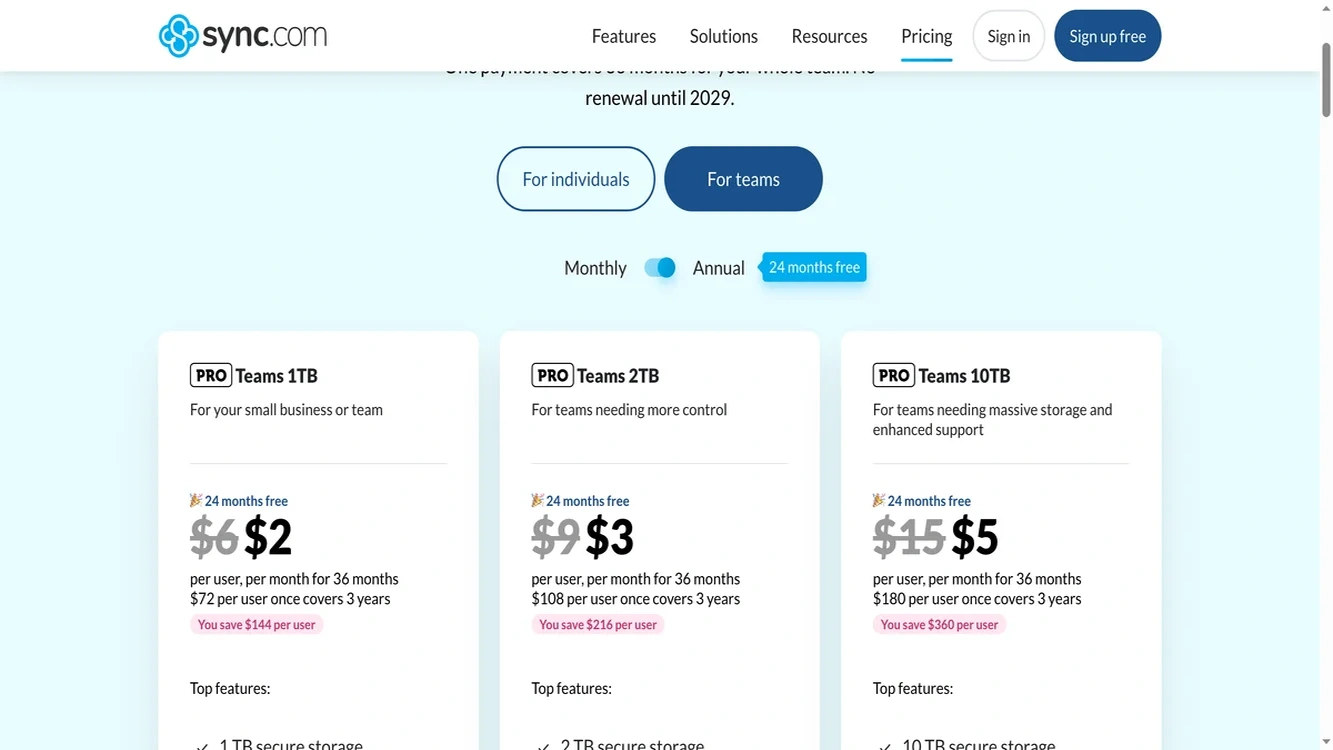
Teams pricing, per user per month on annual billing, 3-user minimum:
| Plan | Price | Storage per user |
|---|---|---|
| Teams 1TB | $6 (was $8) | 1 TB |
| Teams 2TB | $9 (was $12) | 2 TB |
| Teams 10TB | $15 (was $18) | 10 TB |
| Enterprise | Custom | Custom, 100-user minimum |
A 36-month Black Friday promo was running when we checked, cutting the effective rate to $2, $3 and $5 per user; the table shows the standard annual rates to plan on.
Pick Sync.com if the reason you are leaving Dropbox is who can read your files. The 10 TB tier at $15 per user is serious headroom for a vault.
The trade-offs: the collaboration layer is thin next to Dropbox's, with no comparable app ecosystem and simpler admin, and the DAM gap matches everyone else's: no asset metadata, no approvals, no publishing. It is a vault, not a workplace.
5. Air
Air is where this list stops being pure storage. It calls itself a creative operations platform, in practice a lightweight DAM built around collaboration: Kanban boards for approvals, version stacking, comments on images, visual search, and more than fifty AI models for image editing and video. Business includes unlimited users.
Air's pricing: Starter and Free verified November 6, 2026, Business and Enterprise re-checked November 27.
| Plan | Price | Storage | Users |
|---|---|---|---|
| Free | $0 | 10 GB | 3 |
| Starter | $1,200/year ($100/mo billed annually) or $125 month-to-month | 200 GB | 5 |
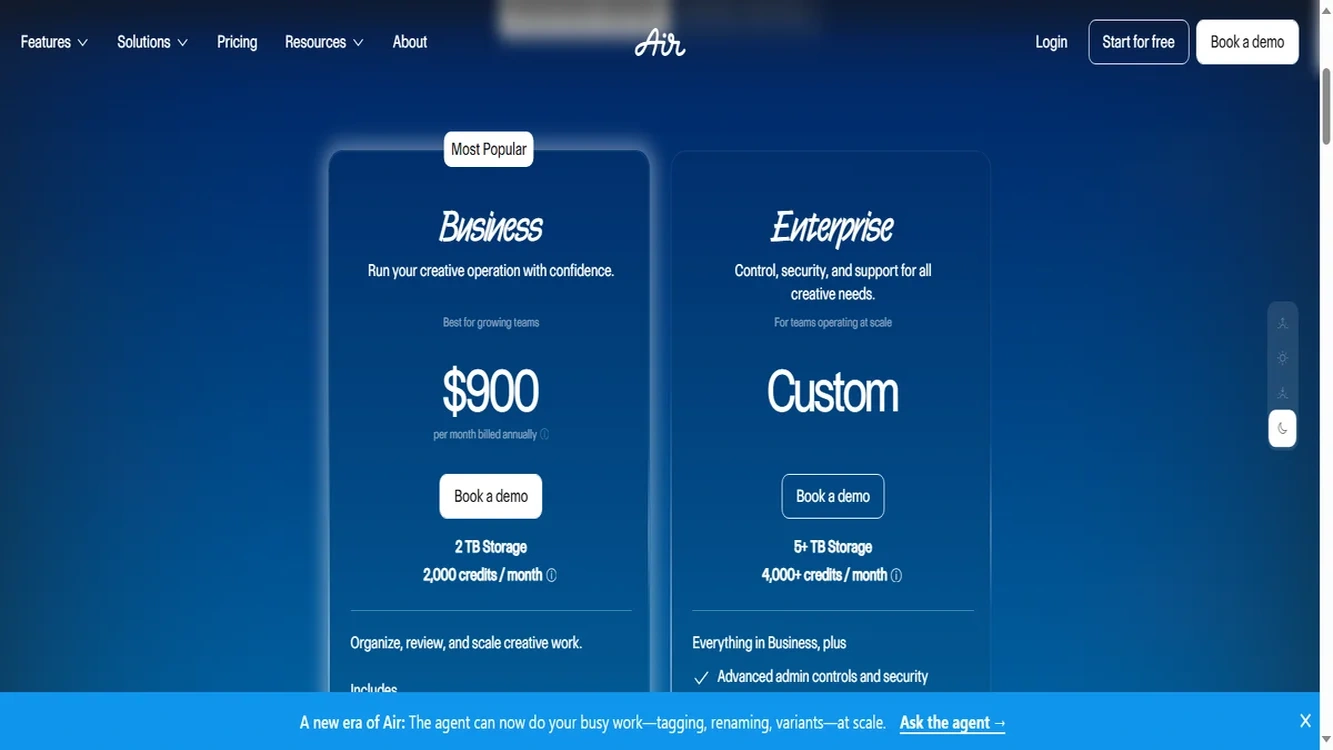
| Business | $10,800/year ($900/mo billed annually) or $1,100 month-to-month | 2 TB | Unlimited |
| Enterprise | Custom | 5+ TB | Unlimited |
Extra storage on Business runs $50 a month or $500 a year per additional terabyte.

Pick Air if your team lives in comments and iterations and wants AI content tooling inside the library.
The trade-offs: Air has run four pricing models since its 2020 launch: per-seat, then package, then credit, now fixed tiers, and Starter was raised roughly fivefold in the late-2026 restructure, capped at five users. There is no publishing, no multi-client isolation, and its content collection link is upload plus form fields. See Air alternatives for the category compared properly.
6. Baseline
Baseline is ours, and it is not a general-purpose Dropbox replacement. It is a digital asset management system with publishing built in, made for agencies and brand teams. If your Dropbox holds mostly contracts and spreadsheets, buy storage and skip this. If it holds client logos, photography, video, fonts and brand colors, read on.
A folder tree answers one question well: where does this file live. It has nowhere to record that this logo is the approved one, that this photo's licence runs out next year, or that the file a client is downloading is the current version. A DAM exists to carry that information. Five things a shared drive cannot do:
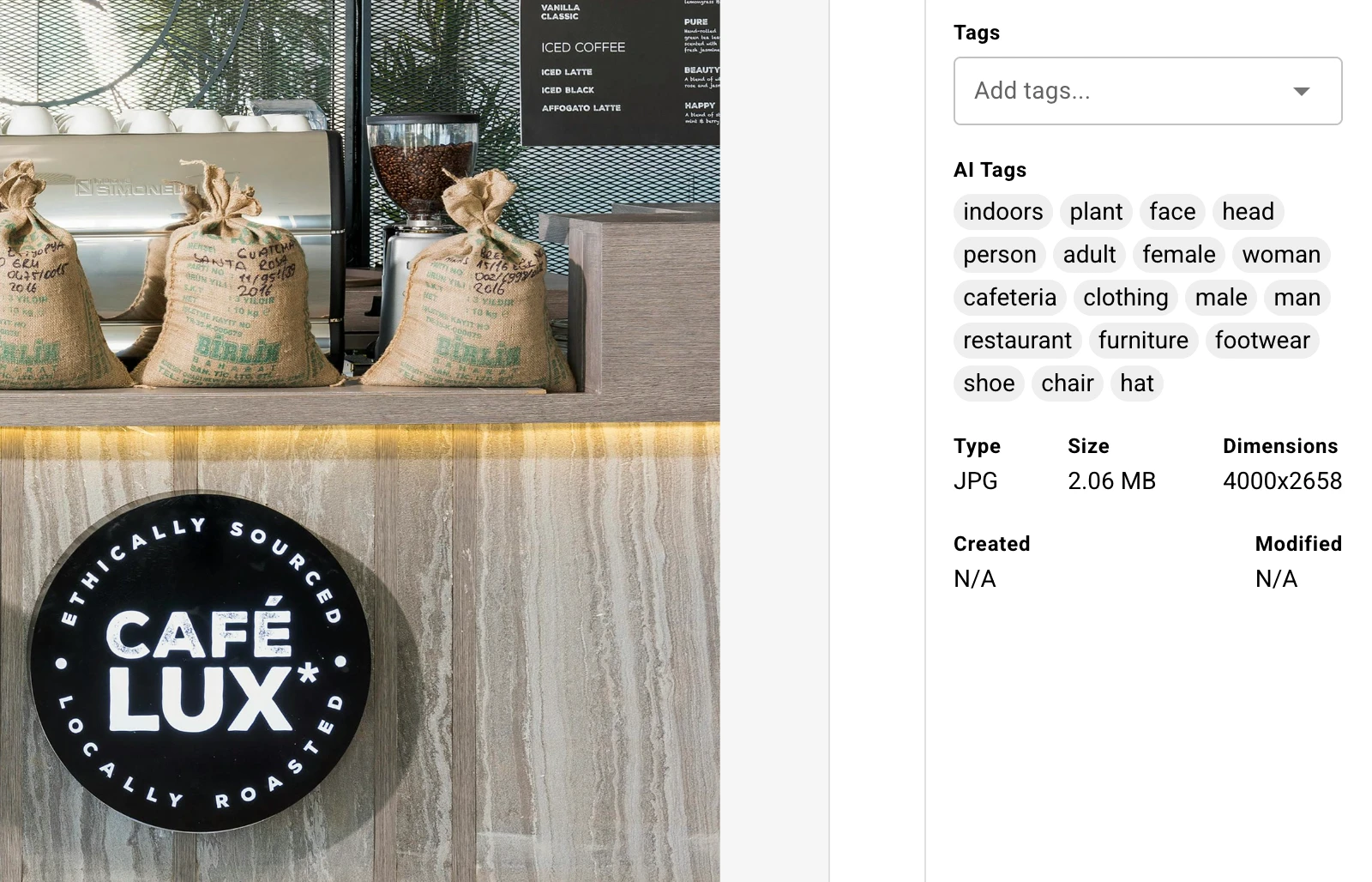
- Find assets by content. AI tags every image on upload and visual search finds similar shots, so "the blue hero photo from the spring campaign" is a query, not an archaeology dig.
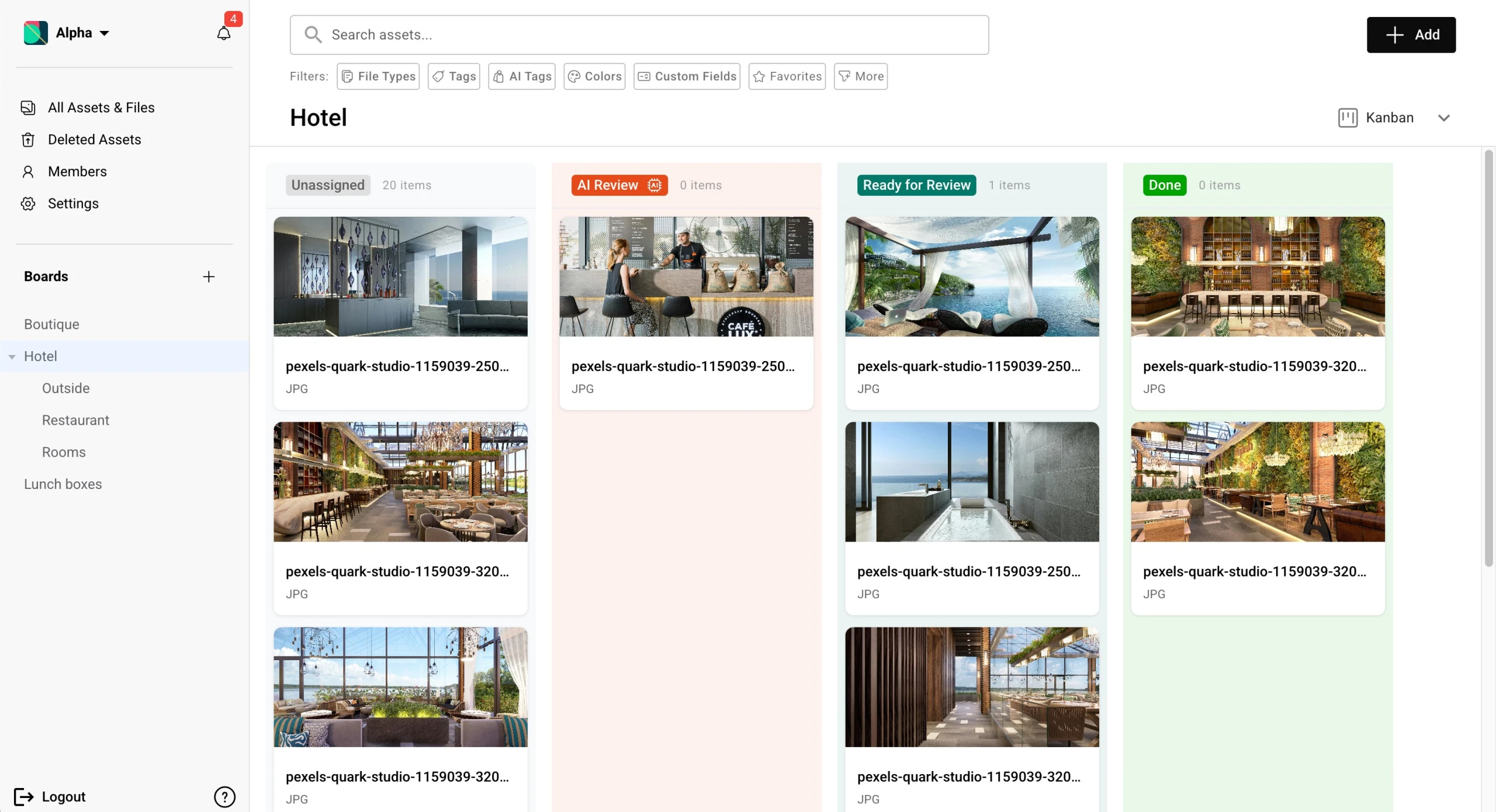
- Carry approval status. Custom fields like Draft, In Review, Approved track each asset, and a Kanban view shows the whole board at a glance, not an email thread.
- Version properly. File versioning, on the Team plan, lets you compare iterations side by side and roll back.
- Separate clients. Isolated workspaces per client, with board-level guest access for freelancers, instead of folder permissions you hope are right. For agencies this extends into client portals.
- Publish. The library becomes a live brand guide or gallery, and updating a logo once refreshes every guide using it. No storage tier here can do this.
The full argument is in DAM vs file sharing; the product is here.
Baseline's pricing is published, per plan not per seat. The free plan has 1 GB and two members, AI tagging, visual search and approval workflows included, but no share links, no forms, no file versioning. Starter is $59/month ($49 annual, $588/year) for three people, 250 GB, and share links with passwords and expiry. Team is $199/month ($169 annual, $2,028/year) for ten people, 1 TB, file versioning. Business is $399/month ($349 annual, $4,188/year) for fifty people, 3 TB, unlimited guests, priority support. All of it is on our pricing page.
Now the honest trade. At three people, on annual billing, storage is cheaper: Sync.com bills $18 a month for three seats, Dropbox Standard $36, Baseline Starter $49. Per-plan pricing changes growth: seats four to ten cost nothing extra on Team, eleven to fifty nothing on Business, while every vendor here re-bills per person. Thirty seats of Dropbox Standard pay $4,320 a year, thirty of Box Business $5,400, against Baseline Business at $4,188 flat for fifty. If your problem is raw capacity, Box's unlimited storage at $15 a seat is the better buy. Buy Baseline when the tool has to find, approve and publish the work; buy terabytes when the problem is terabytes.
Who should pick what
- Pick OneDrive or Google Drive if you already pay for that suite and your files are mostly documents: storage effectively free, both starting at $7 a seat.
- Pick Box if IT or compliance owns the decision, you are regulated, or the archive is huge. Unlimited storage, $15 a seat annual, and unlimited external collaborators from Business Plus upward.
- Pick Sync.com if the reason you are leaving Dropbox is trust rather than features. Zero-knowledge encryption from $6 a user.
- Pick Air if your team wants creative workflow and AI tooling more than governance; pick Baseline if the pain is client brands and creative assets, a category problem, not a storage problem.
- Stay on Dropbox if your team is small, your files are mostly documents, and what you value is sync. Dropbox still does sync better than anything here.
Running both is normal: documents stay in storage, brand assets move to the DAM, split by file type, not team.
Frequently Asked Questions
What is the best free Dropbox alternative?
For one person, a Google account's 15 GB or Box's free 10 GB beats Dropbox Basic's 2 GB. For a team, a genuinely free Dropbox alternative barely exists: Sync.com's individuals tab showed no free card on November 27 either. The cheapest route is the $7 seat you may need anyway, Microsoft 365 Business Basic or Google Workspace Business Starter, storage bundled with the office suite.
Is Google Drive better than Dropbox?
For documents, yes: Drive searches document content, not just filenames, and Docs co-editing is smoother than anything Dropbox offers. For everything else, no: Dropbox's desktop sync is still the category best, and Drive handles large creative files worse.
Does OneDrive come with Office?
That is the point of it: every Microsoft 365 business plan bundles OneDrive. Business Basic at $7.00 includes web and mobile apps, Business Standard with Copilot at $23.50 adds the desktop applications, and the $10.00 Apps for business plan lists 1 TB per user. Pay for Office and you already have a Dropbox alternative.
Which Dropbox alternative is the most secure?
Depends what secure means. Sync.com is strongest on privacy: zero-knowledge end-to-end encryption, so even the vendor cannot read your files, plus Canadian data residency. Box is strongest on assurance: HIPAA, FedRAMP, FINRA and GxP certifications, retention policies and audit logs. Different definitions of the word; only you know which one you need.
Is Box cheaper than Dropbox?
No. Dropbox's late-2026 restructure dropped Standard to $12 per user per month annual and removed the individual Professional tier, against $15 for Box Business. But Box includes unlimited storage from that tier while Dropbox pools 3 TB, and Box includes unlimited external collaborators from Business Plus upward while the Business tier charges for them. On price Dropbox is cheaper; on storage per dollar and client work, Box wins.
Can a DAM replace Dropbox?
Usually not entirely, and that is fine. Contracts, decks and spreadsheets stay in the storage you already pay for; logos, photography, video, fonts and brand guidelines move to the DAM, where they get tagged, approved, versioned and published. Forcing documents into a DAM fails; keeping five thousand brand files in folders fails worse. If the creative-ops middle ground interests you first, Air alternatives compares that end of the field.
Get Started
If this was a documents decision, make it quickly: OneDrive if you pay for Microsoft 365, Google Drive if you run on Gmail, Box if IT is deciding, Sync.com if trust is the driver, Dropbox itself if sync quality is what you love. The best Dropbox alternative for your team is the one that matches your reason for leaving.
If you got this far because brand and creative assets are the problem, that is a different purchase, and you can start free. Create a free Baseline account: no credit card, no trial countdown, AI tagging and approval workflows included from day one. Share links, intake forms and file versioning arrive on the paid plans when you need them. If you run an agency, see what Baseline does for agencies.