Design review software exists to fix one specific failure: the review email that says "looks good to me, one small thing" and then never says which small thing, which file, or who made the call. Feedback like that is not feedback, it is a delay with extra steps. Design review software gives that moment structure: comments land on the exact spot, every version is kept, every approval is recorded.
One disambiguation first: some results for this search term point to Autodesk Design Review, a legacy viewer for marking up CAD and engineering drawings, which is a different product for engineering teams; this page is written for creative teams reviewing design work like brand assets, campaign concepts, layouts, photography, and social creative.
This page is a buyer's explainer, not a pitch: what design review software is, what it does, how a well-run round works, a checklist for choosing, and the honest tradeoff between dedicated proofing tools and review inside your asset library. It closes with how Baseline handles design review.
What Design Review Software Is
Design review software is a shared workspace where creative work gets marked up, discussed, approved, and archived. Instead of emailing files around, reviewers open the asset itself and pin feedback to the exact spot they are talking about. The comment, the decision, and the version history all stay attached to the file.
The category overlaps with design proofing, an older term from print production, where a proof was checked against the original before a job went to press. Proofing tools still lead on print and video inspection. Design review is broader: structured feedback and approval on any creative asset, treated as a trackable workflow, not a conversation.
The alternative is the patchwork most teams know: a chat message that says "the blue feels off", a reply-all thread with three contradictory opinions, and a call about a change while someone looks at a different version than the designer. Nothing is holding the feedback to the work.
What Design Review Software Actually Does
Every serious tool in this category does five jobs. Here is what each one means in practice.
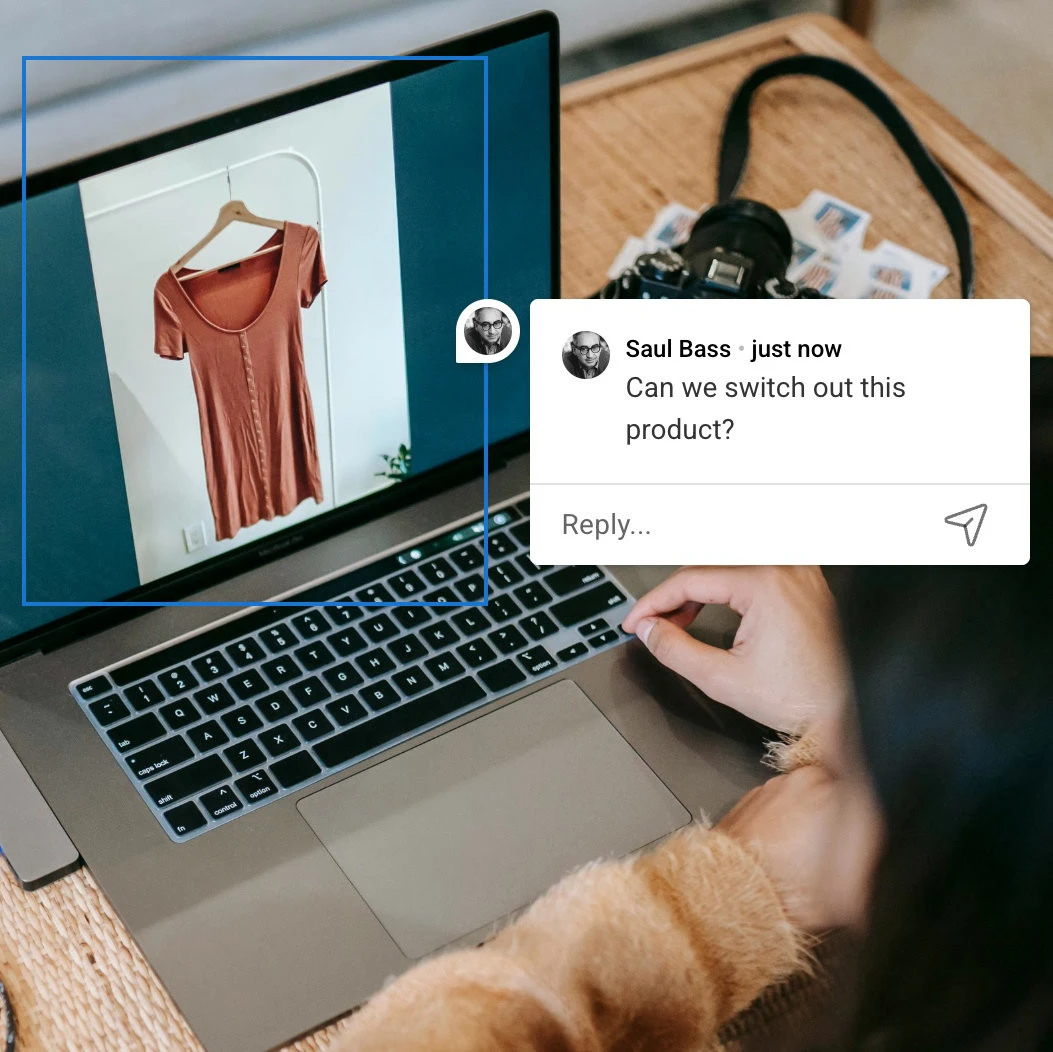
Markup and annotations pinned to the asset. Reviewers drop a marker directly on the work: a point marker on the logo in the corner, an area marker over the whole hero image. Each marker holds a comment and a reply thread, so the discussion happens where the problem is. "The headline sits too close to the edge" becomes a marker, not a sentence to interpret.
Version tracking. The tool keeps every iteration of a file under one asset, so nobody reviews a stale version. When the designer uploads the fix, it becomes the current version and the previous one stays in the history. "Is this the latest?" stops being a real question.
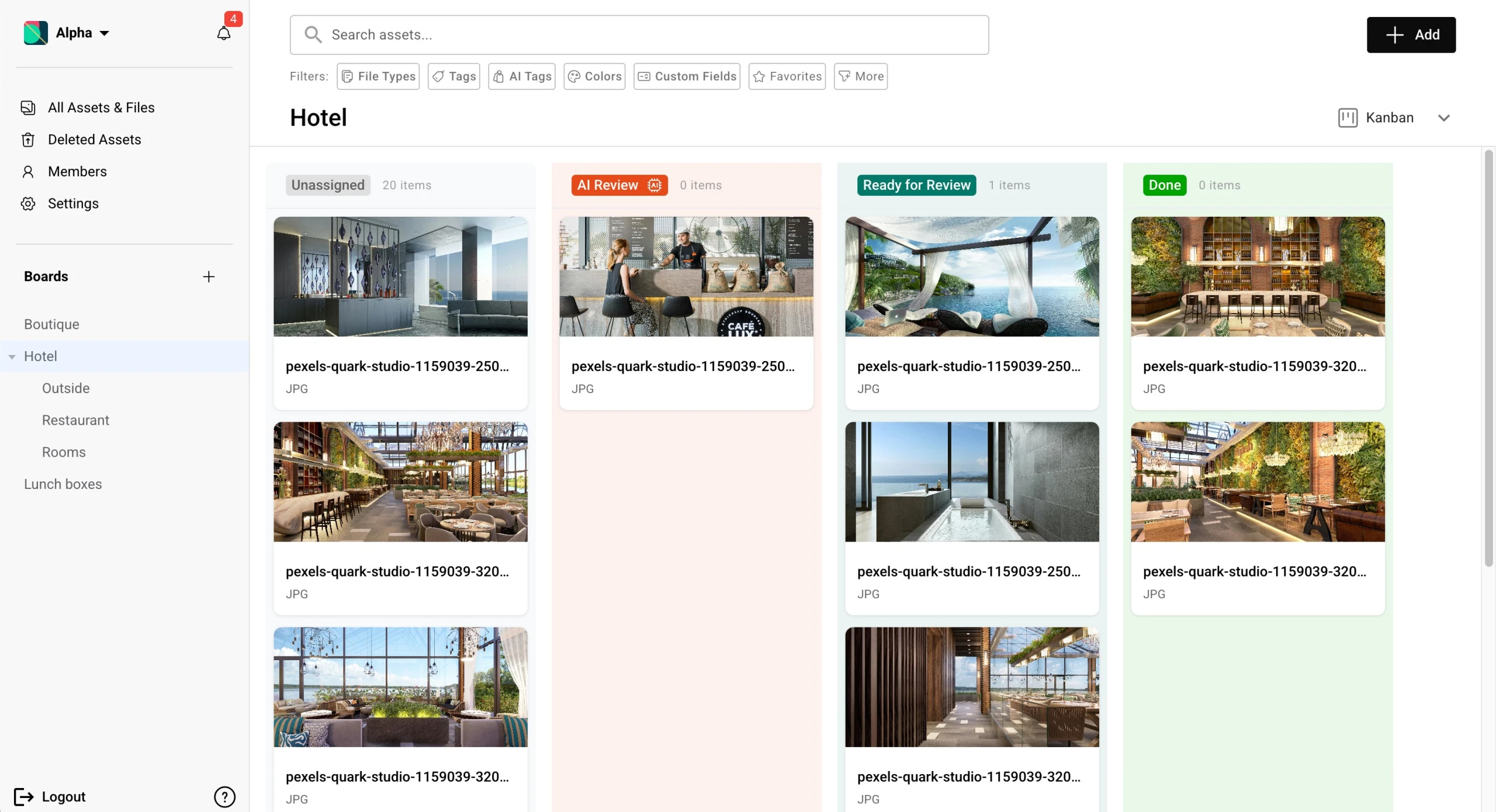
Review stages and approvals. Assets move through a visible pipeline: draft, in review, changes requested, approved. The stage lives on the asset, and a board view shows every asset's stage at once, so a manager can see what is waiting on whom.
Guest reviewers without full accounts. Clients, executives, and other outside stakeholders get a link, open it in a browser, and leave their feedback there. No account creation, no app install, no "I couldn't open the file". Every step between "sent for review" and "client actually looked at it" is where deadlines die.
An audit of who approved what. Every comment, status change, and approval is recorded with a name and a time. When someone asks months later why a decision was made, the answer is in the record, not in someone's memory.
The Design Review Process, In Plain Terms
A tool only helps if the round is run well. Here is how a healthy design review process works, step by step.
- Collect the current work in one place. The designer uploads the candidates to a project board, so the files live where the review happens.
- Invite the right reviewers. Internal teammates get direct access; clients and outside stakeholders get a share link.
- Set the question and the deadline. A round without a clear question produces silence or noise. "Pick one direction, or mark what has to change, by Thursday" gives reviewers something concrete to do.
- Let reviewers mark up the work. Feedback lands as pinned annotations and threaded comments, not as prose in an email. A comment that does not point at anything gets clarified in the thread.
- Work the list. The designer answers every open marker: fix it and reply, or push back in the thread. The new version goes up against the same asset, and reviewers compare old and new.
- Move the stage. When the reviewers sign off, the asset moves to approved. If changes are open, it stays in review. The board, not a status meeting, is the source of truth.
- Keep the record. Who approved what, when, and after which comments stays attached to the asset for whoever inherits the project.
A short worked example: a brand team is reviewing six banner concepts for a spring campaign. The designer uploads them to a "Spring launch" board, marks them in review, and sends a share link to the marketing lead and the client's brand manager. The lead drops an area marker over the hero photo on two banners, writes "crop is too tight, we lose the label", and @mentions the designer. The brand manager approves one banner outright and asks for a type size change on two others. The designer fixes four files, replies to each thread, and uploads new versions; the reviewers compare pairs side by side and confirm. Two rounds later, four banners sit in the approved column. Over email, the same exchange typically takes a week and leaves no record.
How to Choose Design Review Software
Most tools in this category look similar on a feature page. These six criteria separate the useful ones from the demos.
1. Annotations on the file itself
The tool should let a reviewer click an exact spot on the asset and attach a comment there, with an area option for bigger problems. Watch for the failure mode: some tools put comments in a sidebar list only loosely connected to the work. In a demo, click a pixel and ask whether anyone six months later would know what that note meant.
2. Version comparison
Every upload should be filed against the same asset, with previous versions kept, ideally with a side-by-side compare view. Without this, every round resets to zero because nobody can see what changed.
3. Stage tracking
You want a board grouped by status: draft, in review, approved, rejected, or your own stages. The test: can a manager answer "what is waiting on whom?" from one screen, and does dragging an asset between columns update its status?
4. Guest access
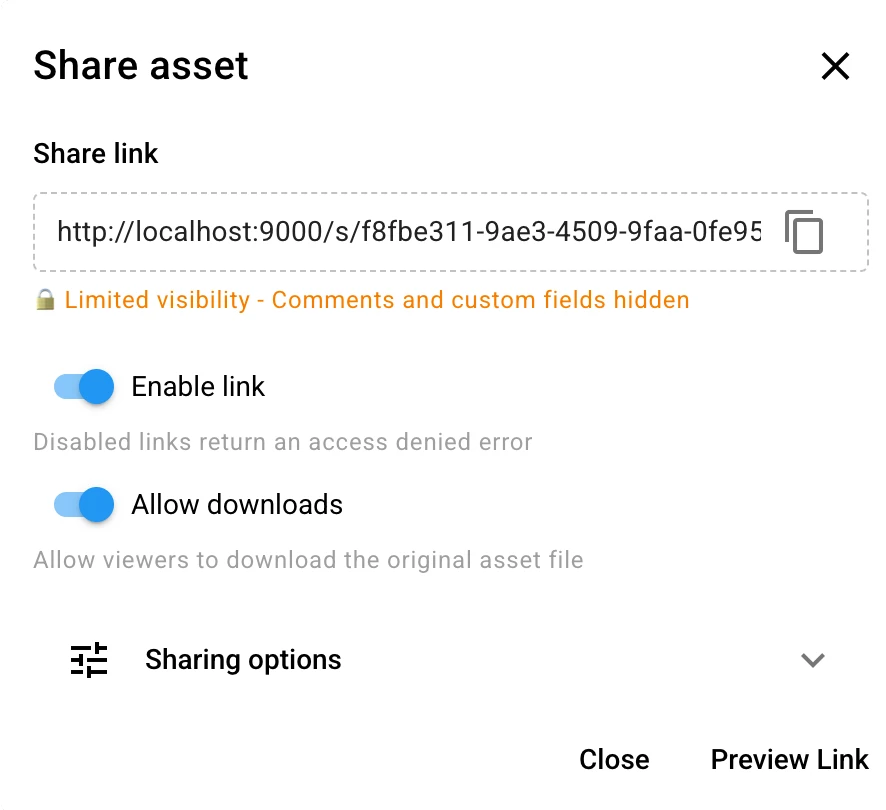
Outside reviewers should need nothing but a link: no account, no install, no wall beyond a password you set deliberately. Check what the link exposes: password protection, expiration dates, and whether guests can comment, or even update an approval status, without seeing the rest of your library.
5. Notification control
Review involves many people, and the tool should not bury them. Look for @mentions for people who must see something, board following for people who want to stay current, and a daily digest for everyone else. Turning notifications down should be easy.
6. Where the files live
The structural question: does review happen where the assets live, or in a separate tool you copy files into? If your team also manages a brand library, reviewing inside it means approved work is already where it needs to be. A separate review tool means export and reconciliation overhead on every round.
Proofing-Heavy Teams vs Review Inside Your DAM
Here is the tradeoff most comparison posts skip.
Dedicated proofing tools grew out of print and video production, and they are still the strongest choice there. If your week is dominated by frame-accurate video review, or long-format print jobs where someone checks bleeds, color separation, and imposition across a catalog, a dedicated proofing tool is built for that work. Pretending a general review tool covers it would be dishonest advice.
If your review work is brand and campaign assets, images, layouts, social creative, and the center of gravity is your asset library, the calculus flips. Keeping review inside the DAM where those assets live means no copying files between systems, approval status written on the asset instead of tracked in a second tool, and one audit trail for both file and feedback. When the library also feeds your published brand guides and client portals, approval becomes the gate that decides what goes live, not a separate ritual someone has to remember.
Some teams run both deliberately: a proofing tool for print and video jobs, review inside the DAM for everything brand-side. That is a reasonable setup. The mistake is not choosing at all, ending up with feedback in three places.
How Baseline Handles Design Review
Baseline is a digital asset management platform, so design review happens inside the asset library rather than in a separate tool. Here is what that looks like.
Visual annotations with point and area markers. Drop a marker on the exact spot in question, or draw an area over the region that needs work, and write the comment there. Each marker holds its own reply thread, and @mentions pull in the person who needs to see it. Feedback stays attached to the work, not floating in an inbox.
Comment threads in place. Every discussion about an asset lives on that asset, with replies nested under the original comment. A disagreement about a crop reads as a conversation about that crop, not a detour in a project channel.
Kanban approval stages. You create a custom approval status field with the stages your team actually uses, such as draft, in review, approved, and rejected. Switch to Kanban view and every asset is grouped by its stage; drag assets between columns as they move forward. For a manager running several campaigns at once, this is the at-a-glance answer to what is approved, what is in flight, and what is stuck.
Share links where guests comment without accounts. Send a client a link and they can open it in a browser and comment on specific assets without creating an account. Links can carry password protection and expiration dates, and you can let guests update an approval status field through the link, which removes the "we approved it, didn't you see the email?" exchange.
Review where the assets live. Because all of this happens in the DAM, the approved file is already in the library when the round ends. The asset keeps its version history, comments, and approval status in one place, and your published brand guides draw from the same assets you just approved.
The sibling guides go deeper. For approvals on marketing work specifically, the marketing approval software guide covers that workflow end to end. For the wider picture of creative teams working together around files, start with the design collaboration guide; for organizing the full production process, see the creative workflow management guide. The marketing approvals use case shows it from the campaign side.
Pricing
Baseline has a free plan, not a time-limited trial, and the review basics are on every plan: comments, annotations, @mentions, Kanban views, and custom approval fields, all included free. Two review-relevant features sit higher up. Board share links for guest reviewers start on the Starter plan at $59/month ($49/month billed annually), and file versioning starts on the Team plan at $199/month ($169/month billed annually). Full details are on the pricing page.
Frequently Asked Questions
What is design review software?
Design review software is a tool where creative work is collected, marked up visually, discussed in threads, and approved with a recorded status. Feedback arrives as annotations pinned to the files themselves, with versions and approvals tracked alongside. If you were looking for the engineering product that shares this name, that is a separate CAD markup viewer.
Is design review software the same as design proofing?
The terms overlap and many tools do both. Proofing comes from print production, where a proof was checked before a job went to press, and proofing tools still lead on print and video inspection. Design review is the broader category: structured feedback and approval on any creative asset. For mostly print or video work, search proofing tools; for brand and campaign work, the review category fits better.
Do we need a design review template?
A short written template helps: what stages exist, who reviews at each stage, and what "approved" means for your team. But the tool should enforce the template, not the other way around. If you maintain a template document to compensate for what your tool does not track, the tool is doing too little.
Can clients review work without creating an account?
With Baseline, yes. You send a share link, the client opens it in a browser, and they can comment on specific assets without signing up. You can protect the link with a password, set an expiration date, and even let the client update an approval status.
How many review stages should we use?
Start with the minimum: draft, in review, approved, and rejected, or "changes requested" if you prefer a softer label. Add stages only when a real handoff needs one, for example a separate legal review. Every extra stage costs someone a drag, and a stage nobody owns becomes a waiting room.
Can Baseline handle video proofing?
Honest answer: Baseline stores video and collects comments on video assets, but it is not a frame-accurate video proofing tool. If heavy video or long-format print inspection is your core work, a dedicated proofing tool serves you better. If video and print are a minority of your review load, reviewing inside the DAM keeps everything in one place.
What does it cost?
The review basics are on every plan, including the free plan. Board share links start on the Starter plan at $59/month ($49/month billed annually) and file versioning starts on the Team plan at $199/month ($169/month billed annually). See full pricing.
Get Started
Design review software is worth exactly one thing: it makes feedback specific and decisions traceable, which is what most creative teams are missing. Pick a tool against the criteria above, run one real project through it, and see whether the "one small thing" emails stop.
If you want to try the DAM-embedded approach, Baseline's free plan has no trial countdown: upload a real project, annotate it, and drag a few assets across a Kanban board before spending anything. From there, the marketing approval software guide and the design collaboration guide are the natural next reads.