
Say hi to Baseline v2, a complete rebuild of our platform from the ground up. If you're an existing Baseline user, there are some important things you should know right away.
First Things First
Baseline v2 is available now at baseline.is, and it's running as a completely separate system from the original Baseline. The original Baseline will continue running alongside v2, so you can keep using it as long as you need.
Here's the part that might be frustrating: we can't automatically migrate your content from v1 to v2. We explored this extensively, but the architectural differences between the two versions make it technically incompatible. Your user account has been migrated, so you can log in with your existing credentials, but in terms of brand guides and content, it's a fresh start in v2.
We know this isn't ideal. But let me explain why we made this choice and what you get in return.
Why We Rebuilt Everything
When we first built Baseline, it started as a simple tool to create a brand guide easily. But with time agencies, teams and businesses started using it to handle and present their brand and client work, and the added features began to pile up. What began as a straightforward brand guide creator evolved into something people wanted to use for much more complex workflows.
The problem was that our initial architecture wasn't built for this kind of growth. It made it really difficult to add the flexibility everyone was asking for. Every new feature felt like we were working against the system rather than with it.
On top of that, the technologies we originally built on have become outdated and unsupported. We were facing a reality where updating would require a massive rebuild anyway. So instead of patching an old foundation, we started fresh with a clear vision: build something truly flexible that can grow with your needs.
We also needed to position ourselves for where content creation is heading. AI is changing everything, and we want Baseline to be the layer where you can store your creations and connect to different services. That's the long-term vision. For now, we're building a solid Digital Asset Management (DAM) platform with brand guide publishing built right in.
The result is Baseline v2. Same mission, completely new foundation.
Understanding the New Mental Model
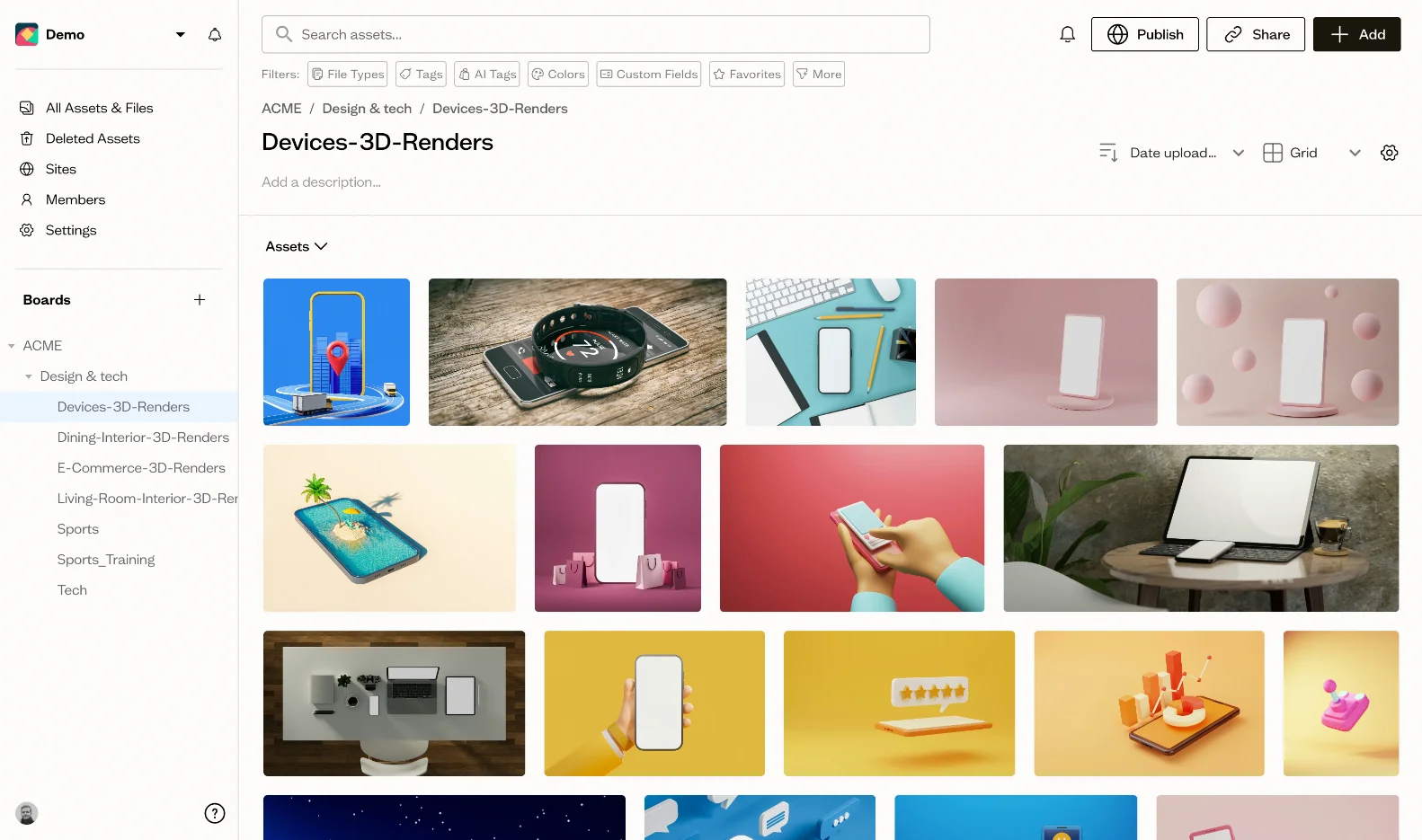
This is probably the biggest shift to wrap your head around. In v1, everything centered around "Brands." In v2, everything centers around "Boards" and "Workspaces."
Think of it this way: v1 was like a filing cabinet where each drawer was a brand. V2 is more like a project management system where each board can become whatever you need.
Here's how it breaks down:
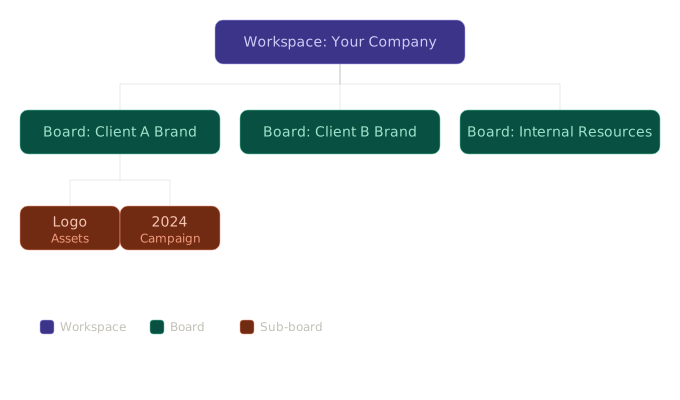
In practical terms:
If you're an agency, you'd typically have one workspace for your company. Inside that workspace, you create a board for each client. Each board can then have sub-boards for different projects or asset categories. When you're ready to share, each board can be published as a brand guide (now called "Sites"), a gallery, or any kind of page you want.
The key insight: Boards replace Brands. But unlike v1, where each brand was locked into a specific format, boards are incredibly flexible about what they become.
Collaboration works differently too: You can invite guests to specific boards, and they'll only see that board and its sub-boards. No need for them to see your entire workspace. Or you can share boards via share links, or publish them as editable sites.
What's Different: v1 vs v2
Let me break down the major changes:
Flexibility & Customization
v1: Opinionated with limited customization. The initial setup wizard was great for getting started quickly, but once your brand guide was created, making changes meant going back through that same creation flow.
v2: Completely customizable layouts, sections, and blocks. Right now, we have three templates to help you get started, with more on the way, but then you can edit literally anything. Add sections, rearrange blocks, customize all the text. It's more work upfront but infinitely more flexible.
Asset Management
v1: Specific asset types. Logos went in logo slots, colors in color slots, fonts as preset selections.
v2: Everything is an asset. Any file type, any format. Upload a Word document, a video file, a design mockup, whatever you need. We have previews for most visual formats, and the focus is on visual files, but technically you can store anything. This is what makes v2 into a proper DAM.
Font Handling
v1: Individual font selections from Google Fonts, or basic uploads.
v2: Full font family management. Upload entire font families with all their weights and styles. When you publish your brand guide, all those variations are available and properly organized. You can also add fonts from Google Fonts or Adobe Typekit fonts, and they'll show up as assets in your boards.
Brand Guide Publishing
v1: Fixed templates with PDF export.
v2: Custom sites with no PDF export. Here's why: the new customization abilities mean it's impossible to support PDF export reliably. There are too many potential problems that arise when users can create any layout they want. We're focusing on web-first publishing going forward, which is where the future is headed anyway.
Collaboration Options
v1: Basic sharing capabilities.
v2: Multiple ways to work together. Add members to your workspace, invite guests to specific boards, generate share links, or publish pages as public sites. Each approach gives you different levels of control over what people can see and do.
Views & Organization
v1: Simple grid view.
v2: Switch between Kanban and Grid views depending on your workflow. Add custom fields to track whatever metadata matters to you. Tag assets, add descriptions, build the organization system that makes sense for your work.
Type Scales
v1: Basic presets you could choose from.
v2: Detailed editing control. Define your type scales with precision, adjust ratios, set exactly how your typography system should work across your brand.
Beyond Brand Guides
Here's where things get interesting. Because boards can be published as any kind of site you want, Baseline v2 opens up use cases we never originally designed for:
For agencies: One workspace, one board per client, sub-boards for different projects or campaigns. Guests see only their board. Clean, organized, professional.
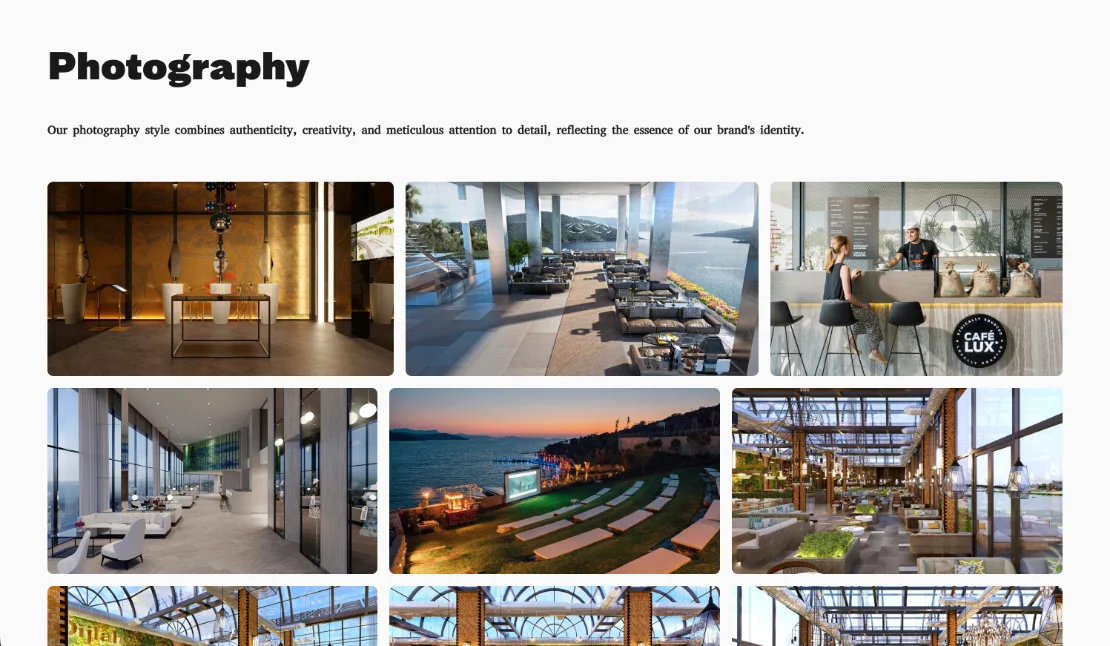
For photographers: Create portfolio sites with beautiful galleries. Upload your work, organize it into boards by project or style, publish as a gallery site.
For events: Upload and share all your event photos in one place. Create a beautiful gallery that you can publish and share with attendees.
For artists and designers: Showcase your portfolio with complete control over layout and presentation.
For wedding photographers: Create gallery sites for each wedding. Share with clients, let them download their favorites.
For internal teams: Manage brand assets across your organization with customizable publishing for different audiences.
The common thread? You have visual content you need to organize, manage, and share. Baseline v2 gives you the tools to do all three, your way.
Frequently Asked Questions
Q: Why can't I migrate my data?
The architectural differences between v1 and v2 make automatic migration technically incompatible. We explored this extensively, but the fundamental rebuild means the data structures don't align and there always some problems, it meant we couldn't do it reliably. Think of it like trying to move a house from one foundation to another. Sometimes you need to rebuild.
Q: Should I switch to v2 now?
Both versions will run in parallel. There's no pressure to switch immediately. Explore v2 at baseline.is while continuing to use v1 for your current work. Transition at your own pace when you're ready.
Q: Will v1 keep running?
Yes. We'll continue supporting the original Baseline alongside v2. You're not being forced off the platform you know.
What's Coming Next
We're not done building. Here's what's on the roadmap:
Custom domain support: You'll be able to use your own domain (CNAME) for published sites. Professional and on-brand.
Asset request forms: Create forms specifically for gathering assets from clients or third parties. They submit files, you review and approve, and everything automatically lands in the right board. This is going to be huge for agencies managing client assets.
Long-term vision: We're building the infrastructure to integrate with AI content creation tools. The goal is for Baseline to be the central hub where you store and manage everything, regardless of how it was created. But that's down the road. Right now, we're focused on building the best DAM and brand publishing platform we can.
Try Baseline v2
Ready to explore? Head over to baseline.is and log in with your existing Baseline credentials. Your account has been migrated, so you can jump right in.
Quick start guide:
- Create a workspace (probably just one for your company)
- Create a board (name it after a client or project)
- Upload your assets
- Click "Publish" to turn it into a site
Pro tips:
- Create a board called "Logos" and Baseline will automatically detect and organize your logo assets
- Use the "Add Fonts" button in the top-right to upload entire font families with proper categorization
- Invite guests to boards rather than your whole workspace to keep things organized
We'd love to hear what you think. The rebuild has been a massive undertaking, and we're excited to finally share it with you. Yes, there are trade-offs, especially around migration. But we believe the flexibility and power of v2 makes it worth the fresh start.
Try it out and let us know what you think.