
Your team creates incredible brand assets every day. Photography, design files, brand guidelines, marketing collateral, client presentations. But without a system to organize, find, and share these assets, they become scattered across Google Drive, Dropbox, email threads, and local hard drives.
If you're an agency managing multiple clients or a brand team coordinating across departments, this chaos isn't just frustrating - it's expensive. Teams waste hours searching for files, recreate assets that already exist, and struggle to maintain brand consistency across channels.
Digital asset management (DAM) solves these problems by providing a centralized platform to store, organize, find, and distribute your brand assets. But DAM isn't just cloud storage with better folders. Modern DAM systems use AI to automate tagging, enable instant search across thousands of files, and even publish your assets directly as brand guides and galleries.
In this guide, we'll explore 12 concrete benefits of digital asset management specifically for agencies, brand teams, and creative professionals who need to move fast without sacrificing quality.
If you're evaluating DAM platforms, check out our comprehensive comparison of the 8 best DAM software solutions for creative agencies with honest pros and cons, transparent pricing, and agency-specific selection criteria.
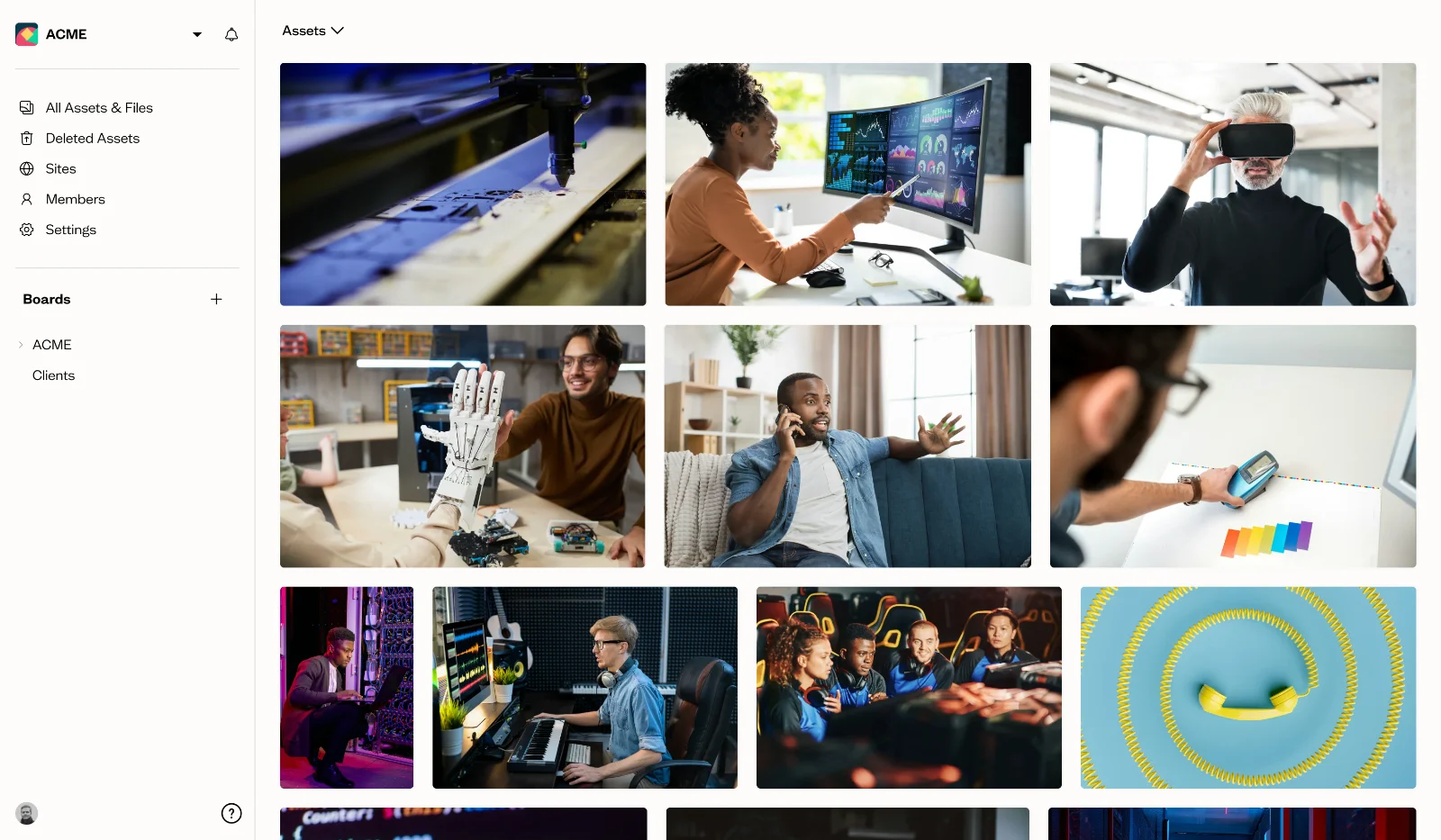
1. Centralized Brand Asset Library
The problem: Your brand assets live everywhere. Designers save files locally. Marketing has their own Google Drive. The client portal has another set. Nobody knows which version is current.
A DAM system provides a single source of truth for all your brand assets. Every logo, every brand guideline, every approved photo lives in one searchable library that your entire team can access from anywhere.
Why this matters for agencies: When managing multiple clients, each with their own brand ecosystem, centralization becomes critical. Instead of juggling separate folders for each client across different storage platforms, you organize everything in customizable libraries within one system.
The real advantage? DAM systems like Baseline don't just store your assets - they let you publish them. Your centralized library can power brand guides, photography galleries, and public-facing brand portals. Update an asset once, and it automatically syncs everywhere it's published.
Without a centralized system, managing the exponential growth in digital assets becomes increasingly difficult as teams scale.
2. Lightning-Fast Asset Discovery
The problem: A designer spends 30 minutes searching through folders named "final_v2", "final_FINAL", and "final_actuallyFINAL" to find last month's campaign assets. They give up and recreate the file from scratch.
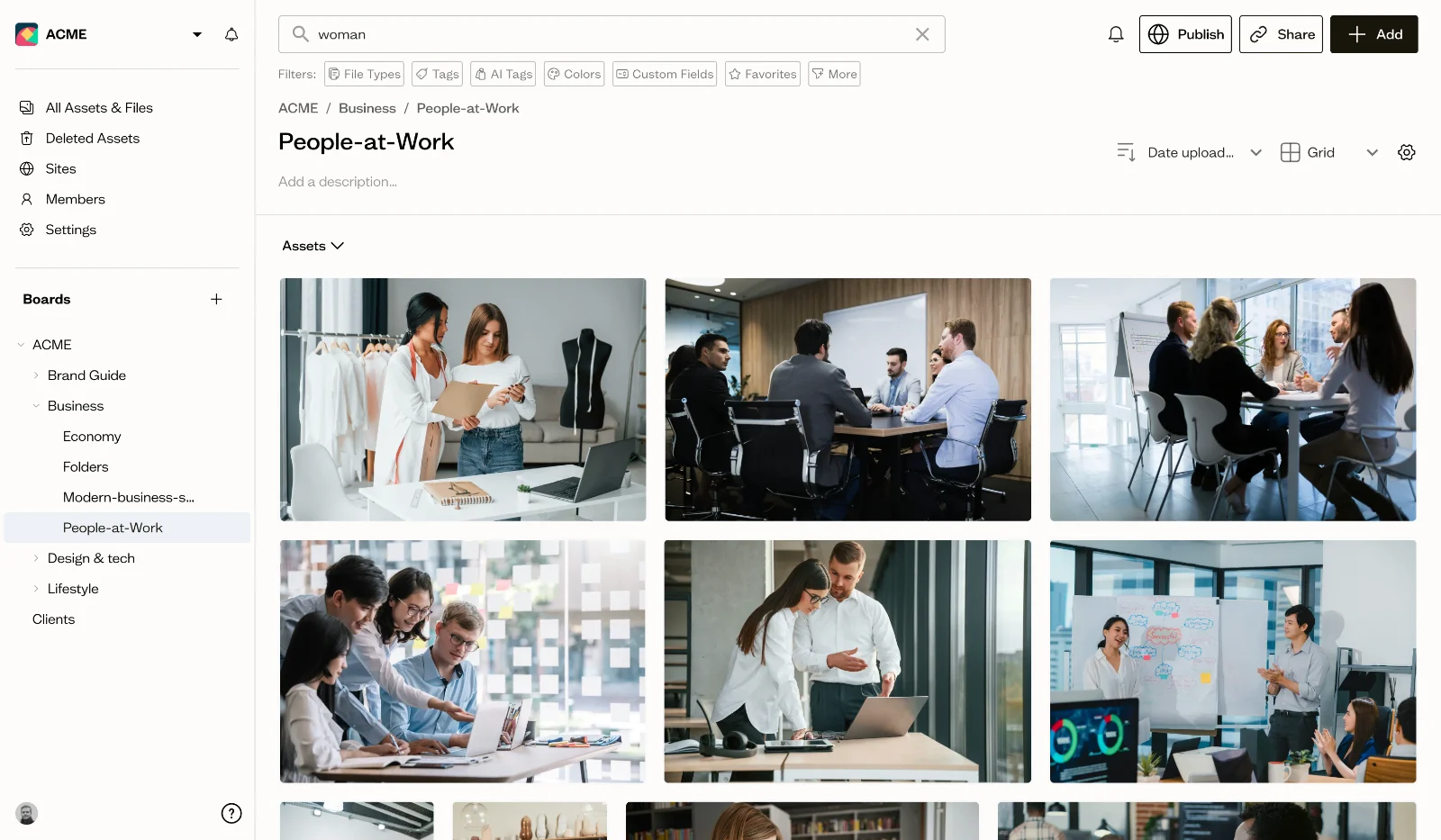
Modern DAM systems eliminate search frustration with AI-powered tagging and visual search. Upload a photo, and the system automatically tags it with relevant keywords based on what's actually in the image. Need to find all photos with a blue background? Search for "blue background" and get instant results.
Key features that speed up discovery:
- AI auto-tagging recognizes objects, colors, and scenes
- Visual similarity search finds images that look alike
- Metadata filtering by file type, date, project, or custom fields
- Facial recognition to find specific people across your library
Teams using modern DAM systems save an average of 5 hours per week on search time. That's 260 hours per year - over six full work weeks - that your team can spend on actual creative work instead of digital treasure hunting.
3. Bulletproof Brand Consistency
The problem: Your sales team uses last year's logo on a pitch deck. A regional office launches a campaign with off-brand colors. Someone sends a client the draft version of a design instead of the approved final.
DAM systems enforce brand consistency by ensuring everyone accesses the same approved assets. When you update a logo or replace an outdated photo, the change is instant for every user. No more version confusion or off-brand materials slipping through.
How DAM maintains consistency:
- Version control tracks every iteration of an asset
- Approval workflows ensure only reviewed assets get marked "final"
- Permission settings control who can access which files
- Expiration dates automatically archive outdated materials
For brand teams, consistency builds trust. When customers see cohesive branding across every touchpoint, from your website to social media to sales materials, they perceive your brand as professional and reliable.
Baseline takes this further by connecting your assets to published brand guides. Update your color palette in the DAM, and it automatically refreshes in your live brand guide. Your team always references the latest brand standards.
DAM systems are essential for brand compliance—the practice of ensuring all brand materials follow established guidelines. This is especially critical for agencies managing multiple client brands, where using the wrong assets can damage client relationships and your agency's reputation.
4. Accelerated Creative Workflows
The problem: A simple client approval takes a week. The designer emails a PDF. The client responds three days later with comments in a separate email. Revisions happen. Another email chain starts. Files get lost.
DAM systems streamline creative workflows by centralizing feedback, approvals, and file sharing. Stakeholders review assets directly in the platform, leave timestamped comments, and approve files with a single click.
Workflow improvements:
- Automated approval routing sends assets to the right reviewers
- In-platform commenting keeps all feedback in one place
- Version comparison shows exactly what changed between iterations
- Automated notifications keep projects moving forward
DAM approval workflows can dramatically reduce review cycles. By centralizing feedback and automating routing, teams eliminate the back-and-forth of email chains and move projects from concept to approval in days instead of weeks.
For agencies: When managing multiple client projects simultaneously, workflow automation prevents balls from getting dropped. Set up approval chains for each client, and the system automatically routes work to the right stakeholders at the right time.
5. Seamless Team Collaboration
The problem: Your design team uses Figma. Marketing lives in the CMS. The video editor needs files from both. Everyone's emailing zip files back and forth, and nobody's sure who has the latest version.
DAM systems serve as the collaboration hub that connects your entire creative ecosystem. Whether your team works in the same office or across different continents, everyone accesses the same files with no version confusion.
Collaboration features that eliminate friction:
- Real-time access means no waiting for file transfers
- Granular permissions control what each user can view or edit
- External sharing lets you collaborate with clients and freelancers securely
- Activity logs show who accessed or modified files
When everyone can find, access, and work with assets easily, projects move faster and miscommunication decreases. Teams consistently report improved collaboration after implementing DAM systems.
Agencies benefit especially from secure external sharing. Create client-specific portals where clients can access their brand assets without requiring training on your full system. They get what they need, you maintain control.
6. Maximize Content ROI
The problem: Your team created an excellent product photoshoot six months ago. Today, a designer needs a product image and doesn't know that shoot exists. They schedule a new photoshoot, spending $3,000 that could have been saved.
DAM systems maximize return on content investment by making existing assets easy to find and reuse. When your entire asset library is searchable and organized, teams repurpose content across campaigns, channels, and markets instead of constantly recreating work.
How DAM improves content ROI:
- Complete visibility into what assets already exist
- Easy repurposing across different campaigns and channels
- Usage analytics show which assets perform best
- Reduced unnecessary spending on redundant content creation
Organizations consistently report significant time savings on asset-related tasks after implementing DAM. Those hours translate directly to cost savings - less time wasted searching and managing files means more time creating valuable work.
For agencies managing multiple clients, maximizing ROI means using existing assets strategically. That campaign asset library from Q1? Repurpose elements for Q3's campaign. That product photoshoot? Use it across web, social, print, and presentations. One investment, multiple returns.
7. Enterprise-Grade Security and Access Control
The problem: You need to share brand assets with freelancers, but you don't want them accessing confidential client files. Your legal team needs to review certain materials before they go public. Managing these permissions through shared folders is a nightmare.
DAM systems provide granular access control that keeps your sensitive assets secure while enabling collaboration. Set permissions at the user, group, or asset level to control exactly who can view, download, edit, or share each file.
Security features that protect your assets:
- Role-based permissions for different team levels
- External sharing with expiration dates and download limits
- File encryption for sensitive materials
- Audit trails showing who accessed what and when
- Compliance support for regulated industries
For agencies handling confidential client work, security isn't optional. A client's unreleased product photos, upcoming campaign materials, or proprietary brand guidelines need protection. DAM systems let you create client-specific access groups, ensuring team members only see assets for clients they work with.
Digital rights management features also help you track usage rights and licensing information. Know when stock photo licenses expire, who can use which assets, and ensure legal compliance across all your materials.
8. Direct Publishing Capabilities
The problem: You've organized all your brand assets in a DAM, but stakeholders still need to reference brand guidelines, browse photography collections, or access brand resources. You end up exporting files to build separate brand guides or portals, duplicating work.
This is where Baseline's approach differs from traditional DAM systems. Instead of DAM being just a storage backend, Baseline lets you publish your assets directly as live, browsable experiences.
What you can publish from your DAM:
- Brand guides with live asset references from your library
- Photography galleries showcasing your visual content
- Brand portals for clients, partners, or public access
- Style guides that automatically update when assets change
The advantage? Update once, publish everywhere. Change your logo in the DAM, and it automatically refreshes in your published brand guide. Add new photography to a collection, and your client-facing gallery updates instantly.
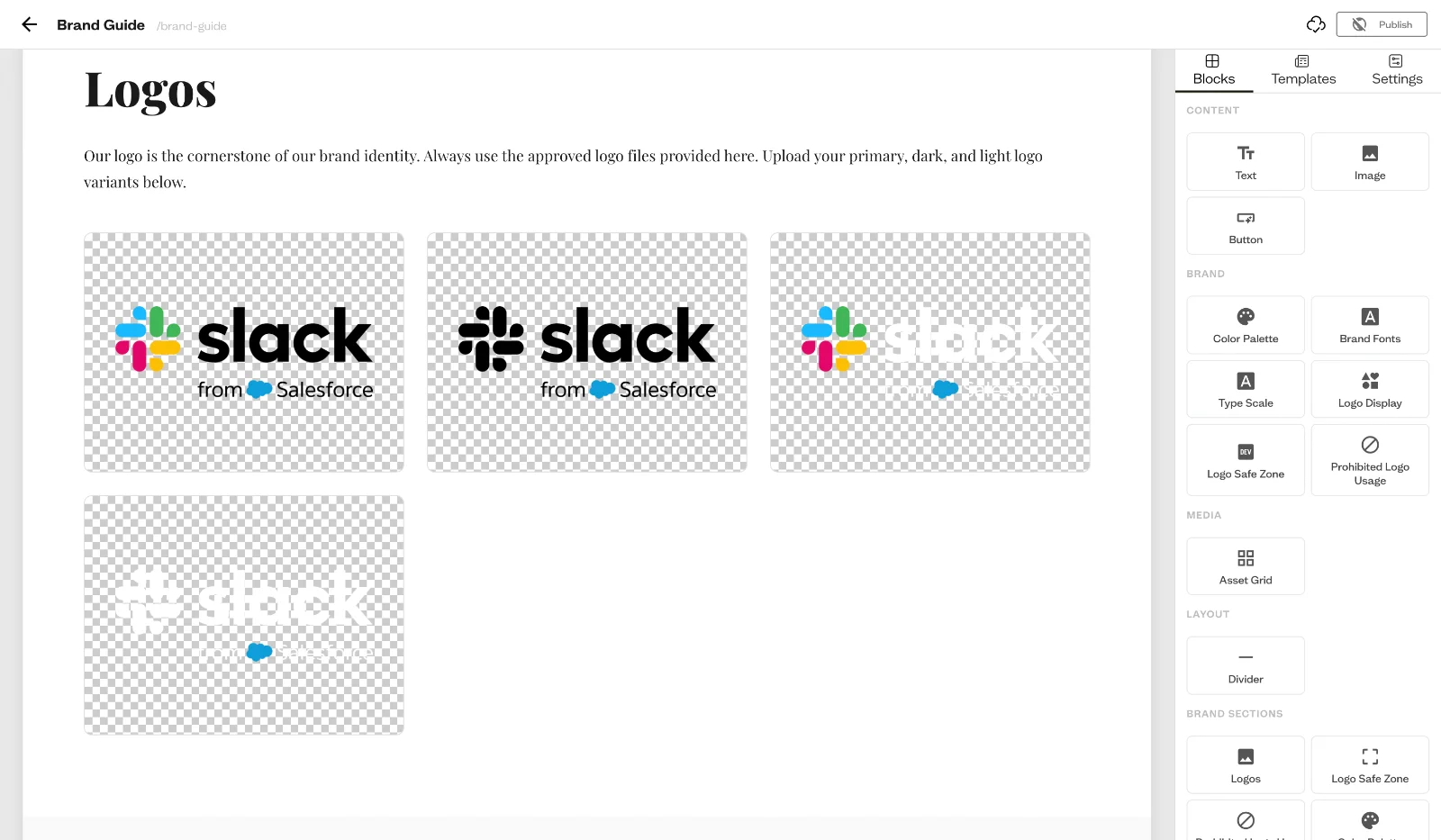
For agencies, this means creating client-specific brand portals without maintaining separate systems. Your DAM becomes both the storage system and the presentation layer. Clients access their branded portal to download assets, reference guidelines, and stay on-brand - all pulling directly from your centralized library.
Traditional DAM systems require you to export assets and rebuild brand guides manually whenever something changes. Baseline eliminates that duplication by making publishing native to the DAM itself.
9. Powerful Analytics and Usage Insights
The problem: You have thousands of assets in your library, but you don't know which ones actually get used. Teams might be overlooking valuable content while recreating similar assets from scratch.
Modern DAM systems include analytics that show you how your assets are being used. Track downloads, views, and shares to understand which content resonates with your team and audiences.
Insights you can gather:
- Which assets get used most frequently
- Which team members or departments use specific assets
- When assets were last accessed
- Search terms people use to find content
- Usage patterns across different projects or campaigns
These insights inform content strategy. If certain photography styles get downloaded constantly while others sit unused, you know what to prioritize in your next photoshoot. If specific brand assets get high engagement, you can create more similar content.
For brand teams: Usage analytics help you prove ROI to leadership. Show how DAM adoption has increased asset reuse, reduced duplicated work, and improved efficiency across the organization.
Analytics also identify bottlenecks. If search terms frequently return no results, you know what content gaps exist. If certain assets get high views but low downloads, perhaps they're not available in the right formats.
10. Integration with Your Existing Stack
The problem: Your designers work in Figma and Adobe. Your marketers live in your CMS. Your sales team uses PowerPoint. Nobody wants to learn another tool or jump between systems constantly.
DAM systems integrate with the tools your team already uses, bringing assets directly into their workflow. Instead of switching to the DAM to find a file, download it, then import it into their design tool, they access DAM assets directly within their creative application.
Common integrations that streamline workflows:
- Design tools: Figma, Adobe Creative Cloud, Sketch
- Content management: WordPress, Drupal, custom CMS
- Marketing automation: HubSpot, Marketo, Mailchimp
- Collaboration: Slack, Microsoft Teams, Google Workspace
- E-commerce: Shopify, WooCommerce, custom platforms
These integrations eliminate context switching. A designer working in Figma can search your entire DAM library and pull assets into their design without leaving Figma. A marketer building an email can browse brand-approved imagery directly in their email builder.
APIs and webhooks enable custom integrations for specialized workflows. If your agency uses proprietary project management tools or client portals, you can build connections that automatically sync assets between systems.
When DAM integrates seamlessly with existing tools, teams report faster project timelines. Reducing friction in the creative process means work flows smoothly from ideation to completion.
11. Scalability for Growing Teams
The problem: Your current system works fine with five people. But you're hiring, expanding to new markets, or adding clients. Suddenly your folder structure becomes chaos and nobody can find anything.
DAM systems scale effortlessly as your organization grows. Whether you're an agency adding your tenth client or a brand expanding into international markets, your DAM adapts without requiring infrastructure overhauls.
How DAM scales with your growth:
- Cloud-based storage expands without capacity concerns
- User management accommodates growing teams
- Flexible library structures organize increasing asset volumes
- Multi-language support for global operations
- Regional permissions for market-specific content
As teams grow and more people gain access to centralized resources, asset usage increases significantly. Instead of each new hire or department creating their own file management system, they plug into the existing DAM and immediately access your entire asset library.
For agencies: Scalability means onboarding new clients without restructuring your entire system. Create a new client library, set permissions, invite team members, and you're operational. As clients come and go, you add and archive libraries without disrupting other client work.
Brand teams expanding internationally benefit from DAM's ability to organize region-specific content while maintaining global brand consistency. Create market-specific libraries for localized assets while ensuring everyone still references the same core brand guidelines and global campaign materials.
12. Significant Cost Savings and ROI
The problem: Leadership asks, "Why should we invest in DAM when we have Google Drive?" The costs of disorganization are hidden but substantial.
DAM systems deliver measurable ROI through time savings, reduced duplicated work, and improved operational efficiency. While the subscription cost is visible, the savings it generates often far exceed the investment.
Where DAM generates cost savings:
- Reduced duplicated work: Teams reuse existing assets instead of recreating them
- Time savings: Less time searching means more time creating
- Lower agency spend: Using existing photography reduces external vendor costs
- Tool consolidation: Replace multiple point solutions with one platform
- Faster time-to-market: Launch campaigns weeks faster with streamlined workflows
- Reduced compliance risks: Avoid legal issues from improper asset usage
Consider the financial impact of time savings. If a five-person creative team each saves just 10 hours per week on searching for files and managing access, that's 50 hours weekly. At an average creative hourly rate of $75, that translates to over $195,000 in annual savings. The DAM subscription costs a fraction of that.
Streamlined workflows mean teams can handle more projects with the same headcount, effectively increasing capacity without increasing costs.
For agencies: ROI calculations become even more compelling. When you can handle more clients without adding overhead, find assets instantly instead of recreating them, and eliminate hours spent on file management, DAM transforms from an expense into a profit center.
Consider the hidden costs of disorganization: lost productivity from searching, client frustration from slow turnarounds, brand damage from inconsistent materials, and legal risks from improper licensing. DAM addresses all of these while creating a foundation for growth.
Who Benefits Most from Digital Asset Management?
While any team managing digital assets can benefit from DAM, certain roles and industries see especially dramatic improvements.
For Agencies
Agencies juggling multiple clients face unique challenges. Each client has their own brand standards, asset libraries, approval processes, and team members who need access. Without DAM, this complexity leads to:
- Assets scattered across client-specific folders and drives
- Confusion about which version is current
- Slow client approvals through email chains
- Difficulty onboarding new team members to client work
- Risk of cross-contamination between client files
DAM systems solve these problems by creating isolated but manageable client workspaces. Each client gets their own library with specific permissions, brand guidelines, and approval workflows. Your team can quickly switch between clients while maintaining perfect separation of confidential materials.
The ability to create client-facing brand portals adds another layer of value. Instead of emailing assets back and forth, clients log into their branded portal to access approved materials anytime. This reduces your team's administrative burden while giving clients more autonomy.
If you're evaluating DAM solutions for your agency, our comprehensive guide on the best DAM software for creative agencies compares 8 platforms specifically for agency workflows, with honest pros and cons, pricing ranges, and selection criteria by agency size. Learn more about how agencies are using Baseline to streamline client work.
For Brand Managers
Brand managers are responsible for maintaining consistency across channels, teams, and markets. DAM gives brand managers the visibility and control they need to protect brand integrity at scale.
You can ensure regional offices use approved assets, monitor how different teams utilize brand materials, and quickly update guidelines across the organization. When brand standards evolve, you update the DAM once and everyone automatically accesses the latest approved materials.
Analytics help you understand brand asset usage patterns. Which teams reference guidelines most frequently? Which assets get the most engagement? This data informs your brand strategy and helps you allocate resources effectively.
For Marketing Teams
Marketing teams need to move fast while maintaining quality. DAM enables this by eliminating bottlenecks in content creation, approval, and distribution.
Campaign launches accelerate when your team can instantly access existing photography, reuse previous campaign elements, and get stakeholder approvals in days instead of weeks. Integration with marketing automation tools means approved assets flow directly into email campaigns, social media, and advertising platforms.
DAM helps marketing teams deliver personalization at scale by making it easy to create localized or customized variations of core campaign materials for different audiences and channels.
Frequently Asked Questions
What is the biggest benefit of digital asset management?
The biggest benefit is time savings through improved findability. Teams waste hours searching for files in disorganized systems, but DAM's AI-powered search and organization features let you find any asset in seconds. This time saved can be redirected toward creative work that drives business value.
How does digital asset management improve ROI?
DAM improves ROI in multiple ways: reducing time spent searching for files, preventing duplicated work by making existing assets easy to find and reuse, consolidating multiple tools into one platform, accelerating campaign launches through streamlined workflows, and reducing compliance risks. Organizations often see substantial annual savings from time efficiency and reduced duplicate content creation.
Is DAM worth it for small agencies?
Yes, especially for agencies managing multiple clients. Even small agencies face complexity in organizing client-specific assets, maintaining brand consistency across accounts, and collaborating with clients and freelancers. DAM systems scale to your size - you don't need enterprise-level complexity to benefit from centralized organization, easy search, and client portals.
Baseline offers transparent pricing that's more affordable than enterprise DAM competitors, making it accessible for small agencies and growing teams. The time you save finding files and managing client access often justifies the investment within months.
How long does it take to see benefits from DAM?
Most organizations see immediate benefits during the first few weeks as teams upload core assets and begin using search and sharing features. Full ROI typically materializes within 6-12 months once your entire asset library is migrated and team adoption is high. The key is getting consistent usage across your organization - DAM only delivers value when people actually use it instead of reverting to old storage methods.
What's the difference between DAM and cloud storage like Dropbox or Google Drive?
Cloud storage provides basic file storage and folder organization. DAM adds layers of functionality specifically for creative assets: AI-powered tagging and visual search, version control and approval workflows, advanced permissions and security, usage analytics, integrations with creative tools, and metadata management. Think of cloud storage as a filing cabinet, while DAM is a complete asset management and workflow system designed for creative teams. For a full breakdown, see DAM vs file sharing.
Do I need DAM if my team is fully remote?
Remote teams benefit especially from DAM. When your team is distributed, having a centralized system everyone can access from anywhere becomes critical. DAM eliminates the "it's on my laptop" problem and ensures remote team members have instant access to every asset they need. Real-time collaboration features, approval workflows, and activity notifications keep remote teams coordinated without endless email chains or chat messages.
Getting Started with Digital Asset Management
The benefits of digital asset management are clear: save time, reduce costs, improve collaboration, and maintain brand consistency at scale. These advantages materialize when you choose the right DAM system for your team's specific needs.
When evaluating DAM options, consider your specific requirements (our digital asset management checklist has the full list, plus setup and upkeep steps):
- For agencies: Prioritize multi-client organization, external sharing, and client portals
- For brand teams: Focus on version control, approval workflows, and brand consistency features
- For creative teams: Look for integrations with your design tools and strong visual search capabilities
Baseline's digital asset management platform approaches DAM differently by combining asset storage with direct publishing. Your brand assets don't just sit in a library - they power live brand guides, photography galleries, and client portals. This eliminates the duplication of maintaining separate systems for storage and presentation.
Whether you're an agency tired of scattered client files, a brand team struggling with version control, or a creative professional buried in search frustration, Baseline's DAM solution offers a path to more organized, efficient, and scalable operations. Starting at $59/month with transparent pricing and no sales calls required.
The question isn't whether your team will eventually need DAM - it's whether you'll implement it before or after disorganization costs you another year of hidden productivity losses.
For the practical steps, audit, organization, governance, distribution, see brand asset management: a framework for agencies.